Review production cost and closeout readiness
Compare expected and actual costs, interpret production reports, and identify what remains before an order can close.
In this lesson
Review production cost and closeout readiness
Before you begin
Use the production order you want to review. Have its material, operation, output and quality records available.
Review costs and performance
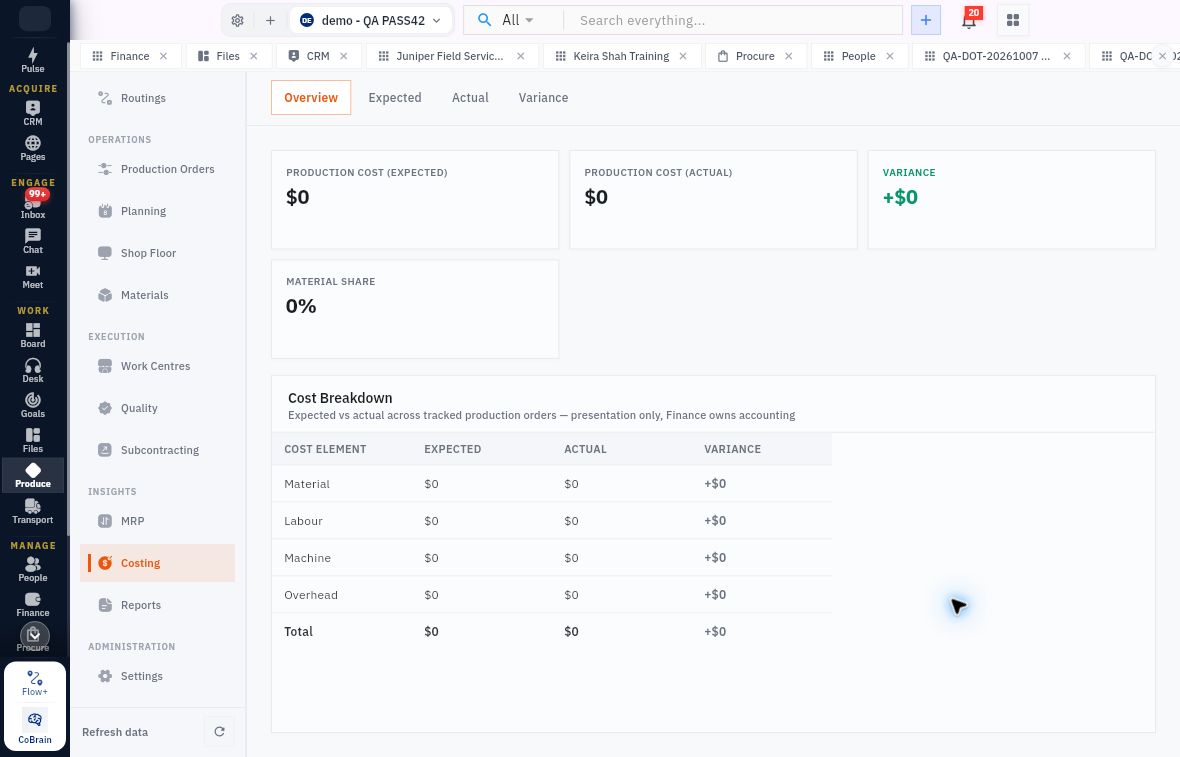
1. Open Produce → Costing → Overview. Compare Expected, Actual and Variance, then the Material, Labour, Machine and Overhead breakdown. 2. Open Expected and Actual. Find the same order in both tables and compare their cost elements. Open Variance for its Expected, Actual, Variance and Explanation. 3. If the order is absent, treat its costing as missing—not as free production. An aggregate $0 or empty table is not a completed cost record. Costing is a presentation view; Finance owns accounting.
Check the result
4. Open Reports → Production Performance to review recorded good output. Compare it with the order's actual output records; output recorded is not automatically accepted, available or delivered stock. 5. Use Work in Progress for remaining unreceived production supply. Use Work Centre Load for queued planned minutes against configured capacity, not actual equipment utilisation. If OEE is unavailable, check whether the required equipment time and first-pass output data exist rather than substituting another percentage. 6. Open Settings and check the completion policy, including whether a quality pass is required. Do not change the policy merely to close an incomplete order. 7. Reopen the exact Production Order. Check materials, completed operations, received output, remaining quantity and final quality together. Resolve missing output, an outstanding inspection or unexplained costs with the responsible team before closing.
Check the result
You can explain the order's cost position and name any remaining completion requirement. A completed operation alone does not complete all planned output; a production report does not establish a Finance posting.
Continue learning
In this series: Plan and record production — guide 8 of 9.
Turn what you learned into the way the team works.
Mark this lesson complete once the workflow exists in your workspace—not simply when you reach the bottom.