Professional email, already connected to how your business works.

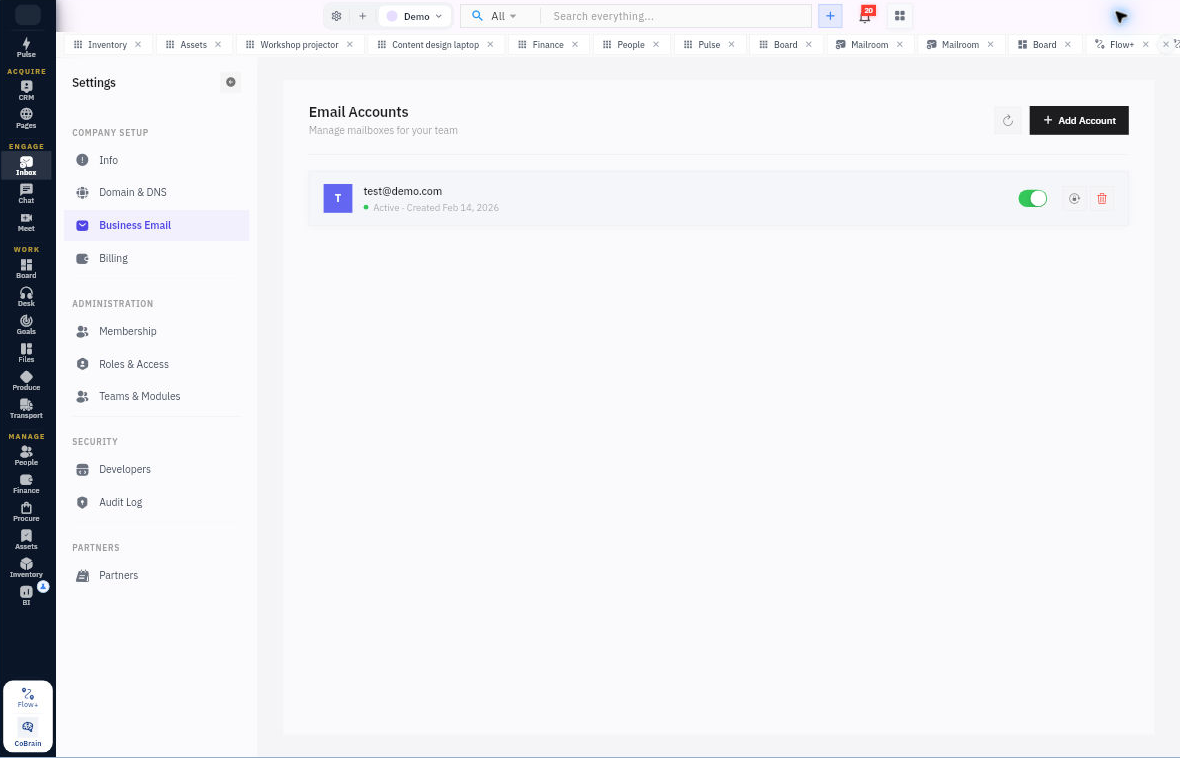
Set up professional email on your company domain and manage the mailboxes behind it. Your team can use the resulting accounts inside Workroomly Inbox.

For workspace administrators setting up company email.

Business Email is included on Team. Domain verification and mailbox setup are required. Compare plans

  • No card required
  • Start with one workflow
  • Expand at your pace
Business Email · WorkroomlyProduct view
Business email should be more than a branded address.Workroomly gives your team professional communication with operating context built in.
Use your domain
Control access
Connect every thread

A mailbox can look professional and still leave the business disconnected.

Generic email hosts deliver messages. They do not understand the customer, the project, the owner, or the work that must follow.

When the process is fragmented

  • Mailboxes and aliases are managed far from the team workspace
  • Customer emails must be copied into CRM and project tools
  • Shared addresses create forwarding chains and uncertain ownership
  • Offboarding risks fragmented history and inconsistent access

When Business Email is connected

  • Create users, aliases, groups, and shared addresses from one administration layer
  • Threads connect to customer records, tasks, files, tickets, and meetings
  • Shared mailboxes use assignment, status, and internal collaboration
  • Access, retention, domain health, and ownership remain governable

Business Email is designed around the movement—not the menu.

Each capability stays connected to the customer, work, people, decisions, and operating context around it.

Connect the company domain.

Add the domain and follow the DNS verification steps before treating it as ready for company mail.

  • Domain setup
  • DNS checks and verification
  • Visible setup status

Create the team’s mailboxes.

Manage company mailboxes and addresses using the hosted email administration surface.

  • Company mailboxes
  • Aliases
  • Catch-all configuration

Use email in the operating workspace.

Open the mailbox through the mail experience where correspondence and calendars stay close to daily work.

  • Workroomly Inbox
  • Familiar compose and reply
  • Account and calendar context

Everything the workflow needs. One coherent operating surface.

Begin simply, configure deeply, and keep the system understandable as the business grows.

Domain administration

Make setup and ownership explicit.

  • Connect a domain and review required DNS records.
  • Run verification checks and inspect domain status.
  • Manage the company email configuration with authorized access.

Mailbox administration

Keep company addresses organized.

  • Create and manage hosted mailboxes.
  • Configure supported aliases and catch-all behavior.
  • Connect the resulting account to the Inbox experience.

Useful details before you start

Sending depends on a completed setup

A domain entered in the administration screen is not the same as a verified, configured mail domain. The product exposes DNS and domain status so an administrator can complete the setup.

From domain ownership to a working mailbox.

A practical sequence your team can review and own.

01

Connect

Add the company domain.

02

Verify

Complete the required DNS setup and checks.

03

Provision

Create the permitted mailboxes and aliases.

04

Use

Work with the account in Inbox.

One product. Clear value at every altitude.

For Growing companies

Growing companies

Create a professional domain identity without separating email administration from everyday operations.

For Customer-facing teams

Customer-facing teams

Write with relationship history and follow-through close at hand.

For IT and operations

IT and operations

Manage accounts, policies, retention, security, and employee transitions centrally.

Start informed. Expand confidently.

The strongest rollout is the one your team can understand, adopt, and prove.

Business Email is included on Team. Domain and mailbox setup still need to be completed by an authorized administrator.

Yes. Connect the domain, configure the required DNS records and verify its status before using company mailboxes.

Company accounts can be used in Workroomly Inbox alongside supported email accounts and calendars.

Give business email a place in the business.

Start with the mailboxes under the most pressure and connect professional communication to the customers and work behind it.