Reconcile subcontract work and received output
Check material ownership, source quantities and the linked receipt before counting subcontract output as stored stock.
In this lesson
Reconcile subcontract work and received output
First decide who provides the inputs. Company-supplied materials need their own issue and supplier-custody account; supplier-provided materials must not be treated as company stock issues.
Check the subcontract order
1. Open Produce → Subcontracting and find the exact order. Match supplier, manufactured product, unit and source reference. 2. Read expected output, commissioned quantity, received, accepted and rejected figures together. A Completed badge on another order does not close this one. 3. Check the material model. Supplier provides all materials is different from a Materials to send list. For company materials, compare each component SKU, unit, planned quantity and actual issued amount. 4. Compare the planned component lines with actual issued quantities. Issue Components is a separate action; a planned line is not evidence that materials have left stores. Do not issue a second time merely because planned quantities remain visible.
Follow the received output
5. On the intended saved order, use its Open RCV link. In the receipt, check Source reference and vendor before trusting the quantities. 6. Match the exact item and compare Expected, Received, Remaining and Accepted. Accepted units are part of received units, not another quantity to add.
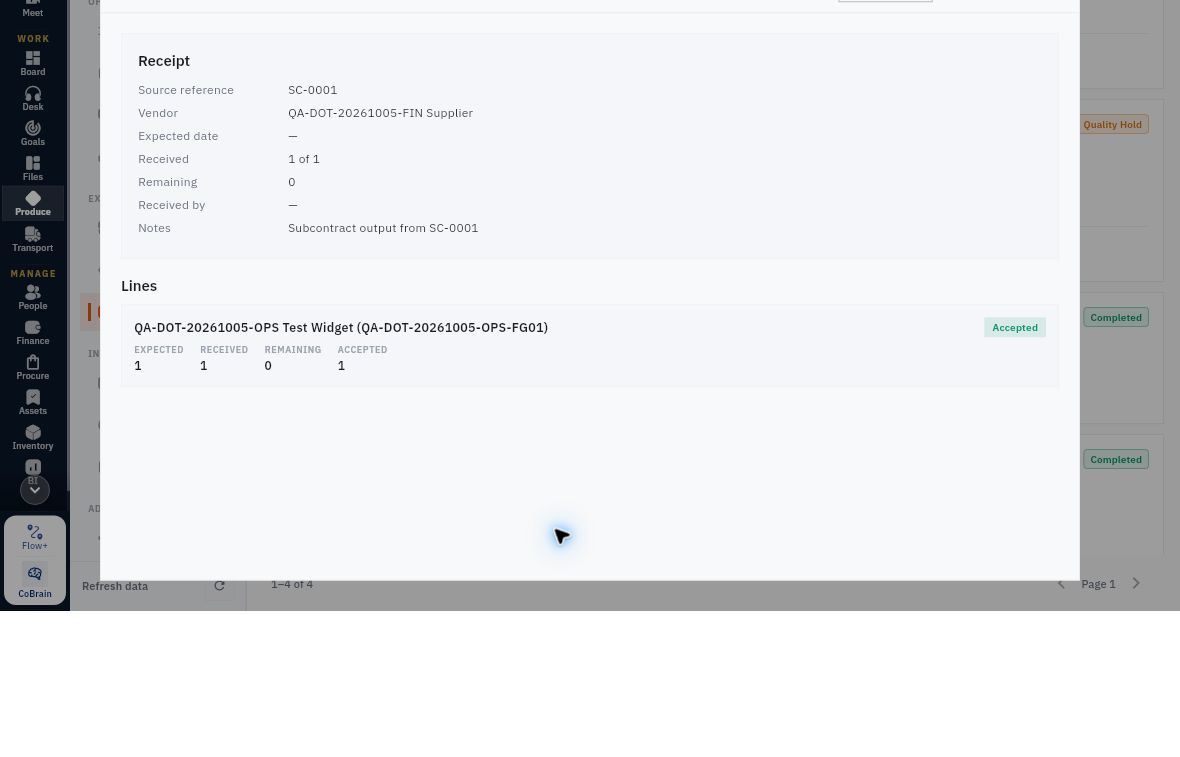
Check the result
7. Open Putaway tasks from that receipt. Check quantity, source dock, destination and the task’s own status. Read lot/serial and operator only where supplied. 8. Compare the relevant Inventory lot/location balance and quality state. A received quantity still awaiting quality or putaway is not automatically available. 9. For company-supplied materials, reconcile issued inputs with use, loss, returned materials and the balance still held by the supplier. Keep those inputs separate from the received finished output.
Expected result: the same subcontract source is traceable through received/accepted output and storage, with remaining material or delivery obligations clear.
Tips: Use Receive Output only for actual received quantities on the eligible order. After an unclear issue or receipt response, inspect the order and linked records before repeating it. Never borrow another order’s receipt, lot or completed status because the product name matches.
Continue learning
In this series: Plan and record production — guide 7 of 9.
Turn what you learned into the way the team works.
Mark this lesson complete once the workflow exists in your workspace—not simply when you reach the bottom.