Financial operations connected to what creates the numbers.

Give finance teams one place to follow money from the commercial agreement or purchase through approval, settlement and the ledger.

For finance teams, controllers and the people requesting spend.

  • No card required
  • Start with one workflow
  • Expand at your pace
Finance · WorkroomlyProduct view
The number is more useful when finance can see why it moved.Finance connects billing, spending, budgets, approvals, and reporting to customers and operational work.
Bill confidently
Control spending
See the business

Finance sees the result after the business has already made the decision.

Invoices, expenses, budgets, approvals, projects, customers, and vendor commitments often live in different systems until reconciliation.

When the process is fragmented

  • Billing relies on delivery teams manually confirming milestones
  • Expenses arrive without the project, customer, or decision context
  • Budget owners discover drift after monthly reconciliation
  • Leadership receives financial reports disconnected from operating causes

When Finance is connected

  • Invoices connect directly to customers, contracts, milestones, and approved work
  • Expenses preserve category, owner, receipt, project, vendor, and approval context
  • Budgets update as commitments, purchase orders, assets, depreciation, and actual spend move
  • Finance, Assets, BI, Pulse, Goals, and CoBrain explain performance from shared data

Finance is designed around the movement—not the menu.

Each capability stays connected to the customer, work, people, decisions, and operating context around it.

Collect what customers owe.

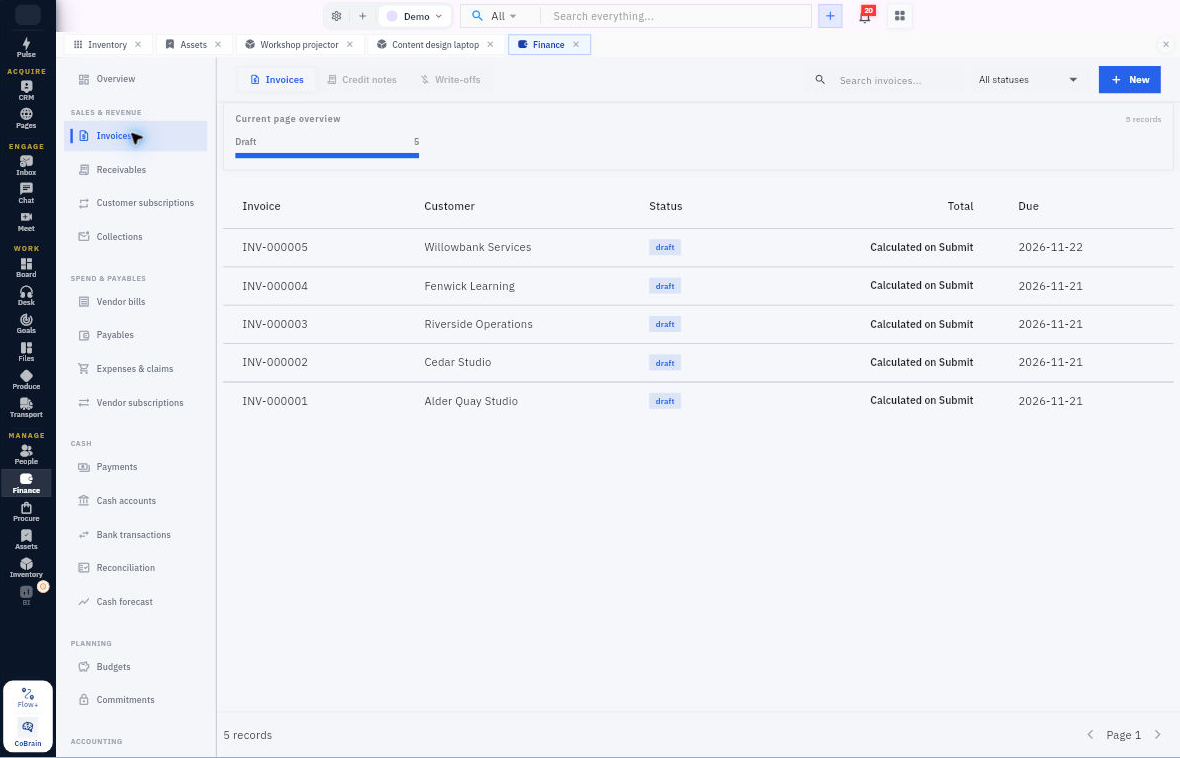
Issue invoices, follow receivables into collections, and allocate customer payments without losing the remaining balance.

  • Invoices and credit notes
  • Collections, promises to pay and disputes
  • Customer payments and allocation

Control spend before and after it happens.

Review vendor bills and employee claims, approve obligations, then follow disbursement and settlement through to closure.

  • Vendor bills and payables
  • Pre-spend requests and employee claims
  • Expense advances and retirement

Close with a traceable financial record.

Reconcile cash, review posted journals and use recognition schedules, period controls and reports to explain the numbers.

  • Bank transactions and reconciliation
  • General ledger and trial balance
  • Recognition, tax and accounting periods

Everything the workflow needs. One coherent operating surface.

Begin simply, configure deeply, and keep the system understandable as the business grows.

Revenue & receivables

Keep billing, collection and settlement in the same customer record.

  • Manage invoices, credit notes and open receivable balances.
  • Allocate customer payments and retain unapplied amounts or outstanding balances.
  • Work collections with owners, reminders, promises to pay, disputes and controlled write-offs.
  • Manage customer subscriptions and their billing schedules.

Spend & payables

See obligations before cash leaves the business.

  • Match vendor bills to purchasing evidence, then submit and approve the payable.
  • Allocate vendor payments and follow partial settlements.
  • Review employee claims and create the related reimbursement from an approved claim.
  • Disburse expense advances and retire them with receipts, returned balances and variance review.

Cash & reconciliation

Explain the movement in each cash account.

  • Manage cash accounts, payments, transfers and bank transactions.
  • Import statements and match transactions in reconciliation.
  • Review unapplied payments and cash-forecast sources.

Accounting & tax

Follow operational transactions into controlled accounting.

  • Maintain the chart of accounts, journals and opening balances.
  • Review general ledger and trial balance reports.
  • Manage accounting periods and tax records.
  • Recognize deferred revenue and prepaid expense through schedules and posted events.

Planning & control

Keep financial decisions accountable.

  • Track budgets, commitments and recurring vendor obligations.
  • Review financial reports and forecast assumptions.
  • Apply approval policies, currencies, exchange rates and role-based controls.

Useful details before you start

Recognition with a source trail

Recognition schedules retain the originating invoice or bill line, the term, the recognized amount and the remaining balance. Controlled posting and catch-up actions preserve the original event history.

An advance is not yet an expense

An approved advance moves through disbursement and retirement. Finance reviews the employee’s receipts and returned funds before closing the obligation; approved overspend can create a linked reimbursement.

Payments are recorded and controlled

Workroomly manages payment records, allocations, approvals and release states. This does not imply that every bank or payment provider is connected for automatic money movement.

Transport costs and financial records

Transport expenses can be linked to an existing Finance expense by a user with the required permissions. Review the operational cost and its matching accounting record; the link does not itself create a payment.
From approved purchase to settled payable.

A practical sequence your team can review and own.

01

Purchase

Procure holds the supplier, order and receipt.

02

Recognize

Finance reviews and approves the matched vendor bill.

03

Settle

Create, allocate, approve and release the vendor payment.

04

Explain

Retain the payable, cash and journal evidence.

One product. Clear value at every altitude.

For Finance teams

Finance teams

Operate billing, spend, budgets, collections, and reporting with the underlying business context.

For Department leaders

Department leaders

See commitments and budget impact before decisions become month-end surprises.

For Executives

Executives

Understand performance through live financial and operational signals in one view.

Start informed. Expand confidently.

The strongest rollout is the one your team can understand, adopt, and prove.

Yes. Customer invoices and collections sit alongside vendor bills, payables and payments, with allocation and outstanding-balance tracking.

Yes. Pre-spend requests, claims and expense advances follow configured approvals. Advance retirement records the evidence needed to account for disbursed funds.

No. It also includes cash reconciliation, accounting, recognition, tax, planning and reporting. Access and available actions follow your workroom permissions and configuration.

See the money and the business behind it.

Start with billing, expenses, or budgets and connect financial control to the work creating revenue and spend.