Turn the way your business works into a living system.

Turn repeatable processes into workflows that move work forward. Connect triggers, conditions and actions, then follow every run from start to finish.

For operators and administrators configuring repeatable processes.

Available on Team, with workspace permissions and credential controls. Compare plans

  • No card required
  • Start with one workflow
  • Expand at your pace
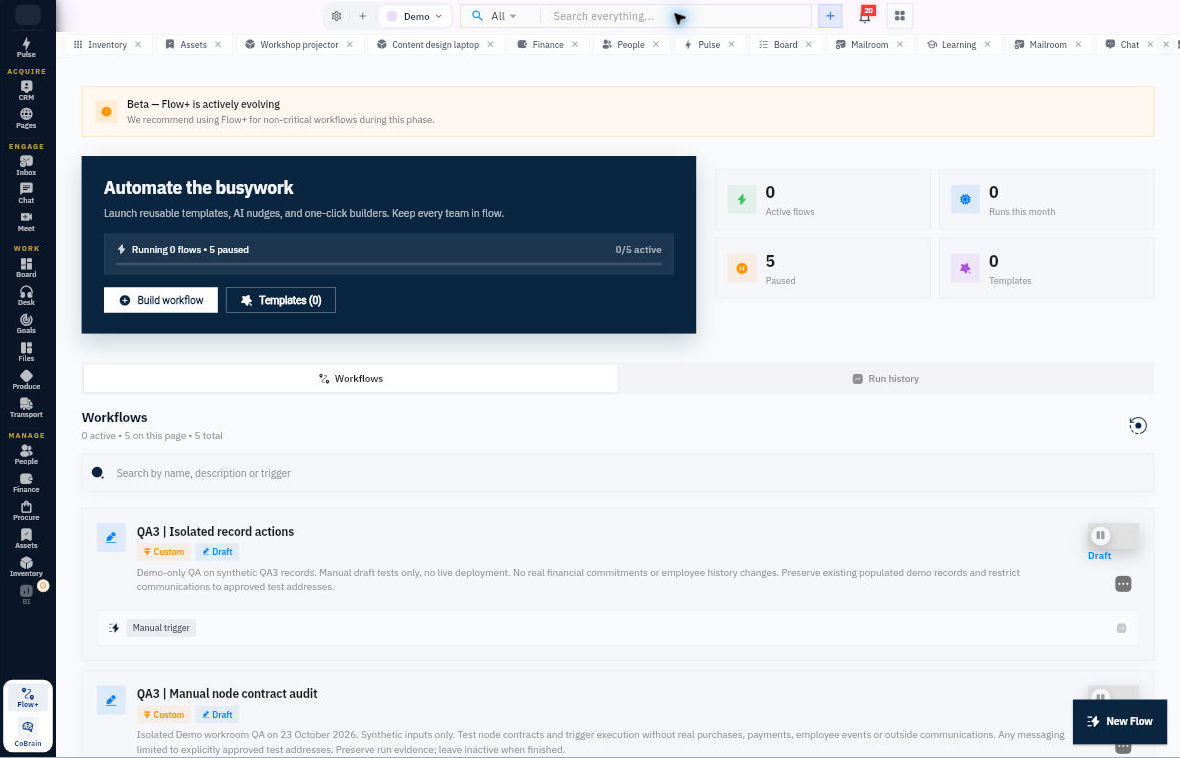
Flow+ · WorkroomlyProduct view
Automation should coordinate the business, not just move a field.Flow+ combines triggers, decisions, people, approvals, records, communication, and intelligence across Workroomly.
Trigger from change
Model real decisions
Coordinate action

The most important workflows usually cross the boundaries automation tools cannot see.

A customer promise can involve CRM, email, delivery, people, finance, procurement, assets, and leadership approval. Point automation handles one step and leaves humans coordinating the rest.

When the process is fragmented

  • Processes live across SOPs, memory, messages, and hidden integration logic
  • Automations move data without understanding the business situation
  • Approvals and exceptions disappear into email threads
  • Teams cannot easily see why a workflow ran, stopped, or changed a record

When Flow+ is connected

  • Visual workflows connect triggers, conditions, branches, actions, waits, and approvals
  • Flow+ works across every Workroomly module and connected systems
  • People remain part of governed decisions and exception handling
  • Runs, context, changes, ownership, and failures remain observable and auditable

Flow+ is designed around the movement—not the menu.

Each capability stays connected to the customer, work, people, decisions, and operating context around it.

Define the repeatable process.

Create a workflow or start from a template, then connect triggers, conditions and actions around your process.

  • Workflow builder
  • Triggers, conditions and actions
  • Templates and configuration

Control when it runs.

Review the workflow’s configuration and authority before activation. Use the available lifecycle controls to pause, resume or deactivate it.

  • Configuration and release checks
  • Role and credential controls
  • Explicit lifecycle actions

Understand the result.

Inspect run history and evidence, then use the supported recovery actions when a run needs attention.

  • Run history
  • Execution evidence
  • Recovery and retry controls

Everything the workflow needs. One coherent operating surface.

Begin simply, configure deeply, and keep the system understandable as the business grows.

Definition & configuration

Describe the process explicitly.

  • Create and edit workflows in the visual builder.
  • Choose from the current trigger and action catalog.
  • Use available templates and conditions.

Execution & controls

Keep authority with the workflow.

  • Review required credentials and module permissions.
  • Activate, pause, resume and deactivate using explicit actions.
  • Start workflows from scheduled or event triggers in the catalogue.

Runs & recovery

See what happened after activation.

  • Inspect workflow runs and their current status.
  • Review execution evidence and event-delivery context.
  • Use permitted retry and recovery actions.

Useful details before you start

Permissions travel with the workflow

Configure the module permissions and credentials each action needs. Review the workflow before activation and manage changes through its lifecycle controls.

Choose how work starts and what happens next

Use the trigger and action catalogue to connect the steps of your process, with conditions that guide the next action.

From a repeatable need to an inspectable run.

A practical sequence your team can review and own.

01

Define

Choose the trigger and sequence of actions.

02

Review

Check actions, permissions and required credentials.

03

Activate

Release the configured workflow when ready.

04

Inspect

Review run evidence and handle exceptions.

One product. Clear value at every altitude.

For Operations teams

Operations teams

Turn cross-functional SOPs into visible systems with ownership, policy, and auditability.

For Business teams

Business teams

Automate customer, project, people, finance, procurement, assets, and service workflows without waiting on custom code.

For Developers and IT

Developers and IT

Extend governed workflows with APIs, webhooks, integrations, environments, and operational observability.

Start informed. Expand confidently.

The strongest rollout is the one your team can understand, adopt, and prove.

Start with a template or create a workflow in the builder. Choose a trigger, configure conditions and actions, then review and activate the workflow.

Explore the trigger and action catalogue to find the steps available across your workroom. Each action uses the permissions, credentials and configuration required by its module.

Yes. Run history and execution evidence show outcomes and available recovery actions.

Make the operating system move with the business.

Start with the workflow people coordinate manually every week and turn it into one visible, governed Flow+ system.