Knowledge that stays connected to the work it supports.

Keep working documents and supporting files inside the business context that makes them useful. Organize, share and edit with the right access around the record.

For teams managing working documents and operational evidence.

  • No card required
  • Start with one workflow
  • Expand at your pace
Files · WorkroomlyProduct view
A file is useful when the team knows which version matters—and why.Files keeps business knowledge collaborative, governable, searchable, and attached to the work.
Create together
Organize clearly
Govern confidently

Shared drives store files. They rarely preserve the working context around them.

Teams lose time finding the current version, understanding the decision, requesting access, and connecting documents back to active work.

When the process is fragmented

  • Documents, spreadsheets, and decks are spread across personal drives
  • Links circulate without clarity on the approved version
  • Project and customer teams recreate knowledge in multiple tools
  • Permissions and employee transitions leave ownership unclear

When Files is connected

  • Create and store business content in one connected workspace
  • Version history, approvals, comments, and ownership stay visible
  • Files link to accounts, projects, tickets, goals, meetings, and workflows
  • Access, retention, and sharing follow business policy

Files is designed around the movement—not the menu.

Each capability stays connected to the customer, work, people, decisions, and operating context around it.

Put the material where people can find it.

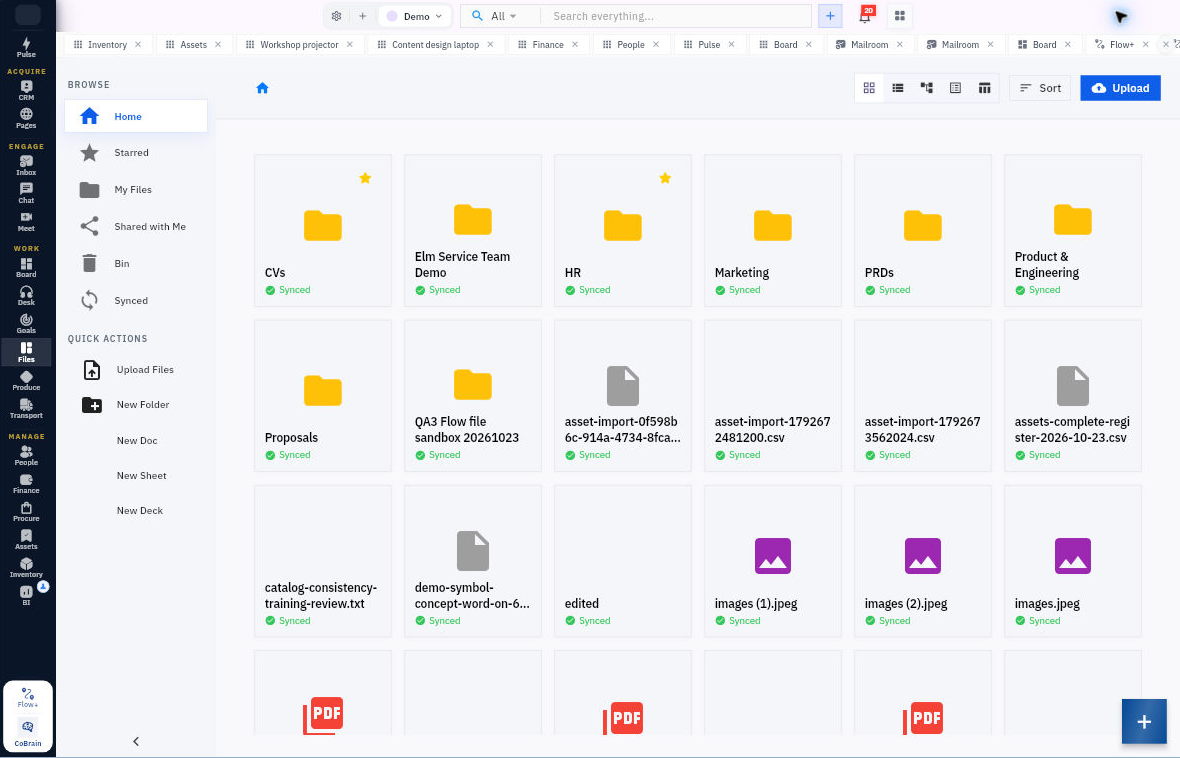
Organize uploads, folders and starred items in the file workspace.

  • Uploads and folders
  • Starred files
  • Search and file organization

Create the working document.

Use supported document, spreadsheet and presentation editors to develop the material your team needs.

  • Documents
  • Spreadsheets and presentations
  • Editing and version history

Share with the right people.

Manage access and keep files linked to the related business work.

  • Sharing and access controls
  • Related work records
  • Document versions

Everything the workflow needs. One coherent operating surface.

Begin simply, configure deeply, and keep the system understandable as the business grows.

Files & organization

Find the useful material again.

  • Upload files and organize them into folders.
  • Use starred items and search.
  • Keep supporting files with related operational records.

Document creation & editing

Work on more than uploaded attachments.

  • Create supported documents, spreadsheets and presentations.
  • Use the configured editing and collaboration experience.
  • Review document versions and permitted restoration actions.

Sharing & access

Make access part of the workflow.

  • Share files and documents with permitted recipients.
  • Respect folder, file and document access controls.
  • Keep working knowledge close to customer, employee and project context.

Useful details before you start

Editing depends on the configured document service

Create and edit documents, spreadsheets and presentations with the editors configured for your workroom. Keep other files in the shared workspace for access, sharing and version history.

From supporting material to shared working knowledge.

A practical sequence your team can review and own.

01

Create

Upload a file or start a supported document.

02

Organize

Place it in the right folder or work context.

03

Collaborate

Edit and share using the available permissions.

04

Retain

Keep versions and the related record accessible.

One product. Clear value at every altitude.

For Operations teams

Operations teams

Centralize policies, SOPs, trackers, and working knowledge with clear ownership.

For Delivery teams

Delivery teams

Keep briefs, specifications, approvals, assets, and decisions attached to the project.

For Customer teams

Customer teams

Connect proposals, contracts, decks, notes, and service knowledge to the relationship.

Start informed. Expand confidently.

The strongest rollout is the one your team can understand, adopt, and prove.

Yes. Supported document, spreadsheet and presentation types can be created and edited through the configured document services.

Yes. Files, folders and documents use the product’s sharing and permission controls.

Files provides a shared workspace for storing, sharing and editing documents. Access your work through Workroomly; desktop folder synchronisation is not included.

Make company knowledge part of the work again.

Start with the team whose files are hardest to find, approve, or trust—and give every important document a living context.