Buying that moves quickly without giving up control.

Carry the reason for a purchase from request to supplier selection, order and receipt. Give procurement teams the controls to buy with evidence.

For procurement teams, requesters and purchasing approvers.

  • No card required
  • Start with one workflow
  • Expand at your pace
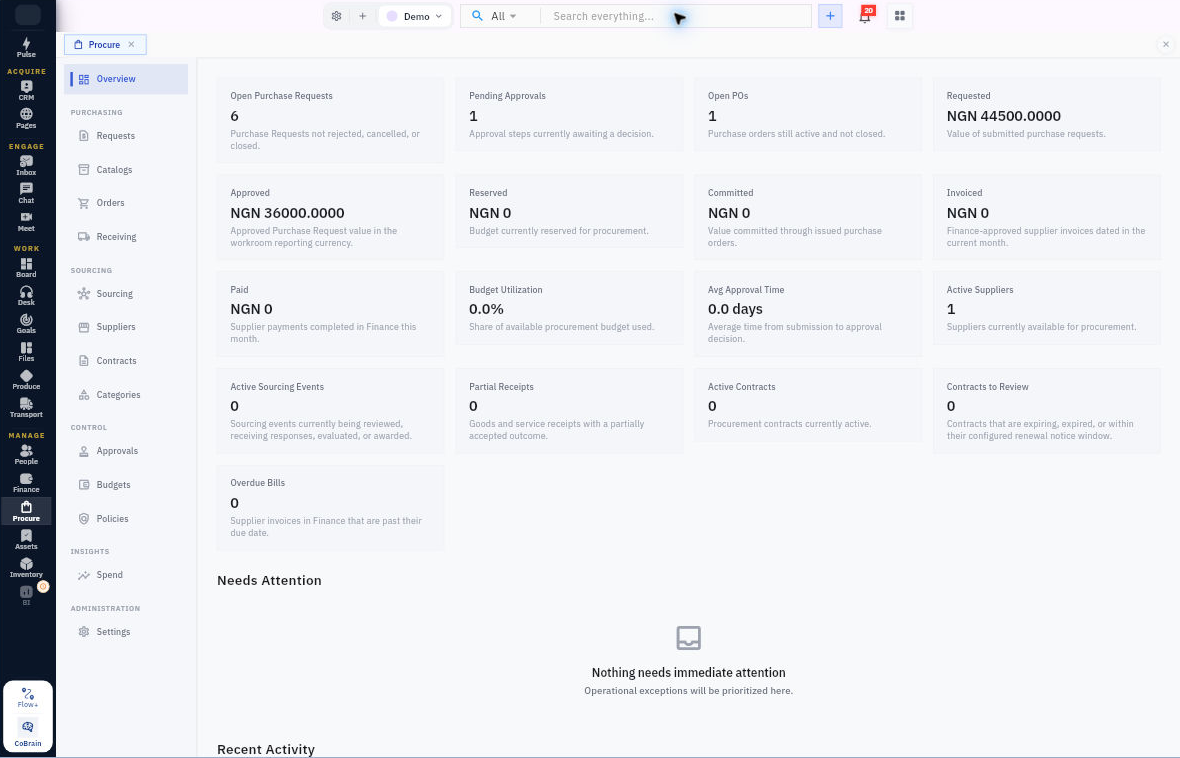
Procure · WorkroomlyProduct view
Procurement should protect momentum and money at the same time.Procure connects the business need to policy, budget, approvals, vendors, and delivery.
Request clearly
Approve responsibly
Receive completely

Purchasing becomes slow when context and control arrive in separate conversations.

The requester knows the need. Finance knows the budget. Legal knows the terms. Procurement is left joining email, forms, spreadsheets, and vendor documents.

When the process is fragmented

  • Requests arrive without a complete business case or budget owner
  • Approvals happen in chat and email with little audit history
  • Vendor, contract, PO, invoice, and receipt records are fragmented
  • Leaders see actual spend without the commitments already in motion

When Procure is connected

  • Guided requests collect need, specification, project, timing, vendor, and budget context
  • Approval paths adapt to category, value, risk, entity, and policy
  • Vendor, contract, PO, delivery, asset receipt, invoice, and performance stay linked
  • Commitments update Finance, Assets, budgets, projects, BI, Pulse, and CoBrain

Procure is designed around the movement—not the menu.

Each capability stays connected to the customer, work, people, decisions, and operating context around it.

Start with an accountable request.

Capture the need, review policy and budget context, and route the request to the right approvers.

  • Purchase requests and requisitions
  • Catalogs, budgets and policies
  • Approval workflows

Choose and manage suppliers.

Run sourcing events, collect supplier responses and keep onboarding evidence and contracts with the supplier relationship.

  • Sourcing and supplier invitations
  • Supplier onboarding and compliance evidence
  • Contracts and supplier records

Follow the purchase through receipt.

Manage orders and receiving, then pass purchasing and matching evidence to the vendor-bill workflow in Finance.

  • Purchase orders
  • Receiving and matching context
  • Finance vendor-bill handoff

Everything the workflow needs. One coherent operating surface.

Begin simply, configure deeply, and keep the system understandable as the business grows.

Requests & control

Put the business need before the purchase.

  • Create purchase requests with owners and supporting detail.
  • Apply approval workflows, budgets and purchasing policies.
  • Use catalogs and categories where enabled.

Sourcing & suppliers

Keep the choice of supplier explainable.

  • Manage sourcing events, supplier invitations and quote revisions.
  • Capture supplier onboarding information and evidence through an invitation-scoped portal.
  • Track supplier records, contracts and compliance context.

Orders & receiving

Follow what was ordered and what arrived.

  • Create and manage purchase orders.
  • Record receipts and preserve purchasing evidence.
  • Carry order, receipt and matching context into Finance.

Spend & governance

Give procurement leaders a usable operating view.

  • Review spend and procurement activity with permissioned reporting.
  • Manage approvals, delegation and policy configuration.
  • Keep supplier communication status and recovery actions visible.

Purchasing for stock and production

Bring the reason for a purchase into the purchasing process.

  • Receive purchase requirements explicitly handed over from Inventory replenishment.
  • Receive procurement requirements handed over from Produce material planning.
  • Continue through supplier selection, purchase orders and receiving controls.
  • Explore purchasing datasets in BI with the relevant source access.

Useful details before you start

Supplier onboarding is invitation-scoped

Suppliers receive access to their onboarding case. Submitted responses and documents enter a controlled review process; an internal field alone is not proof that a supplier passed a check.

Sent and delivered are different

Sourcing retains invitation and notice status, including retry paths. An accepted email request does not establish that the supplier opened it.

Two routes into purchasing

Inventory replenishment and Produce material planning can each create requirements that a user explicitly hands to Procure. Review the requirement, choose the supplier and follow the purchasing controls before committing spend.

From purchasing need to a payable with evidence.

A practical sequence your team can review and own.

01

Request

Capture the need and obtain approval.

02

Source

Review suppliers, responses and contracts.

03

Receive

Place the order and record receipt.

04

Handoff

Send supported purchasing evidence into Finance.

One product. Clear value at every altitude.

For Procurement teams

Procurement teams

Run a complete, auditable purchase lifecycle without becoming the manual coordination layer.

For Finance teams

Finance teams

See policy, budget, commitment, receipt, invoice, and actual spend before reconciliation.

For Employees and managers

Employees and managers

Request what the team needs through a clear process with visible status and fewer repeated questions.

Start informed. Expand confidently.

The strongest rollout is the one your team can understand, adopt, and prove.

Yes. Sourcing events, supplier responses, onboarding and contracts sit alongside requests, purchase orders and receiving. Some surfaces depend on workspace configuration and permissions.

The connected workflow carries supplier, order, receipt and matching evidence into vendor-bill processing. Finance owns bill approval and payment.

Yes. Invitation-scoped onboarding pages collect supplier responses and supporting documents for review.

Make every purchase move with context and control.

Start with the category creating the most delay or surprise spend and build one visible path from request to receipt.