Business intelligence that starts with the business already connected.

Give analysts and business leaders a shared analytics layer. Work with governed datasets, define metrics and build reporting that keeps the underlying business context visible.

For analysts, operations leaders and teams responsible for reporting.

  • No card required
  • Start with one workflow
  • Expand at your pace
BI · WorkroomlyProduct view
The dashboard should answer the next question, not create another report request.BI connects metrics to live records, owners, work, and decisions across Workroomly.
Measure consistently
Drill into causes
Act on change

Reporting is slow when every function defines and exports its own truth.

By the time data is cleaned, joined, visualized, and presented, the business has already changed—and the explanation still lives elsewhere.

When the process is fragmented

  • CRM, projects, support, people, and finance report from separate systems
  • Metric definitions change between teams and reporting cycles
  • Leaders see aggregate movement without records or owners behind it
  • Analysts spend time rebuilding recurring reports instead of investigating change

When BI is connected

  • Shared metrics draw from connected operational records
  • Dashboards combine Acquire, Engage, Work, and Manage in one model
  • Every chart can drill into customers, work, people, spend, assets, and decisions
  • Alerts, Pulse, Goals, and CoBrain convert movement into timely action

BI is designed around the movement—not the menu.

Each capability stays connected to the customer, work, people, decisions, and operating context around it.

Start with governed data.

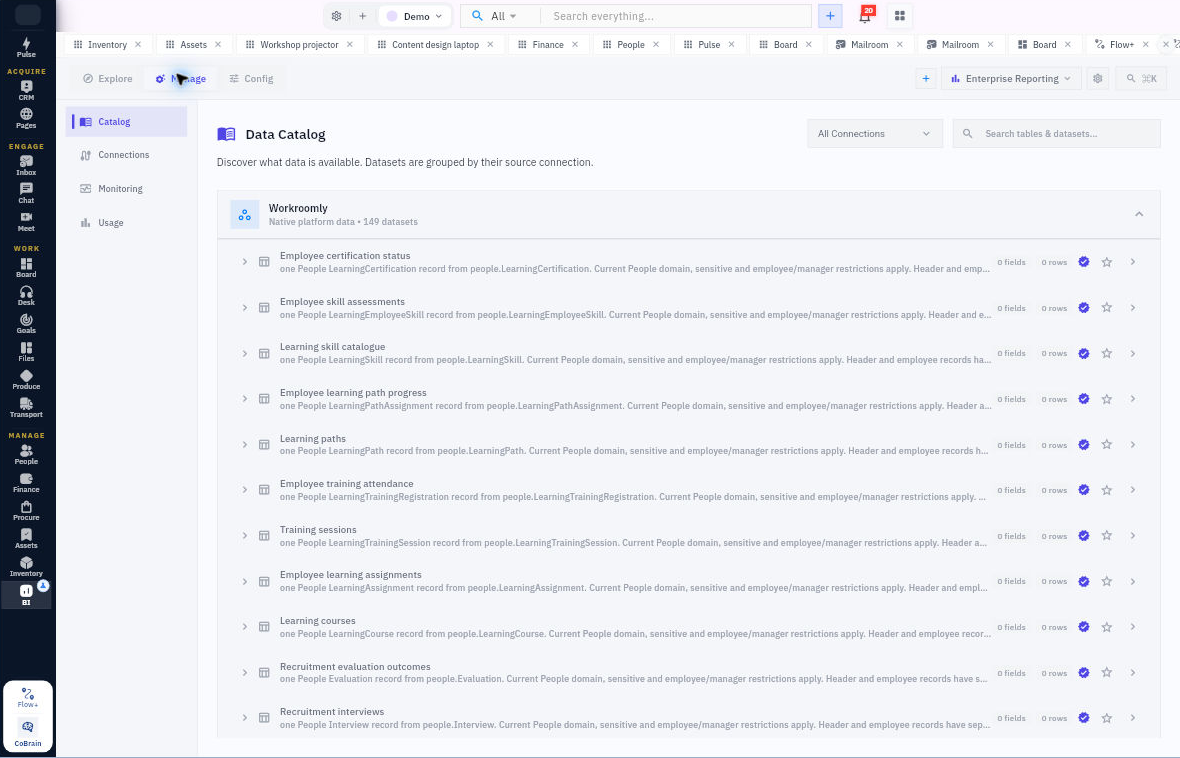
Inspect available datasets and fields, preview records and work with supported connections under the workspace’s capabilities.

  • Workroomly datasets and permissions
  • Supported external data connections
  • Dataset discovery and previews

Build the analysis.

Use BI Studio to work across report, model and data experiences. Define relationships, metrics, filters and visualizations.

  • BI Studio and report authoring
  • Metric definitions and model relationships
  • Filters and visualization

Put reporting into use.

Publish and share supported reporting experiences, configure alerts and review refresh or export controls where available.

  • Dashboards and published reports
  • Alerts and templates
  • Sharing and report access

Everything the workflow needs. One coherent operating surface.

Begin simply, configure deeply, and keep the system understandable as the business grows.

Data & connections

Know what the analysis is built on.

  • Browse governed datasets and their fields.
  • Preview and query available data.
  • Configure supported connections, including PostgreSQL where enabled, and inspect metadata sync status.

Models & metrics

Define the business meaning once.

  • Build and inspect dataset relationships.
  • Create metric definitions and reuse them in analysis.
  • Work with BI Studio’s data and model experiences.

Reports & dashboards

Turn a question into a usable view.

  • Author reports with visualizations and filters.
  • Publish report experiences and manage versions.
  • Use dashboards and available templates for recurring questions.

Alerts & administration

Keep access and operation visible.

  • Configure supported alerts and inspect activity.
  • Manage sharing and role-based access.
  • Inspect connection, refresh and export capabilities available to the workspace.

Operations reporting across the business

Use governed source datasets to examine the work behind the numbers.

  • Procure datasets cover purchasing and receiving records.
  • Inventory datasets cover stock, movements and fulfilment.
  • Produce datasets cover orders, operations, output and quality.
  • Transport datasets cover fleet, trips, deliveries and operational costs.
  • Use permitted Finance, Assets, People and CRM datasets for the relevant business context.

Useful details before you start

Connections are capability-driven

BI exposes its supported connection and data capabilities through the active API-backed repository. The site does not imply support for every database, file format or third-party application.

Published views have a source

Report authoring, model relationships and metric definitions provide analytical structure underneath a dashboard. They are separate from the permission to publish or share it.

Compare the right measures

Source permissions still apply in BI. Group quantities by their recorded unit and costs by currency. Inventory stock value uses current standard cost; manufacturing and transport cost records are operational measures, not Finance settlements. Validate model relationships before combining datasets.
From governed data to a shared operating view.

A practical sequence your team can review and own.

01

Discover

Inspect the dataset and its fields.

02

Define

Establish relationships and metric meaning.

03

Build

Create the report and its visualizations.

04

Share

Publish within the supported access model.

One product. Clear value at every altitude.

For Executives

Executives

See one current operating narrative across growth, customers, delivery, people, and money.

For Business analysts

Business analysts

Spend more time investigating change and less time rebuilding recurring joins and exports.

For Team leaders

Team leaders

Use trusted, role-specific metrics with the records and owners behind every result.

Start informed. Expand confidently.

The strongest rollout is the one your team can understand, adopt, and prove.

No. BI includes governed data, metric definitions, modeling and BI Studio report authoring, as well as dashboards, templates and alerts.

BI includes supported connection workflows, including PostgreSQL where enabled. Available source types and actions follow the capabilities exposed to your workspace.

No. Data access, BI roles and publishing permissions determine what a member can inspect and share.

Turn connected operations into trusted intelligence.

Start with the operating question your leadership team asks repeatedly and build the live view behind the decision.