Record a delivery outcome with genuine proof
Match the delivery to its actual recipient and evidence before recording a successful outcome.
In this lesson
Record a delivery outcome with genuine proof
Proof must belong to the same delivery, recipient and package scope. A trip’s arrival or an Out for Delivery label is not recipient acceptance.
Check the delivery first
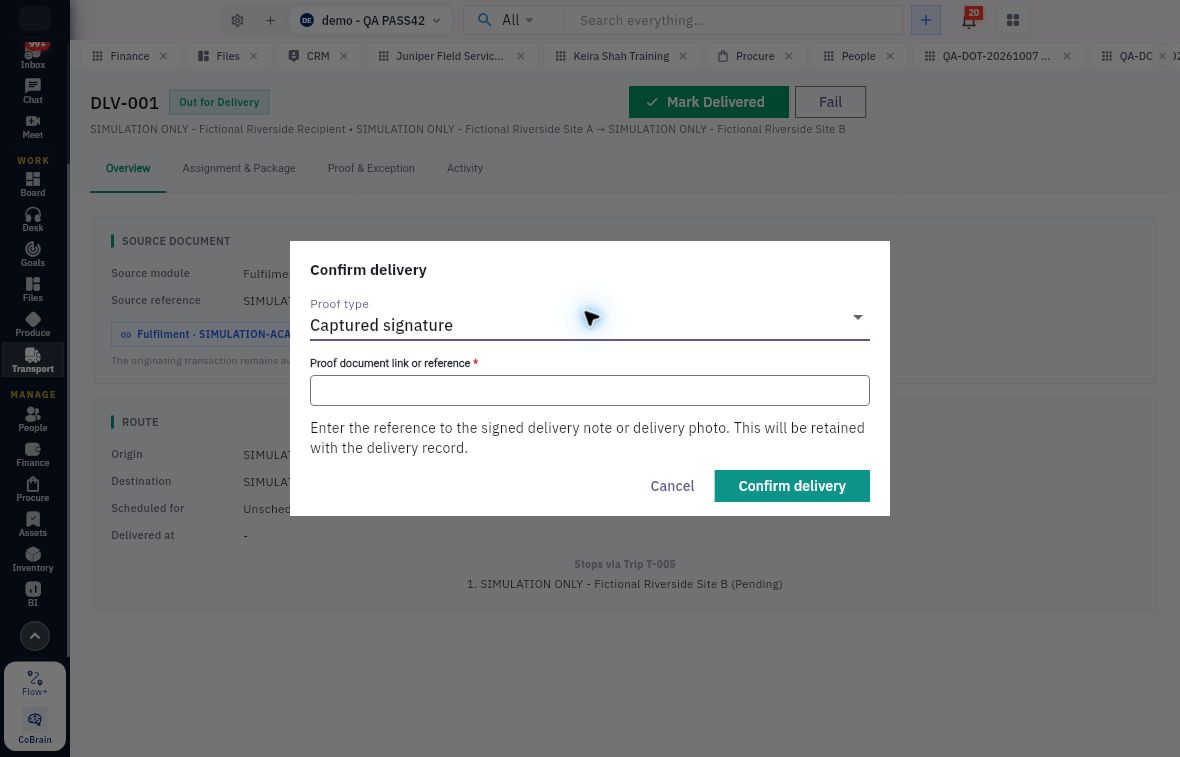
1. Open Transport → Deliveries → All and find the exact delivery. Match its recipient, origin, destination and source request. 2. Read Overview and Assignment & Package. Compare the linked trip, package count, weight, volume and cargo description. 3. Open Proof & Exception and Activity to see the evidence and current stage. If the successful outcome is already recorded, inspect it rather than confirming it again. 4. For a delivery that has actually completed and is at the appropriate stage, select Mark Delivered to open Confirm delivery. 5. Select the true Proof type—Captured signature or Captured photo—and enter the genuine Proof document link or reference for the signed note or delivery photo.
Check the result
Confirm and check
6. Verify that the proof is accessible through the intended process and matches the actual event. Review the delivery identity and evidence, then select Confirm delivery. 7. Reopen the same delivery. Check its state, Delivered at value and retained proof in Proof & Exception, then compare Activity. If the save result is unclear, inspect these before submitting again. 8. If delivery did not complete or proof is unavailable, keep that outcome explicit and use the relevant exception workflow. Do not substitute a signature or image from another delivery.
Expected result: a successful delivery outcome is supported by the correct captured evidence, or the unresolved outcome remains visible.
Tips: A package count is not necessarily the item-unit count inside it. A Returned status is not proof of an Inventory return receipt. Keep transport outcome, recipient acceptance and stock movement records linked by their actual source references.
Continue learning
In this series: Manage trips and deliveries — guide 5 of 7.
Turn what you learned into the way the team works.
Mark this lesson complete once the workflow exists in your workspace—not simply when you reach the bottom.