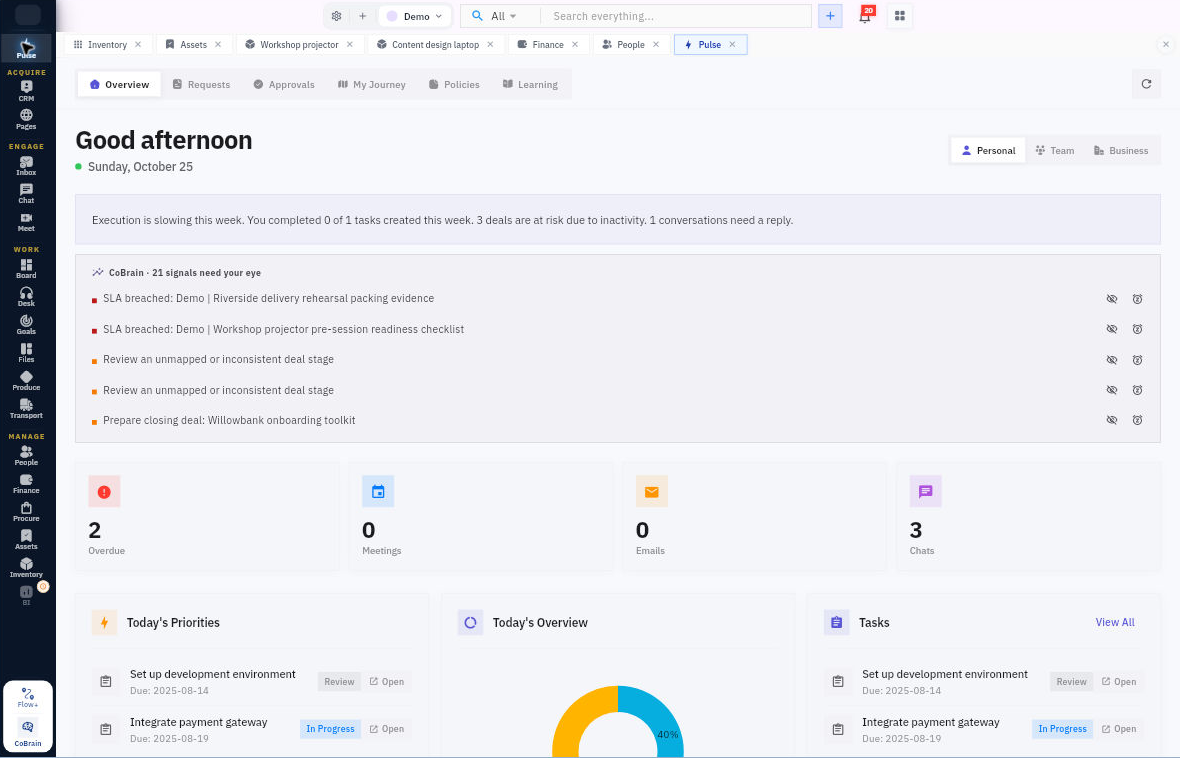
Know what needs attention before the business asks.

See what needs your attention across Workroomly. Pulse brings personal priorities, requests, approvals and employee actions into a place you can return to throughout the day.

For every member, with additional actions for managers and approvers.

  • No card required
  • Start with one workflow
  • Expand at your pace
Pulse · WorkroomlyProduct view
Your business produces signals all day. Pulse decides which ones deserve attention.One live operating feed connects change across Acquire, Engage, Work, and Manage.
Detect movement
Reduce noise
Focus ownership

Important work does not always look urgent inside the tool where it begins.

A quiet account, delayed approval, overloaded specialist, unpaid invoice, and slipped milestone can combine into one material risk while each system shows only its part.

When the process is fragmented

  • Teams monitor separate dashboards, queues, inboxes, and project views
  • Alerts treat every change as equally important
  • Cross-functional risk becomes visible only in a meeting
  • Leadership asks for updates because the operating state is hard to trust

When Pulse is connected

  • Pulse watches customer, work, service, people, finance, procurement, asset, and goal movement
  • Signals are ranked using business context, impact, urgency, and ownership
  • Related changes converge into one intelligible attention item
  • Owners can open the evidence, coordinate action, and track resolution

Pulse is designed around the movement—not the menu.

Each capability stays connected to the customer, work, people, decisions, and operating context around it.

Start with what needs attention.

Review your available priorities and operating signals, then open the underlying record to act.

  • Personal and workroom context
  • Priorities and signals
  • Links to the source record

Follow requests through to a result.

Create and review supported employee requests without finding a separate administrative screen for every module.

  • Purchase and pre-spend requests
  • Claims and expense advances
  • Request status and next action

Complete your part of the employee journey.

Review approvals, policies, learning and assigned assets from the member experience.

  • Approvals and employee journey
  • Policy acknowledgements and learning
  • Assigned assets and member actions

Everything the workflow needs. One coherent operating surface.

Begin simply, configure deeply, and keep the system understandable as the business grows.

Attention & context

Find the work that needs your part.

  • Review personal priorities and available business signals.
  • Open related records in the appropriate module.
  • Keep ownership and next actions close to the signal.

Requests & approvals

Make employee operations navigable.

  • Submit and follow supported purchase, pre-spend, claim and advance requests.
  • Review approval work within your authority.
  • See the status of a request and the next permitted action.

Your employee journey

Keep everyday responsibilities accessible.

  • Review policies and complete acknowledgements.
  • Access assigned learning and employee journey actions.
  • View assigned assets and use available issue or return actions.

Useful details before you start

Pulse uses the existing domain workflows

A purchase request remains a Procure record and an expense advance remains a Finance record. Pulse provides the member entry point rather than creating a second approval or reimbursement process.

From attention to the right action.

A practical sequence your team can review and own.

01

See

Review what needs your attention.

02

Open

Follow the signal to its source.

03

Act

Complete the action available to your role.

04

Track

Return to the status and next step.

One product. Clear value at every altitude.

For Executives

Executives

See what materially changed across the business without commissioning a status report.

For Team leaders

Team leaders

Focus the team on risks and opportunities that cross tools and responsibilities.

For Operators

Operators

Understand why a signal matters, who owns it, and what response is already underway.

Start informed. Expand confidently.

The strongest rollout is the one your team can understand, adopt, and prove.

Pulse is a member command centre. It combines attention with requests, approvals and actions that lead back to the underlying workflow.

Yes. Pulse exposes the supported member request types and their status, evidence and permitted next actions.

No. It uses the existing module records and controls.

Give the business an attention system.

Start with the risks your leadership team currently discovers too late and let Pulse make them visible while there is still time to act.