Prepare a production rework decision
Identify the exact held output and define a bounded correction without losing the original quality history.
In this lesson
Prepare a production rework decision
Start from the defect and the affected quantity, not from a desire to clear a status. Keep the original output and failed or incomplete checks identifiable.
Review the exception
1. Open Produce → Quality → Final and find the inspection for the exact product, order and output lot. Match its quantity and current stock state. 2. Read Checks, expected and actual results, defects, notes and evidence. If observations are missing, obtain them from the responsible inspector; “None recorded” under defects is not an automatic pass. 3. Decide what correction is needed, who can perform it and how the same output will be rechecked. Distinguish a physical defect from a data-entry error. 4. Open Create Rework on the intended inspection. Check the inspection reference and quantity shown. 5. Prepare Defect or hold reason and Rework instructions. Describe the actual issue and the specific work permitted; include the relevant output identity and acceptance check.
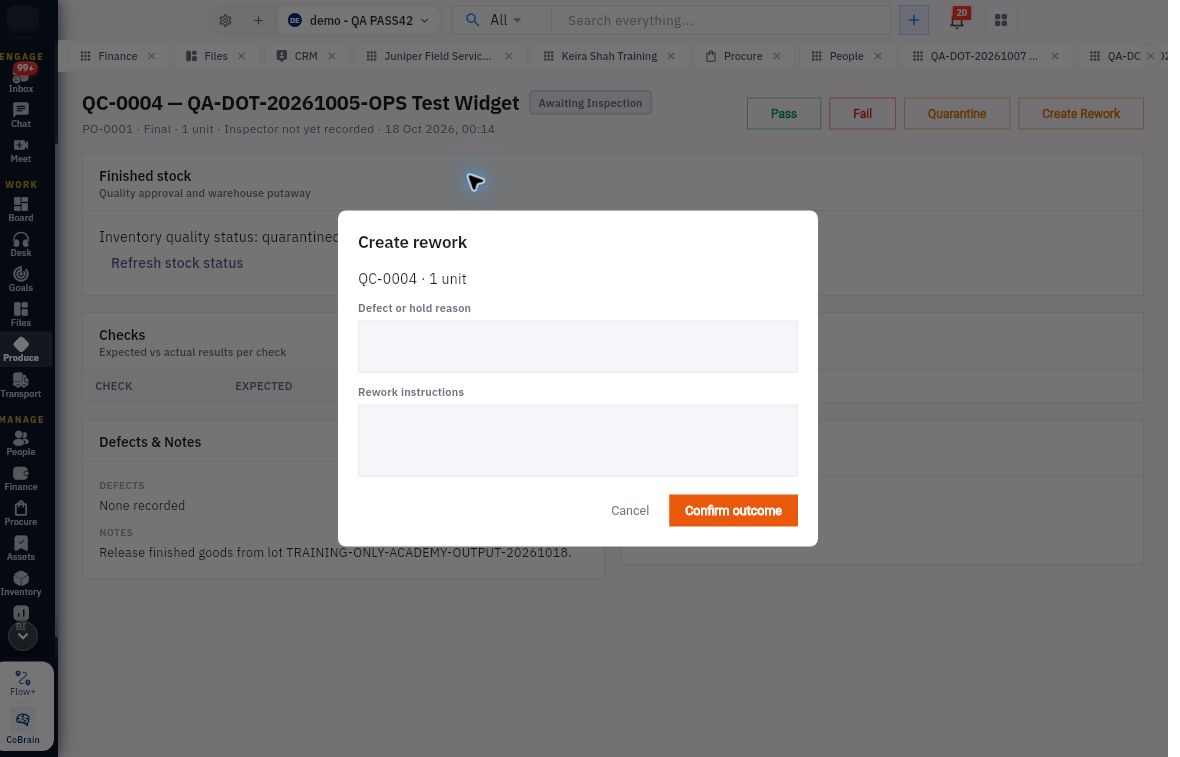
Check the result
Keep the correction controlled
6. Before Confirm outcome, establish the action’s supported effect with the production/quality owner: what record it creates or changes, what quantity it covers and whether stock remains held. Do not assume the form creates a new order or releases stock merely from its name. Use Cancel while any of those points is unresolved. 7. After an approved submission, reopen the original inspection and any resulting related record. Compare source linkage, quantity, status and the remaining quality/storage requirements. 8. Retain the original finding and the later correction/recheck result. For an uncertain save, look for existing results before submitting again.
Expected result: a clear correction decision tied to the original output, without an unsupported stock release.
Tip: a negative output, stock adjustment, new BOM version or new Pass is not a generic undo action. A data-entry correction needs its own supported route and review of downstream effects.
Continue learning
In this series: Plan and record production — guide 6 of 9.
Turn what you learned into the way the team works.
Mark this lesson complete once the workflow exists in your workspace—not simply when you reach the bottom.