Triage a queue and assign a ticket
Find the work that needs attention and give a ticket a clear owner.
In this lesson
Triage a queue and assign a ticket
Triage turns a list of requests into a sensible next action. Consider customer impact, urgency, promised dates and available capacity—not just the order in which cards appear.
Before you start: You need access to the desk and permission to assign its tickets. Know which existing team member should handle the request.
Find the right work
1. Open Desk → Tickets and choose Table or Kanban. Review the search text and active date, department, assignee, SLA and status filters before interpreting the list.
2. Locate the exact ticket by its reference, title and requester. In Kanban, look in the relevant status column; a resolved ticket will not remain in New. If you cannot find it, check the view and filters before concluding that it is missing.
3. Read the full request and recent conversation. Decide the next useful action and apply your team’s priority definitions. The available intake labels are Low, Medium, High and Urgent; a label alone does not explain the customer’s impact.
Assign an owner
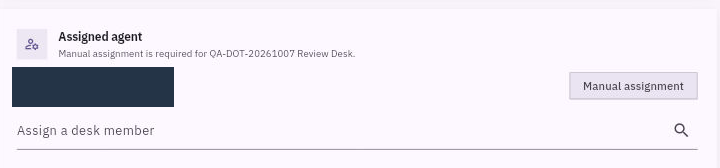
4. In the ticket, find Assigned agent. If the correct person is already assigned, keep that assignment and continue at step 6.
5. Open Assign a desk member, search by name or email and select the intended existing account. Selecting the person saves the assignment immediately in this route; there is no separate Save button. Check the identity before selecting.
6. Return to the ticket list, find the same ticket and reopen it. Confirm the assigned agent and that the original context is still intact.
Make ownership useful
A department identifies the team; an assigned agent identifies the individual handling this request. A requester, watcher or creator is not automatically the owner. Assignment also does not prove that a teammate has accepted the work or has enough capacity—coordinate the next action with them.
Your result is a correctly identified ticket with a clear handling owner. Keep queue filters separate from ticket status: filtering for Resolved does not resolve a ticket.
Continue learning
In this series: Handle support requests — guide 7 of 14.
Turn what you learned into the way the team works.
Mark this lesson complete once the workflow exists in your workspace—not simply when you reach the bottom.