Set up a support department
Organise eligible agents and choose how a department receives work.
In this lesson
Set up a support department
Departments organise support ownership and routing within a desk. Set up a department around a real service team rather than creating a new one for every ticket.
Before you start: You need desk configuration access and the names of the agents who should handle this work.
Configure the department
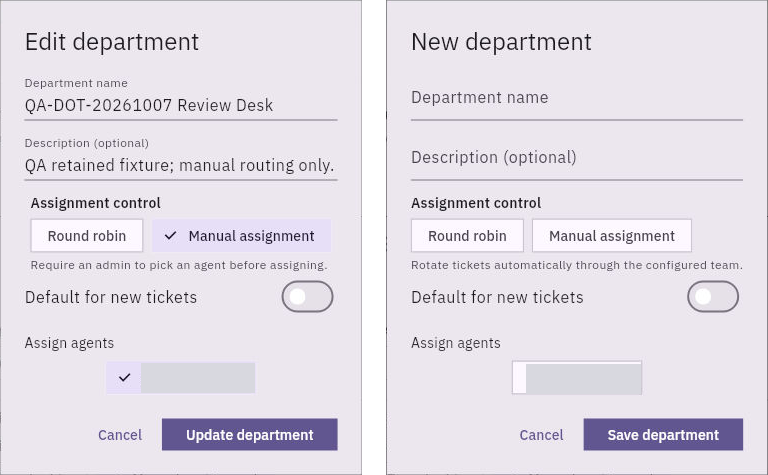
1. Select the correct desk and open Config → Departments. Check existing department cards first. Use Manage routing & agents to update an existing department, or open the new-department form when a new team is needed.
2. Enter a clear Department name and optional description. Describe the requests this team handles, such as account enquiries or technical support.
3. Choose an assignment mode explicitly: Manual assignment or Round robin. Manual assignment suits a team whose dispatcher chooses an agent; round robin is intended to rotate work through the configured team. Check your actual routing results before relying on an unattended process.
4. Decide whether this should be the Default for new tickets. A default affects more than the ticket currently in front of you, so choose it only when this department should receive the desk’s new work.
5. Under Assign agents, select the existing accounts that belong to this department. Check the selected names carefully.
6. Select Save department for a new department or Update department for an existing one. Reopen the department and check its name, assignment mode, default setting and selected agents.
Use the distinction correctly
A department’s eligible agents are not necessarily the assigned agent on an individual ticket. Open the ticket to see its actual Assigned agent; a requester, watcher or ticket creator is not automatically its owner.
Your result is a saved department with a clear purpose and eligible team. When handling live requests, confirm the ticket’s department and individual owner rather than assuming that the department name proves someone has taken responsibility.
Continue learning
In this series: Handle support requests — guide 3 of 14.
Turn what you learned into the way the team works.
Mark this lesson complete once the workflow exists in your workspace—not simply when you reach the bottom.