Move a deal to its next stage
Advance an existing deal through its available lifecycle transition and check that the intended stage is saved.
In this lesson
Move a deal to its next stage
Advance an existing deal through its available lifecycle transition and check that the intended stage is saved.
Before you start: You need an existing deal, permission to move it, and the customer information your team requires for the next stage.
Steps
1. Open CRM → Deals in the correct space. Find and open the deal. Check its title and linked Account so you are working on the right opportunity.
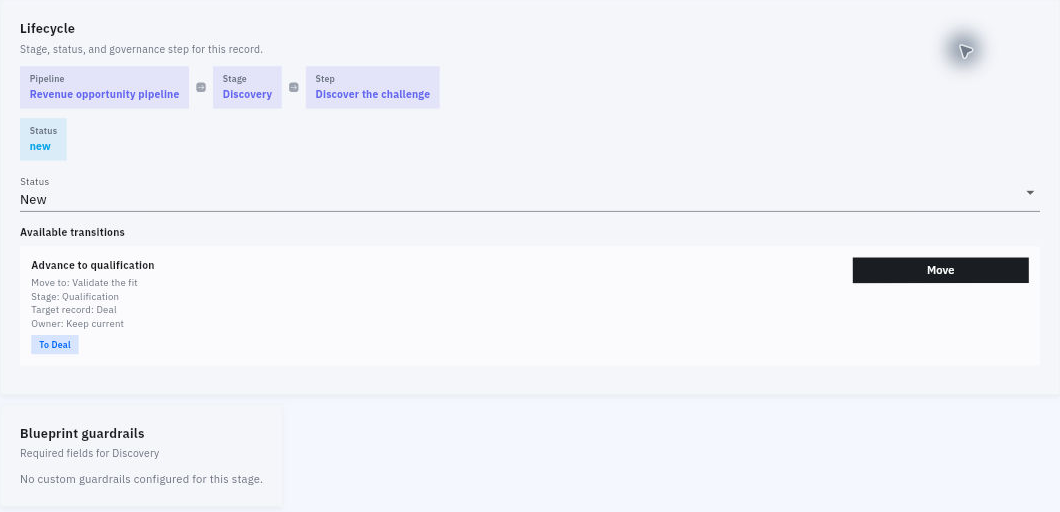
2. Read the current Lifecycle: pipeline, stage, step and status. Also check the owner, amount and close date. Decide whether the customer information supports moving forward; an enabled button is not a substitute for that decision.
3. Scroll to Available transitions. Read the transition’s destination step, stage, target record type and owner instruction. For example, Advance to qualification can move a Deal from Discovery to Qualification, with the step Validate the fit.
Check the result
4. Select Move on the intended transition. In Confirm transition, check that the destination and target record match what you want. Select Cancel if they do not.
5. Select Confirm once and wait for the deal to finish loading. Read the new stage and step. A stage transition may leave the separate Status value unchanged.
6. Return to Deals, reopen the same deal and confirm its lifecycle. Check that the owner, amount and close date still reflect your intended opportunity. Under Notes, a Stage updated entry can help you follow the change history.
7. Read the next available transition so you know what comes next. If the action is unavailable, ask the CRM administrator about the specific transition instead of changing unrelated settings or using Status to imitate the move.
Expected result
The existing deal is in the intended stage and step, and you can find the retained result from the Deals list.
Common pitfalls
- Moving to Qualification does not create a new deal, convert a lead, send a proposal or mark the opportunity won.
- If a confirmation is slow or unclear, reopen the deal before trying the transition again.
Continue learning
In this series: Manage customer relationships — guide 5 of 15.
Turn what you learned into the way the team works.
Mark this lesson complete once the workflow exists in your workspace—not simply when you reach the bottom.