Connect an enquiry form to CRM
Check the form fields and retain a Lead route to the correct CRM space.
In this lesson
Connect an enquiry form to CRM
Check the form fields and retain a Lead route to the correct CRM space.
Before you start: Have a draft page, an agreed field plan and access to the CRM space where enquiries belong. Decide who will handle the resulting leads.
Steps
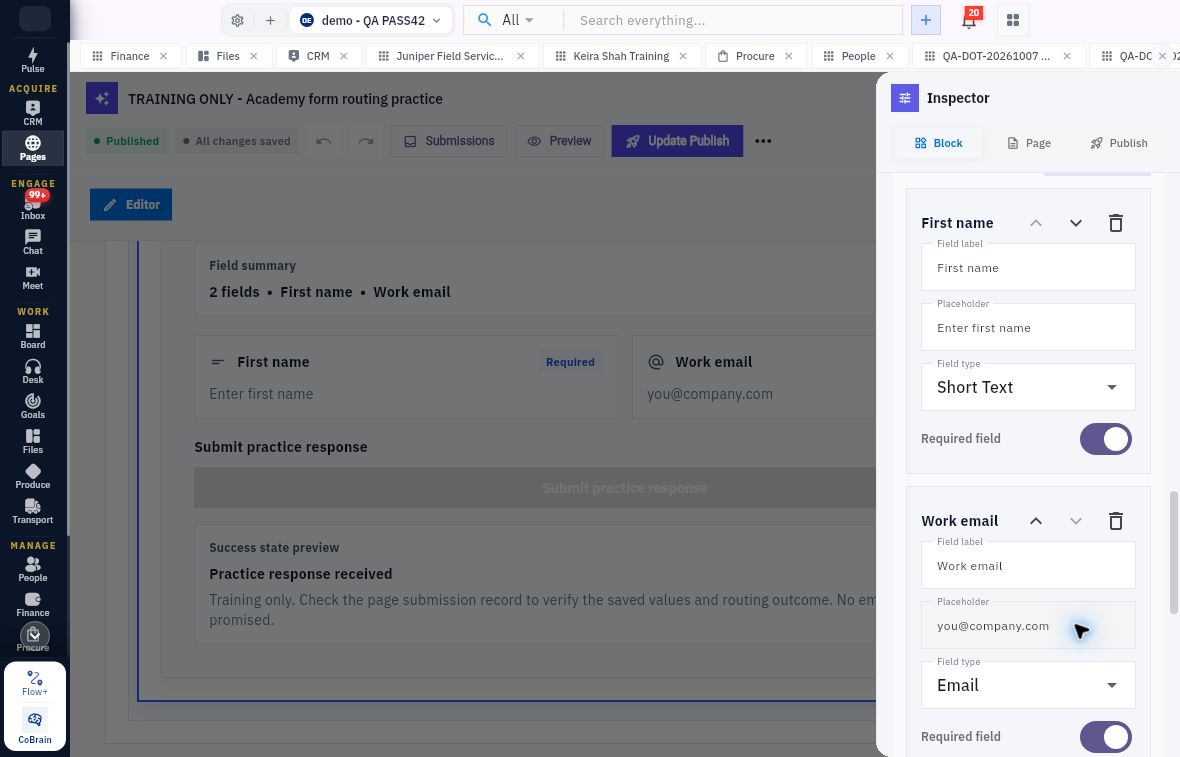
- Open the exact page in the correct workroom and select its form on the canvas. If needed, open More builder actions → Inspector panel. Confirm Form Widget on the Block tab.
- Review each field’s label, type and Required field setting. For a simple name-and-email form, First name uses Short Text and Work email uses Email.
- Find Routes and open the intended existing route. Reuse a suitable route rather than adding another with the same purpose.
- If the route does not exist, choose Add route. Set a clear route label, select Route type → Lead and choose the intended CRM Space.
- Read every selected mapping. Check First name → lead.first_name and Work email → lead.email when those are the fields you intend to send. Inspect the full option if the identifier is clipped.
- Review the route condition and state. Always runs describes when the configured route applies; it does not mean a visitor has submitted anything.
- Wait for All changes saved. Leave and reopen the same page, select Form Widget again and compare the route label, type, space, mappings and condition.
Expected result
The saved form configuration points to the intended CRM space with the field mappings you have checked. Test a submission separately before relying on the route for customer enquiries.
Remember
Required fields are not automatically mapped to CRM. If a selected space and a warning disagree, resolve the configuration and inspect the resulting test submission before launch rather than repeatedly adding routes.
Continue learning
In this series: Build enquiry pages — guide 4 of 7.
Turn what you learned into the way the team works.
Mark this lesson complete once the workflow exists in your workspace—not simply when you reach the bottom.