CRM course 03 — Read commercial documents and hand off agreed work
Commercial records connect a possible purchase to proposed scope, price and terms. Their version and state matter as much as the headline amount. This chapter explains the Quotes workspace, document header and line fields, then shows how to carry an agreed baseline into Finance and delivery without confusing an offer with an invoice or a payment.
Part of CRM module course
In this lesson
Document identity and commercial fields
Commercial records connect a possible purchase to proposed scope, price and terms. Their version and state matter as much as the headline amount. This chapter explains the Quotes workspace, document header and line fields, then shows how to carry an agreed baseline into Finance and delivery without confusing an offer with an invoice or a payment.
In this chapter
- Find the exact document and revision
- Read the header before the price
- Understand the line fields and arithmetic
- Keep revisions and decisions together
- Move from agreement to two distinct handoffs
- Practise a commercial review
Find the exact document and revision
Open CRM → your space → Commercial → Quotes. Despite the tab name, the list can contain different document types, including Estimates and Order forms. Read number, type, version, state, Account and amount together. A document labelled Sent is not automatically accepted, and a zero amount does not establish a free agreed order.
Expand the intended row with its chevron. Inspect its lines and Revision history. Current identifies the current version; Superseded identifies an earlier one. Equal totals do not prove equal scope. The history describes previous versions as immutable and available for audit, so use the version reference when discussing what a reviewer or customer saw.
The illustration in this course uses an existing Estimate with three units at USD100, a percentage discount and tax. It is a pricing example, not an offer to any learner. Use your own approved record for inspection and do not overwrite an unrelated document to make it resemble the example.
Read the header before the price
On the expanded document, Edit opens its header for inspection. Read the document type, Account, Deal, primary Contact and layout. No Deal or No primary Contact is an actual missing association; a customer name in notes does not repair it. When a selected reference can be opened, compare its identity with the intended customer and opportunity.
The header separates several kinds of date and text:
| Field | What to check |
|---|---|
| Issue date | The stored document date; it is not evidence that the document was sent. |
| Expiry | The period in which the proposed terms are intended to remain available. |
| Payment terms | The proposed payment basis, reviewed for this transaction. |
| Commercial terms | Conditions governing the proposed scope and purchase. |
| Document notes | Additional document context; inspect where it appears in the output. |
| Customer comments | Customer-facing commentary where the interface identifies it that way. |
| Internal comments | Internal review information, separate from what the customer receives. |
Do not hide a condition the buyer needs to evaluate in a field marked non-customer-visible. Conversely, do not assume every note is private. Inspect the intended output before an authorised share. A default such as Net 30 or 30-day validity is not automatically the right term for a different customer.
Use Cancel to finish an inspection without saving. If you are making an authorised change, compare the entire revised header with the reviewed instruction before saving, then reopen the exact document and version. A changed form is not yet a retained result.
Understand the line fields and arithmetic
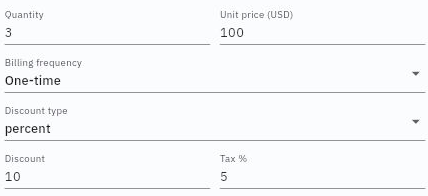
Use the line's pencil to inspect Description, Quantity, Unit price, Billing frequency, Discount type, Discount and Tax %. Read the currency in the unit-price label rather than inferring it from a dollar symbol elsewhere.
Price interpretation versions and handoff
Quantity counts what you sell. One workshop for 12 people can be one billable session, not 12 sessions. A two-page checklist can be one deliverable, not two units. Describe the output clearly enough that another person can identify the unit before multiplying.
In the displayed example, Quantity 3 × USD100 gives USD300. A 10 percent discount removes USD30, leaving USD270. Applying the example's Tax % 5 to that discounted subtotal adds USD13.50, producing USD283.50. These are the illustrated inputs and calculation; select the approved tax treatment for your actual transaction rather than copying a rate.
Discount type changes the meaning of the number. On a USD50 gross amount, a fixed 7.50 discount leaves USD42.50. A 7.5 percent discount removes USD3.75 and leaves USD46.25. Check type and value together.
Billing frequency distinguishes a one-time line from a recurring basis. Do not infer the duration of a service from its unit price. The summary labels TCV and MRR refer to total contract value and monthly recurring revenue. In the illustrated one-time example, TCV is USD270 and MRR is zero, while the displayed document total is USD283.50. The different amounts answer different questions; neither proves an agreed contract or earned revenue.
If your calculation differs, check all lines, units, currency, frequency, discount type, tax basis and precision. Do not change values just to force an unexplained total to match. Resolve the basis with the commercial or Finance owner.
Keep revisions and decisions together
Suppose a proposed workshop and checklist total GBP850. A new option adds a GBP150 follow-up session, producing GBP1,000. The newer option is not an accepted replacement merely because it is newer. Preserve the original scope and the proposed change, identify who must review it, and record which version any acceptance refers to.
A useful comparison includes changed deliverables, exclusions, quantities, price, dates, terms and dependencies—not just the amount. Increasing a workshop from 90 to 120 minutes changes scope even if its price is unchanged. A later version should not silently rewrite what delivery or Finance believes was agreed.
The workspace exposes actions such as New document, Add line, Recipients, Submit, Duplicate and delete. Treat these as separate operations with their own review. Recipients concerns who may receive the document; Submit is not a synonym for customer acceptance. Before a consequential action, check its current confirmation and your team's supported procedure. Do not discover send or deletion effects on a live customer record during training.
Move from agreement to two distinct handoffs
An agreement handoff needs the exact customer identity, document and version, accepted scope and full amount, currency, relevant decision-maker evidence, conditions and remaining dependencies. A Draft or Sent state is not enough on its own. The delivery owner also needs the output, timing, inputs and completion criteria, and must accept responsibility through the team's process.
For Finance, keep the CRM Account and Contact references separate from typed customer text. Where an invoice form offers Customer and Billing contact, select the intended saved records and inspect the retained references. Selecting a coordinator does not establish that they are authorised to receive invoices. Confirm the billing entity, destination, terms, currency and transaction details with the responsible owner.
A commercial document is not an invoice. An invoice records a charge; a receivable records what remains owed; a receipt or payment records money and its allocation. The Deal being won does not prove any of these records exists. Use Finance's own workflow and verify its resulting source and balances rather than claiming that CRM automatically completed the accounting.
For delivery, create or use the intended work record with the exact accepted baseline, owner, due date, dependencies and output. Check access to the source material. A task titled with the customer's name is not enough if it points to a superseded option or lacks the agreed deliverables. A note saying “handoff complete” does not establish that the receiving team can continue.
Practise a commercial review
Inspect an approved sample document without saving changes. Identify its number, type, version, state and customer references. Recalculate one line from quantity, currency, frequency, discount type/value and tax. Explain any difference between line total, document total, TCV and MRR.
Then consider two sample options: GBP850 for a workshop and checklist, and GBP1,000 with an additional session. Acceptance exists only for the first. Your expected decision is to hand off the GBP850 version with its actual scope and conditions, while retaining the extra session as a separate proposal requiring a new decision. Neither option alone establishes an invoice, payment or completed service.
Turn what you learned into the way the team works.
Mark this lesson complete once the workflow exists in your workspace—not simply when you reach the bottom.