Run a focused daily Board review
Find the work that needs attention and leave the review with a clear next action.
In this lesson
Run a focused daily Board review
Start with a question: What is due soon? What is waiting for review? Which task is blocked? You do not need to visit every Board view to answer it.
Review the right work
1. Open Board and confirm the selected Board. 2. Choose Table for exact rows and fields, or Kanban to see tasks by workflow status. 3. Use the Project, Sprint, Label, Priority or Assignee filters to narrow the list. Check which filters remain active before interpreting the result. 4. Open the task that needs attention. Read its description, status, due date, assignee and any required inputs. Use its full title to distinguish it from similar tasks. 5. If you need a specific task, use global search with Board scope, enter its title and press Enter.
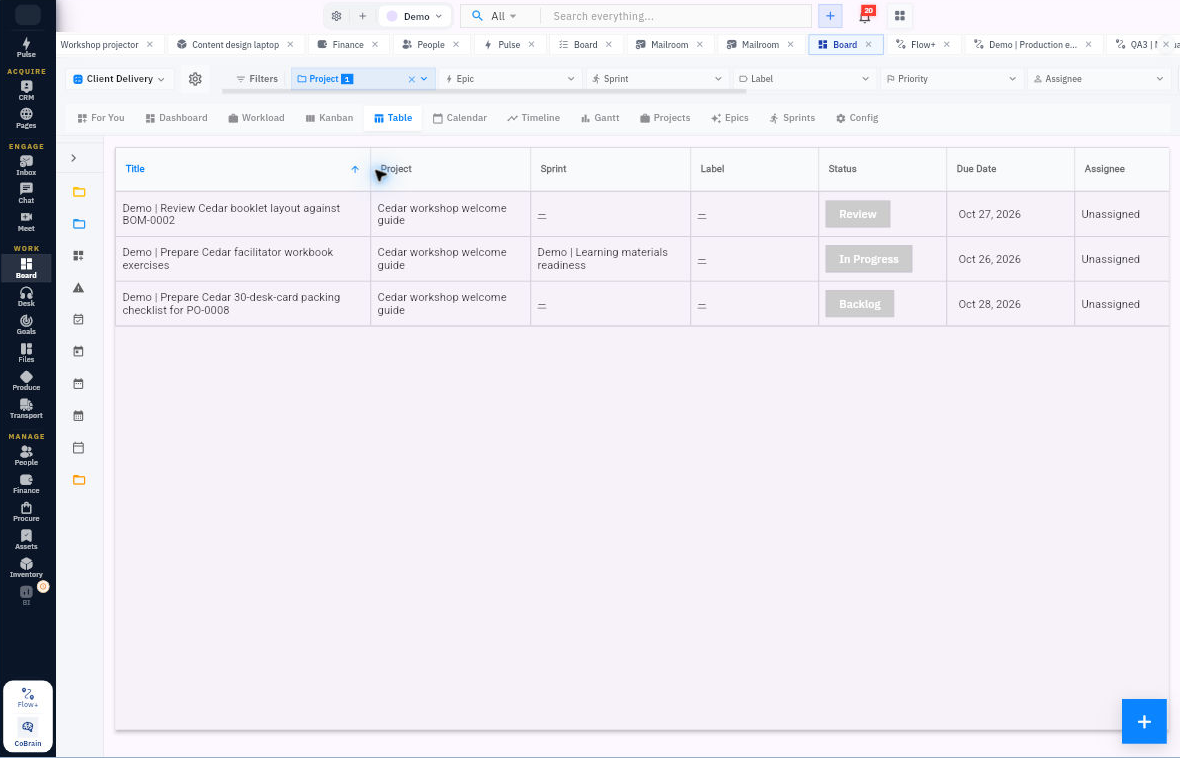
Check the result
Decide the next action
6. For a due-date review, use System Filters → Due Today or Due This Week and wait for the list to settle. If a task is missing, check its own due date and the other active filters before changing the deadline. 7. Agree the next action, owner and check-in: for example, obtain a missing input, finish a draft or request a review. Keep status updates separate from simply inspecting the work.
Choose other views when useful: Calendar shows the selected date window; Timeline and Gantt help compare dates; Dashboard gives a summary to investigate. Open the underlying task when a number or bar affects a decision.
Expected result: you know which work needs attention and what will happen next.
Tip: an empty filtered view is not proof that a task was deleted. Clear unnecessary filters, check the Board and reopen the task. Undated tasks may not appear where you expect in date-based views.
Continue learning
In this series: Plan and deliver work — guide 9 of 17.
Turn what you learned into the way the team works.
Mark this lesson complete once the workflow exists in your workspace—not simply when you reach the bottom.