Request issue and acknowledge asset custody
Create a clear temporary assignment and follow its separate approval, issue and receipt stages.
Part of Issue, return and maintain an asset
In this lesson
Request issue and acknowledge asset custody
Have the accepted asset, intended employee, purpose, expected return and accessory list ready. A request is not a handover, and approval is not the recipient’s acknowledgment.
Request the assignment
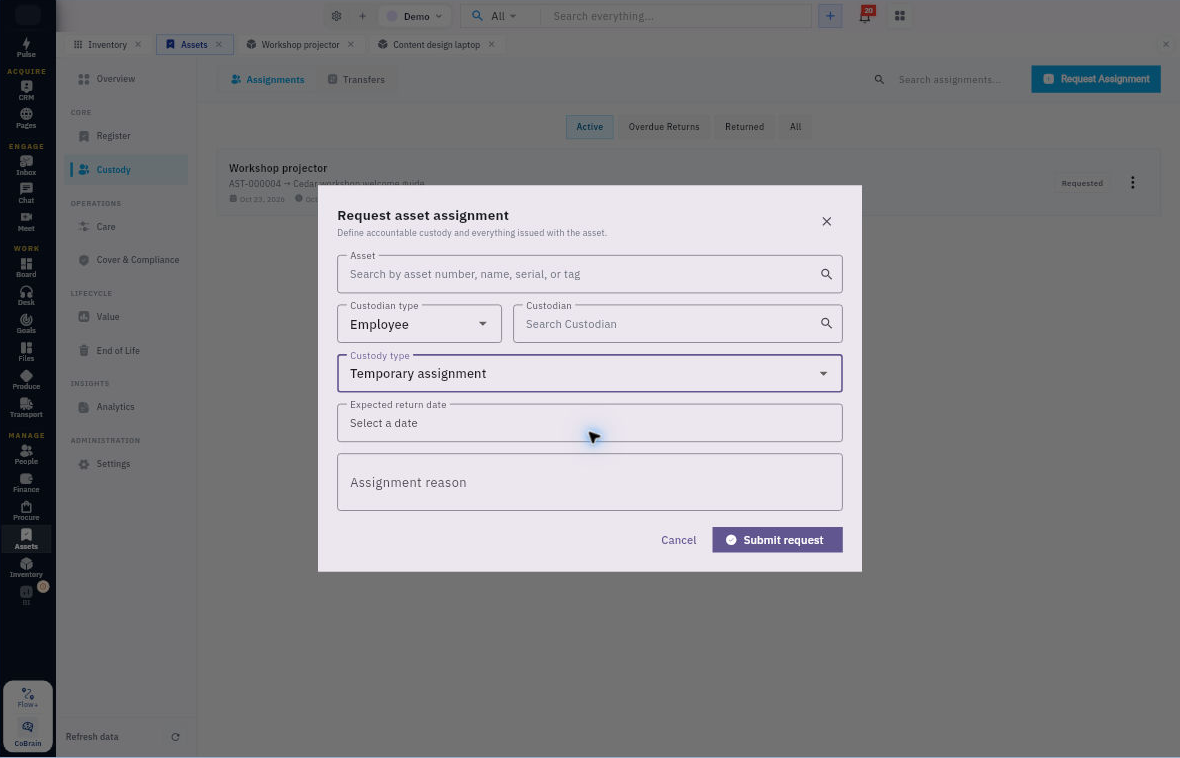
1. Open Assets → Custody → Assignments and check for the intended existing assignment. If it exists, use its current stage and skip the request steps; do not replay completed actions. 2. Select Request Assignment. Find the exact asset by number/name and choose Custodian type: Employee plus the correct person. 3. Choose Temporary assignment and set the Expected return date. Enter Assignment reason and review everything to be issued with the asset. 4. Compare the accessory list with the actual requirement. If the form cannot represent a needed quantity or condition detail, retain it through your team’s supported handover record rather than dropping it from the requirement. 5. Select Submit request once. Return to Assignments and check the saved asset, custodian, dates and Requested state.
Check the result
Approve issue and confirm receipt
6. The responsible approver reviews the request and uses Approve request on the exact Requested row. Check that it becomes Approved; this action may apply immediately. 7. When the actual handover is ready, use Issue asset on the Approved row and check Issued. Compare the exact asset and each accessory at handover. 8. The responsible recipient follows your organisation’s process for Acknowledge receipt, after checking what was received. Do not use an administrator’s click as a substitute for another person’s actual acknowledgment. 9. Reopen the assignment and check its current state. Open Register → the asset → Assignment to compare the history, then inspect Summary separately.
Expected result: the assignment records the correct employee and terms, with approval, issue and receipt supported by the corresponding actions and evidence.
If the result is unclear: check the same assignment and asset history before repeating an action. If Summary or Placement disagrees with the assignment, ask the asset coordinator to reconcile it; do not create a second request as a workaround.
Continue learning
In this series: Manage asset custody — guide 4 of 15.
Turn what you learned into the way the team works.
Mark this lesson complete once the workflow exists in your workspace—not simply when you reach the bottom.