Find an asset and check its custody
Identify the exact asset and read its lifecycle, availability, custody and condition separately.
Part of Issue, return and maintain an asset
In this lesson
Find an asset and check its custody
An asset record should tell you which resource you are looking at, where it belongs and who is responsible for it. One Active badge cannot answer all of those questions.
Inspect the asset
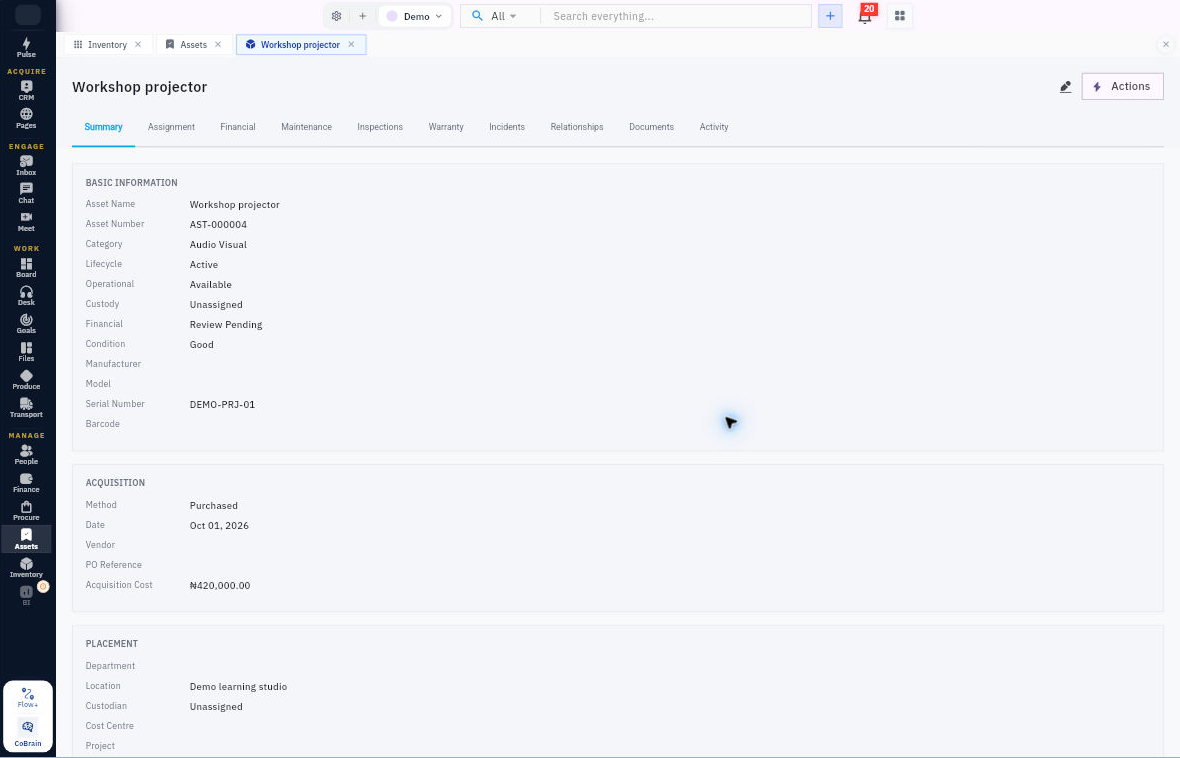
1. Open Manage → Assets → Register → All Assets. 2. Search for the asset and match its full name and asset number. Compare the serial number or tag when you need to distinguish similar equipment. 3. Open Summary. Read Lifecycle, Operational, Custody, Financial and Condition individually. 4. Scroll to Placement and check the location, department and custodian. Keep those values distinct from the asset’s name or category. 5. Open Assignment on the same asset. Read the current assignment and history, including the person, assignment type, assigned date, expected return date and reason.
Check the result
Decide what is ready
6. Compare the assignment with Summary. If custody or placement disagrees, ask the asset coordinator to resolve the discrepancy before reporting a completed handover. 7. For an actual issue or return, compare the exact asset and every required accessory with the handover record. Check the agreed condition and readiness criteria rather than relying on the register alone. 8. State what is ready and what remains—for example, the asset is registered but its custody handover or financial review is still pending.
Expected result: you can identify the asset, locate its custody record and explain its current states without mixing them together.
Tips: Available operational status is not the same as a recipient acknowledging receipt. A registration record is not proof that a physical inspection occurred. Keep unresolved accessory, identity or condition issues visible until the responsible person resolves them.
Continue learning
In this series: Manage asset custody — guide 1 of 15.
Turn what you learned into the way the team works.
Mark this lesson complete once the workflow exists in your workspace—not simply when you reach the bottom.