Plan production and check usable output
Connect the material plan, exact production order and final stock eligibility before promising dispatch.
Part of Plan production and check usable output
In this lesson
Plan production and check usable output
Before you begin
Have the exact manufactured product, effective BOM, routing, required quantity/date and intended demand. Keep unrelated planning analyses, supplier receipts and production outputs separate.
Plan the same product and demand
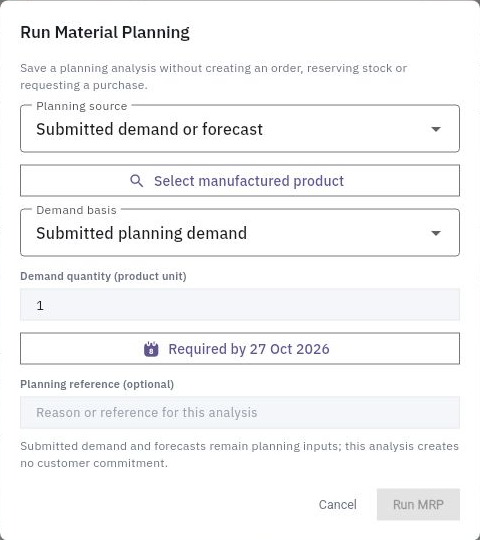
1. Open Produce → Products, BOMs and Routings. Match the Inventory item and stock unit, effective BOM version, output batch and component quantities. A newer Draft version is not automatically the manufacturing basis. 2. Check MRP → Requirements for the intended analysis. If it exists, review its saved cutoff and continue at step 3. For a new analysis, choose Run MRP, select Submitted demand or forecast, the exact product and Submitted planning demand, enter quantity, required date and a clear Planning reference, then Run MRP once. 3. Reopen the analysis. Compare submitted demand, physical on-hand, eligible finished goods and production requirement. Read Required, Available, Reserved, Incoming and Shortage for each component. The saved analysis does not itself create an order, reserve stock or request a purchase. 4. Check Production Orders for the intended job. If it exists, continue at step 5. For a new job, use Create Production Order, choose the product, effective BOM, explicit routing, quantity, priority and planned dates, then recheck BOM/routing after the final edit before Create Order. Reopen the generated Draft.
Continue the workflow
Establish readiness
5. Open the order's Materials and use View Stock and View Incoming for the exact components. An accepted receipt description or another item's stock is not this job's supply. 6. If a genuine shortage requires purchasing, check for its existing source requirement first. Only if missing, use Request Procurement, review the exact quantity/source, choose Create Requirement, then reopen it. When ready for the purchasing handoff, use Hand to Procure once and verify the destination request. Follow legitimate receipt, quality and putaway before counting the supply as available. 7. Check Work Centres, routing and Operations for actual materials, people, equipment and time. For a ready Draft, Plan should retain Planned; use the supported Release route only when release prerequisites are satisfied, then check the actual reservations and resulting state. Do not change shortage or quality policies just to advance the order.
Check output before dispatch
8. After production work is actually performed and recorded through its operation workflow, reopen the same order's Materials, Operations and Output. Compare issued/consumed inputs, completed quantity and received output separately. Review existing output after an uncertain save before recording more. 9. Open Quality → Final for the exact order/output population. Confirm the complete observations and responsible decision. A Passed In Process inspection does not replace final clearance, and recorded good output may still be held. 10. In Inventory → Lots & Serials, trace the exact output lot and Review quality inspections. Follow the required final decision and putaway, then check eligible stock at the intended destination before promising dispatch.
Check the result
The plan, order, components and usable output belong to one chain. Keep remaining demand, held output and unfinished cost or quality work visible; produced quantity is not automatically dispatchable quantity.
Continue learning
In this series: Operations and fulfilment — guide 3 of 5.
Turn what you learned into the way the team works.
Mark this lesson complete once the workflow exists in your workspace—not simply when you reach the bottom.