Check a CoBrain answer against the source task
Ask CoBrain for a task update, then verify the answer against the exact Board record before using it to make a delivery decision.
In this lesson
Check a CoBrain answer against the source task
Ask CoBrain for a task update, then verify the answer against the exact Board record before using it to make a delivery decision.
Before you start: You need access to CoBrain and the source task. Know the workroom, Board, full task title and record reference if available. This is a read-only question: it does not require changing task status or sending a customer message.
Steps
1. Open CoBrain → Ask. Start or use the relevant conversation, and inspect any attached current-page context. Remove an unrelated attachment with its X if necessary; this removes the context from the request, not the underlying record.
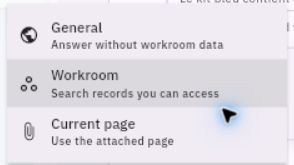
2. Under Message CoBrain, open Choose answer sources. Select Workroom for a question about saved records you can access. Use Current page only when the exact intended page is attached. General does not independently look up current workroom data.
Ask and verify the exact task
3. Enter a specific request using your own details: “Read only. In [workroom], on [Board], find [full task title/reference]. Give its human-readable Task Status, Due Date and exact source. Include a usable source link if available. State anything you cannot verify. Do not change records or send messages.” Select the Send message up-arrow.
In the Demo worked example, the exact task Demo | Review Cedar booklet layout against BOM-0002 was opened from Board → Client Delivery → Table in the Cedar workshop welcome guide project. Its attached page was checked before selecting Current page. One question was sent: “Using only the attached Demo task, what is its exact title, current status and due date? Cite or identify the attached task as your source. If any field is unavailable, say so. Do not change any record.”
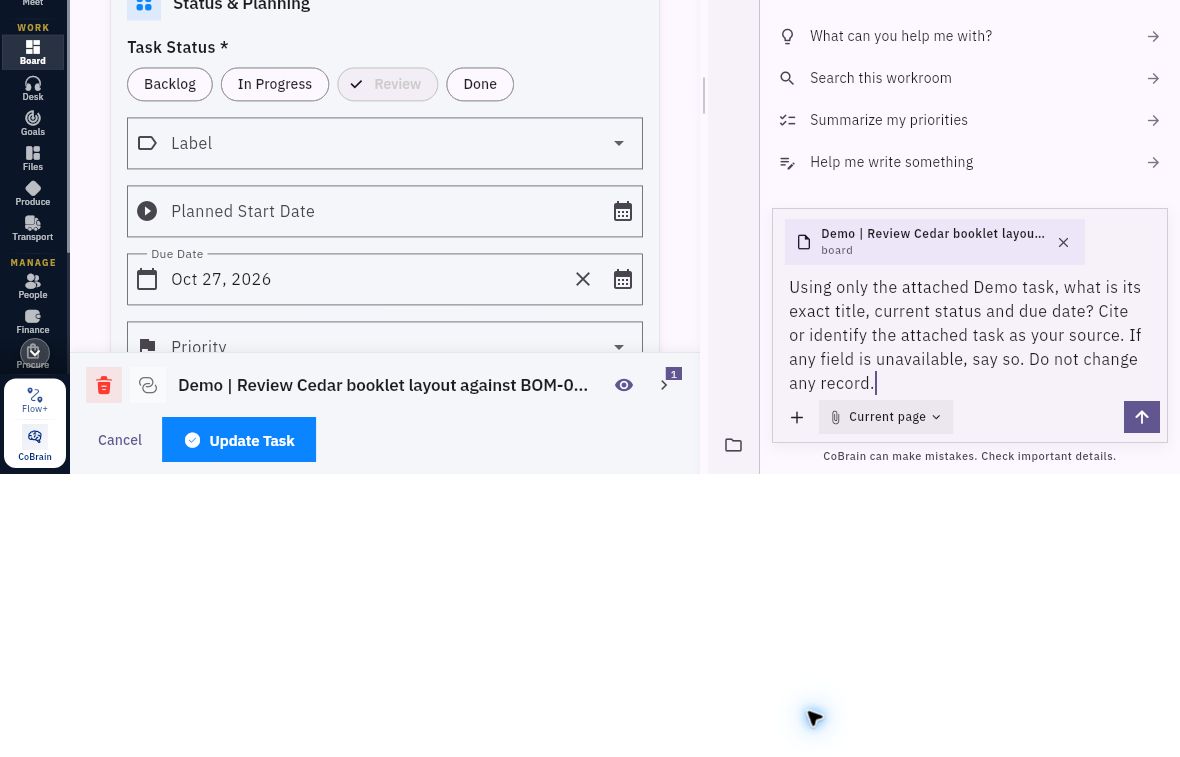
Compare the answer with the current task
4. Read the answer and open its source link if one is supplied. Check that it leads to the intended task, not an activity event or another Board’s same-titled item. Do not treat a raw status identifier as a readable status or guess its meaning.
5. If the link fails without an access-denied response, use ordinary navigation to the known record: confirm the workroom, open the top global search, choose Board as the scope, enter the full task title and press Enter. Select the matching Board result. A successful manual lookup does not make the original citation link valid.
6. In the task, confirm Task Title and Select board, then read Status & Planning → Task Status and Due Date. Compare them with the answer without editing the fields. If the question concerns delivery readiness, also read the relevant Description and output; a status label alone does not establish that the promised work meets its requirements.
7. Use the source-backed facts in your update. If the answer and task disagree, prefer the current task details and explain the difference, including whether the answer was older. State any source or field you could not check instead of filling the gap with a guess.
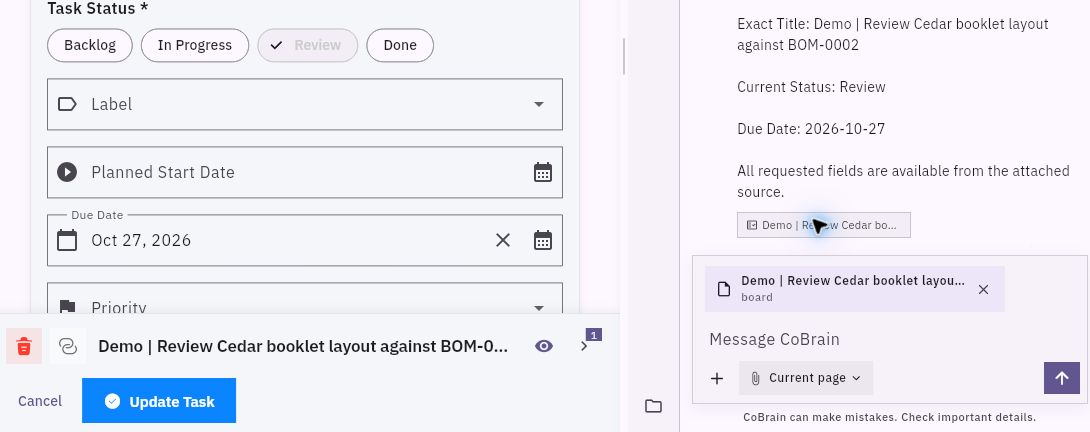
The answer returned the exact task title, Review and 2026-10-27. The open task’s Task Status was Review and Due Date was Oct 27, 2026, so these fields matched. The visible source chip identified the attached task; clicking it once caused no visible view change while that task was already open. This observation does not establish either a working deep link or a broken one. The comparison used the actual open record, not an assumed citation destination.
For this check, the supported update is limited to those three matched fields. No task status, workflow or customer message was changed. Current-page success for one attached Demo task is not proof of Workroom-wide retrieval accuracy or the behaviour of other source links.
Keep the result within its verified scope
Expected result
You have a task update supported by the correct record, with any missing or conflicting information made clear. No task, workflow or customer message has been changed.
Common pitfalls
- If the source says Access denied, stop and ask the authorised owner for access or the needed information. Do not try other accounts or exports to bypass it.
- An answer’s proposed Mark Done or other action is separate from your retrieval request; do not execute it as part of this check.
- After a pending or failed request, inspect the existing conversation before sending it again.
Continue learning
In this series: Customer support and improvement — guide 5 of 6.
Turn what you learned into the way the team works.
Mark this lesson complete once the workflow exists in your workspace—not simply when you reach the bottom.