Transfer stock and check the count
Move one exact item between warehouses, reconcile transit, then investigate any count difference at the right cutoff.
In this lesson
Transfer stock and check the count
Before you begin
Confirm the exact item, stock unit, eligible source quantity and intended destination. Check named locations through Warehouses if Stock shows an unclear location identifier. Keep unrelated quarantine stock out of the transfer.
Follow one transfer
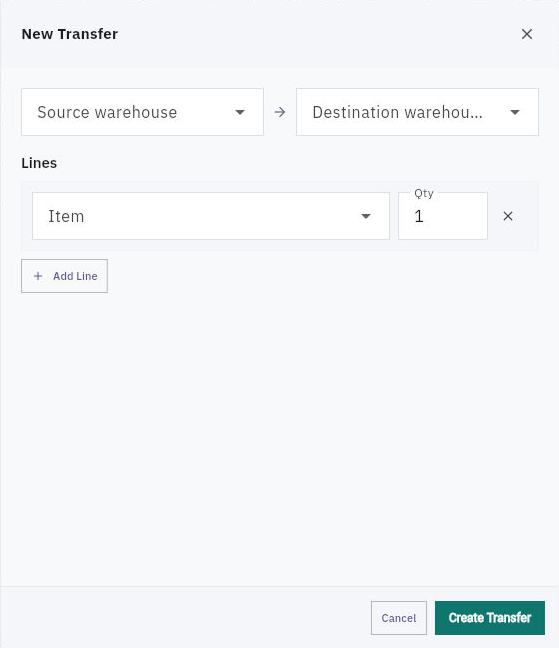
1. Open Inventory → Transfers → All and look for the intended transfer. If it exists, open it and skip steps 2–3; continue only from its actual stage. 2. Choose New Transfer. Select Source warehouse, Destination warehouse, Item and Qty. The observed form does not offer a bin selector, so confirm routing requirements before creating the transfer. 3. Choose Create Transfer once. Reopen the saved reference and verify Draft, the full route and quantity. Check that creating the draft has not been mistaken for dispatch. 4. On a checked Draft ready for approval, choose Approve and confirm Approved. When an Approved transfer is ready for picking, choose Start Picking. Reopen the item's Stock and Reservations to check the exact transfer's source allocation; Reserved is not extra stock. 5. When the goods actually depart and the transfer is Picking, choose Dispatch once. Confirm In Transit and the picked quantity. Check the source decrease and separate In transit position, then verify the assigned destination location through Warehouses before receipt.
Continue the workflow
6. After the full quantity actually arrives and its count/condition are checked, choose Receive on the In Transit transfer. This can immediately record a full receipt. If only part arrives, resolve the supported partial process instead of recording the whole amount. 7. Reopen Stock and reconcile source, cleared transit and received destination quantity. Return to the Received transfer and choose Complete only after those checks. Reopen to confirm Completed. Do not repeat a stage already recorded.
Reconcile the count separately
8. Define the count's exact SKU/unit, included locations and cutoff. Preserve the stock snapshot, actual count and any independent recount, plus movements between their times. Held units can be physically present while remaining unavailable. 9. Open Stock Counts and inspect the intended count reference and each Expected, Counted and Variance line. A historical counted line is not today's physical observation. 10. Before scheduling a new count, inspect Schedule Count. The initial form's Warehouse and Limit to Zone A controls can otherwise cover every stocked location. If that does not match your intended scope, cancel and obtain the correct route rather than broadening the count. 11. Reconcile timing, identity and unit differences before seeking a correction. Use the reviewed, exact-scope process for any approved adjustment, then reopen the count and stock/movement records to verify the result.
Check the result
The transfer quantity is accounted for once across source, transit and destination. Any count difference uses the same scope and cutoff, with no unrelated adjustment used to force agreement.
Continue learning
In this series: Operations and fulfilment — guide 2 of 5.
Turn what you learned into the way the team works.
Mark this lesson complete once the workflow exists in your workspace—not simply when you reach the bottom.