Use Pulse to choose what needs attention
Find an item that needs your attention and check the underlying work before deciding what to do.
Use Pulse to choose what needs attention
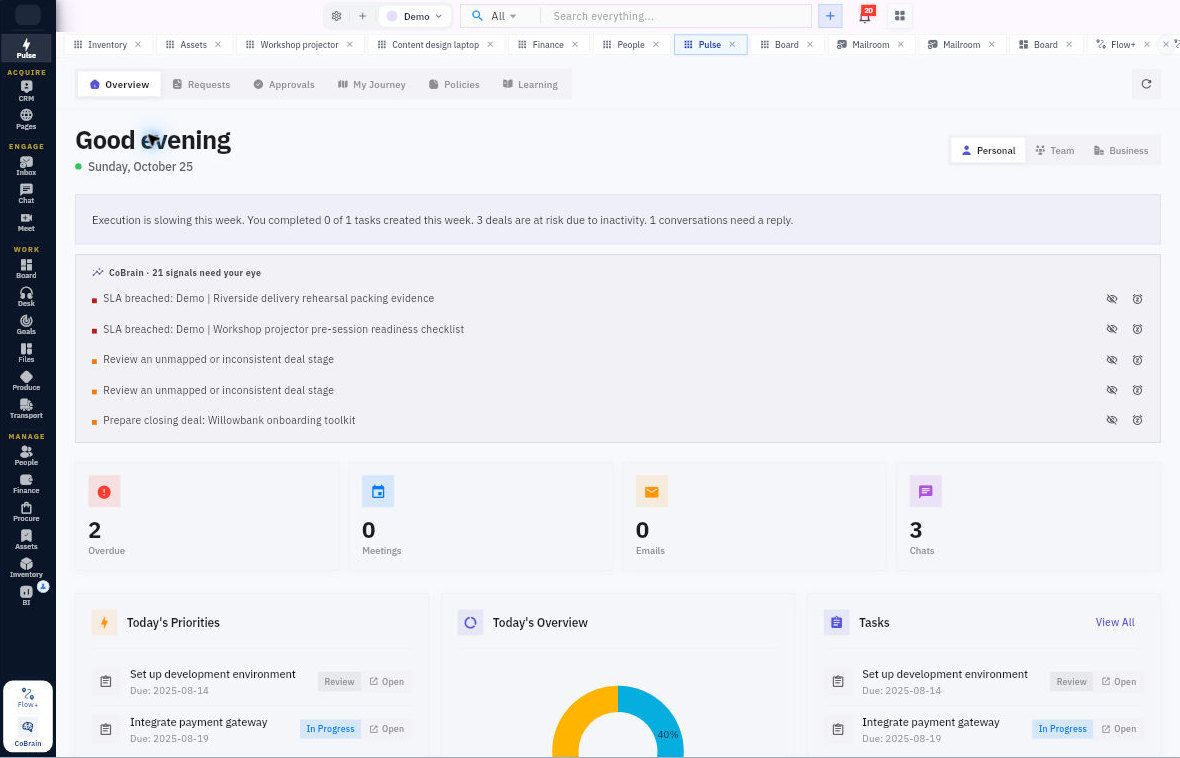
Pulse brings work, requests and decisions into one place. Use its summaries to choose what to investigate—not as a substitute for reading the underlying record.
Before you start: Open the workroom you want to review and use your own account.
Review your overview
1. Open Pulse → Overview. Choose the relevant Personal, Team or Business view. Start with Personal for your own attention list.
2. Wait for the view to load, then look for something that needs a decision or action. An Overdue card, a priority item or a task summary can be a useful starting point.
3. Open an available item and read its full title, due date and current status. Check the associated task or record before deciding that it is complete or overdue in the way you expect.
4. If you use Tasks → View All, check the destination view and find the same task. Compare its Board and other details when two tasks have similar names.
Decide the next action
Ask what would actually move the work forward. Does someone need to supply information, review an output or make a decision? A task called “Prepare the agenda” may still need the agenda itself to be written even if a summary looks reassuring.
Finish with one clear next step for the item you opened. You do not need to clear every count to have a useful daily review.
Keep the scope in mind: Personal and Team views can contain different records. A count in one view is not automatically comparable with a count in another. If an item or detail is unavailable, use the underlying module you can access rather than guessing from the total.
Turn what you learned into the way the team works.
Mark this lesson complete once the workflow exists in your workspace—not simply when you reach the bottom.