Run material planning for production demand
Analyse the right demand source, then check shortages and capacity before committing production.
Part of Plan production and check usable output
In this lesson
Run material planning for production demand
Have the exact product, manufacturing definition, demand quantity and required date ready. Material planning is an analysis; it does not itself create an order, reserve stock or request a purchase.
Run the analysis
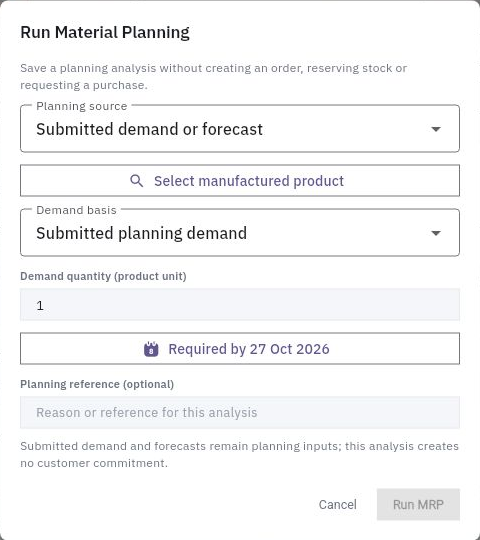
1. Open Produce → MRP → Requirements. Find any existing analysis for this demand and check its product and reference before deciding whether a new run is needed. 2. Select Run MRP. Choose the correct Planning source:
- Submitted demand or forecast for a new planning quantity.
- Existing production order to analyse a saved order’s materials, issues and own reservations. 3. For submitted demand, select the manufactured product, Demand basis, Demand quantity in the product’s unit and Required by date. Add a meaningful Planning reference. Replace defaults with the actual requirement. 4. For an existing-order analysis, select the exact order. Read the helper: this mode uses that order’s saved basis, rather than substituting a newer BOM or deducting finished goods as a fresh forecast might. 5. Review the inputs, select Run MRP once and reopen the generated result.
Check the result
Turn the result into a plan
6. Check the product, BOM/version, demand and component rows. Compare required, available, reserved, incoming and shortage quantities. 7. Open Material Shortages. Keep the saved MRP shortage separate from current eligible stock, dated receipts and To Procure. An old snapshot may differ from today’s supply. 8. Use Planning → Material Availability, Capacity and Production Plan to check open-order material needs, work-centre load and proposed dates. Confirm people and a feasible time slot separately from a capacity percentage.
Expected result: a traceable analysis with clear material and resource gaps for the next planning decision.
Tips: A recommendation is not a purchase request or receipt. Do not run another analysis merely because a stale filter hides the first. A date-only requirement does not preserve an exact deadline hour; keep that timing in the accompanying plan.
Continue learning
In this series: Plan and record production — guide 2 of 9.
Turn what you learned into the way the team works.
Mark this lesson complete once the workflow exists in your workspace—not simply when you reach the bottom.