Prepare a production order for release
Create the right order and check materials, versions and resources before releasing work.
In this lesson
Prepare a production order for release
Have the demand source, net quantity to make, dates and manufacturing versions ready. Planned work is not the same as released work or recorded output.
Create or inspect the order
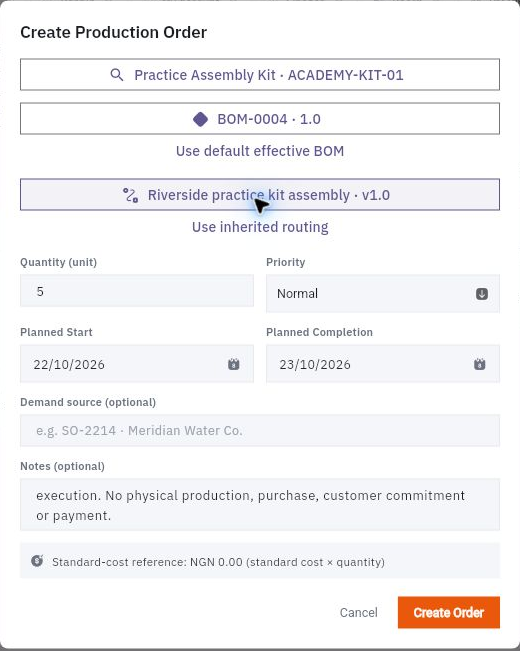
1. Open Produce → Production Orders and find the intended order. If it already exists, open it and continue at step 5 rather than creating another. 2. For a new order, open Create Production Order. Select the exact manufactured product, effective BOM and routing version. 3. Enter Quantity, Priority, Planned Start and Planned Completion. Add a truthful demand reference and useful notes where applicable. 4. Recheck the BOM and routing after the final date or product edits, because dependent selections may change. Select Create Order once, then leave and reopen the generated Draft. 5. Read every material row: Required, Reserved, Issued, Consumed, Material lost and Unsecured. Use View Stock and View Incoming for the same component SKU; a similar item cannot fill its shortage.
Check the result
Check readiness
6. Review the operation sequence, instructions, work centre, planned time and operator readiness. Confirm a feasible staffed slot, not just nominal hours of capacity. 7. When the draft is ready to enter the plan, use Plan and reopen the order to check its state. Planning does not itself secure materials or release execution. 8. Before Release, resolve material and resource gaps with the production owner. Read the applicable Settings, including auto-reservation, backflush consumption and final-quality requirements, without changing rules just to clear a gap. 9. If you release the order later, reopen the exact order and inspect its actual state and material allocations before adding any manual reservation or issue.
Expected result: an identifiable planned order with a clear release-readiness decision. If supply or staffing is missing, keep release pending.
Remember: reservation, issue and consumption are different stages of the same material. Do not count them as three separate deductions or assume a visible Release button proves readiness.
Continue learning
In this series: Plan and record production — guide 3 of 9.
Turn what you learned into the way the team works.
Mark this lesson complete once the workflow exists in your workspace—not simply when you reach the bottom.