Check operation progress and material use
Read the exact operation’s quantities and time, then reconcile its materials without counting the same issue twice.
In this lesson
Check operation progress and material use
An operation’s progress, material use and quality results are related but different records. Check the same order and operation throughout.
Read the operation
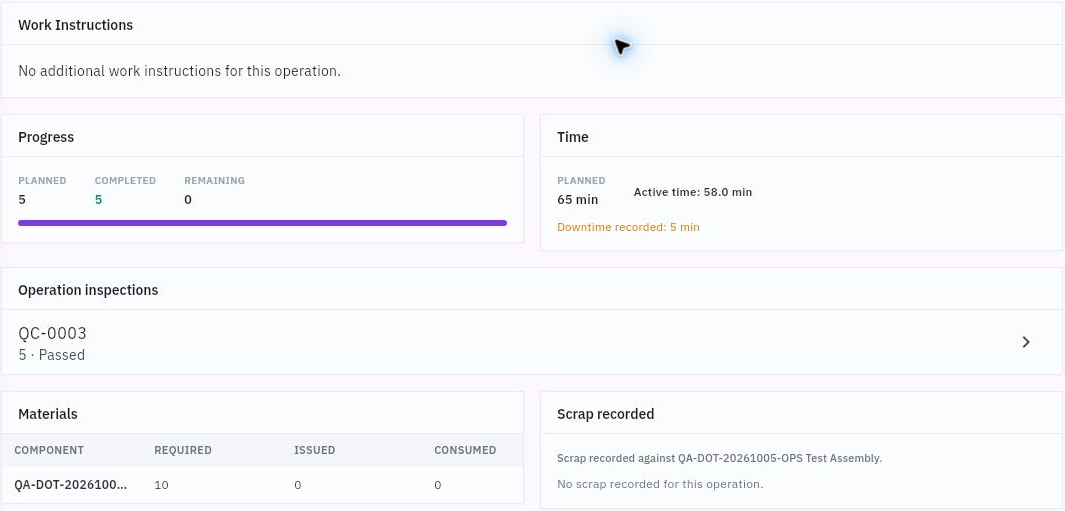
1. Open Produce → Shop Floor. Choose the relevant Today, Active, Paused or Completed view and search by order, product or operation. 2. Open the exact operation. Compare its order, product, work centre and instructions before reading progress. 3. Read planned, completed and remaining quantities. Keep planned time, active time and downtime separate. Do not invent an elapsed interval when start and end timestamps are not available. 4. Read Materials, Scrap recorded and linked Operation inspections on the same detail. A Completed operation does not by itself reconcile material quantities or prove final-output acceptance.
Check the result
Reconcile the material account
5. Open Produce → Materials and search the material and order. Read Required, Reserved, Issued, Consumed, Shortage, Warehouse, Location and Lot across the exact row. 6. Compare the material evidence with the order and Inventory source. Reservation allocates stock; issue puts it into production custody; consumption records its use. Do not deduct all three as separate physical issues. 7. Read the applicable Settings for issue method, auto-reservation and backflush. Backflush on completion concerns issued material; a policy switch alone does not explain or repair a mismatched row. 8. If progress or material figures disagree, preserve the exact values and ask the production/materials owner to resolve the source transactions before recording another issue or consumption.
Expected result: a clear view of operation progress, reported time and material accounting, with any discrepancy identified.
Before recording new work: confirm the correct released operation, issued inputs, instructions and responsible operator. Use the operation’s available controls only for actual work, and check whether quantities/time are incremental or cumulative. After an uncertain submission, reopen the operation before retrying to avoid duplicate progress.
Continue learning
In this series: Plan and record production — guide 4 of 9.
Turn what you learned into the way the team works.
Mark this lesson complete once the workflow exists in your workspace—not simply when you reach the bottom.