Check finished output and final quality
Trace the output quantity to its final inspection and Inventory lot before treating it as available stock.
Part of Plan production and check usable output
In this lesson
Check finished output and final quality
Completed operations, recorded output and quality-cleared stock are different stages. Follow the exact order, output lot and inspection references.
Check the output and final inspection
1. Open Produce → Production Orders and select the order. Compare planned quantity, produced quantity and remaining quantity. 2. Read Output and Quality together. Distinguish good, scrap and rejected output, and match the output date and lot reference. Scrap or rejected quantity does not fulfil a good-output target. 3. Open Produce → Quality → Final and find the inspection for that order and output quantity. Do not substitute a Passed In Process inspection for the final check. 4. Open the final inspection. Read its status, inspector, Checks expected/actual/result columns, defects, evidence and Finished stock helper. 5. If criteria or actual observations are missing, obtain them from the responsible inspector before a quality decision. Empty defects or a note saying “release” is not a pass.
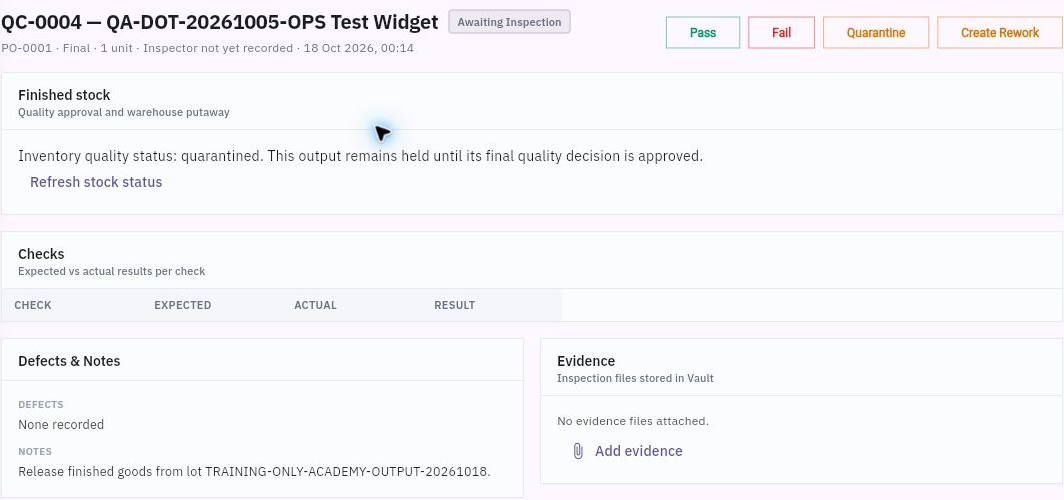
Check the result
Trace stock eligibility
6. In Inventory → Lots & Serials, find the exact output lot. Match item, quantity, receipt/order reference, warehouse, location and quality status. 7. Open Review quality inspections for that lot and compare the Inventory-side source and required Produce final check. Keep their separate inspection identifiers distinct. 8. After the responsible quality decision, follow the supported putaway process for the accepted quantity and check the resulting lot, location and balance before promising availability.
Expected result: you can distinguish recorded output from the quantity actually eligible for use, with any final inspection or putaway requirement still clear.
Before a new output entry: check the actual form’s Good, Scrap and Rejected meanings and whether quantities are incremental or cumulative. Use real output observations and inspect existing output history after an uncertain save before entering again. Never create extra output or a quality pass just to reach the order target.
Continue learning
In this series: Plan and record production — guide 5 of 9.
Turn what you learned into the way the team works.
Mark this lesson complete once the workflow exists in your workspace—not simply when you reach the bottom.