Procure course 04 — Sourcing responses awards and supplier agreements
Sourcing collects comparable offers for an approved need. An award records the authorised selection; a contract records agreement terms and obligations. None is interchangeable with an issued purchase order or paid invoice.
Part of Procure module course
In this lesson
Sourcing decisions and agreement scope
Sourcing collects comparable offers for an approved need. An award records the authorised selection; a contract records agreement terms and obligations. None is interchangeable with an issued purchase order or paid invoice.
In this chapter
- Start sourcing from the approved request
- Make the requirement and deadline usable
- Preserve response versions and visibility
- Read evaluation and award results separately
- Prepare contracts with their real dates and limits
- Make obligations actionable
Start sourcing from the approved request
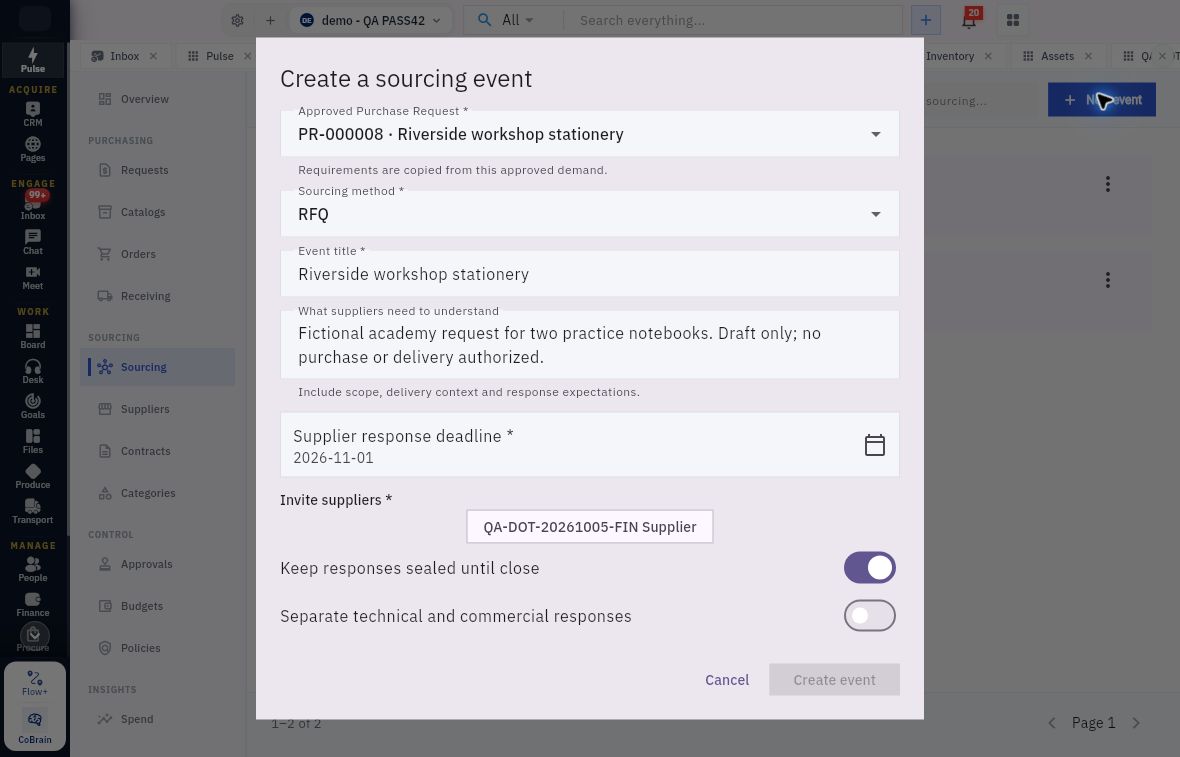
Open Procure → Sourcing → Events → New event. Create a sourcing event requires Approved Purchase Request; its requirements are copied from that source. Inspect the exact PR and lines before continuing.
The form has Sourcing method, Event title, What suppliers need to understand, Supplier response deadline, Invite suppliers, Keep responses sealed until close and Separate technical and commercial responses. Methods include RFI, RFQ, RFP, TENDER and REVERSE_AUCTION. A method label does not prove that an auction or its bidding rules have been configured.
Supplier responses awards and contract controls
Sourcing event form linking an approved request to method, suppliers, response deadline and visibility rules.
The terminal action is Create event, not Save draft. Because the form includes supplier invitations, establish the recipients and communication effect before creating. Internal preparation authority alone is not authority to contact suppliers.
Make the requirement and deadline usable
State quantity and unit, mandatory specification, delivery location/date, acceptance checks, quotation validity and complete commercial basis. Response deadline, quotation validity and delivery date are different. A date-only control does not establish the exact closing hour or timezone; keep that requirement explicit and verify actual behaviour before release.
Ask suppliers for quotation reference and revision, quantities, pack conversion, unit price, discounts, tax, delivery, other mandatory charges, complete total and exceptions. An omitted delivery charge is unknown, not zero. A usual lead time is not necessarily a commitment to the required arrival date.
Preserve response versions and visibility
A sourcing event's Capture response records the quotation received through the supported process. A recorded response does not prove portal use, invitation delivery or award acceptance. Compare the current revision's currency, quantity, unit price, tax, total, lead time, validity, delivery/payment terms and document together.
Count suppliers, responses and revisions separately. Two revisions from one supplier are not two competing offers. Respect sealed commercial information until the permitted point; do not change deadlines or visibility settings to see prices early. If a technical/commercial split is required, keep technical evaluation independent of concealed price information.
For a fictional six-item need due on the tenth, offers of 25.80 delivered on the ninth, 23 delivered on the ninth and 26 delivered on the fourteenth are not compared by price alone. Check mandatory specification, eligibility, complete cost and delivery first. If the first two meet all requirements, 23 is the lower complete cost under that stated method. A paper recommendation still needs the authorised award decision and exact selected response revision.
Read evaluation and award results separately
Open the exact event's Evaluation, or the same event under Sourcing → Evaluations. Compare Status, Chair, Responses and Round, then criterion descriptions and weights. An evaluator submission can expose a conflict declaration, submitted state and lock information. Individual assessments are limited to their author and chair according to the helper; do not bypass that boundary or unlock a finalized submission during inspection.
In Final results, match the response reference and read each criterion's average, weighted contribution, minimum and Met result. The helper says scores are averaged then weighted out of 100, and every minimum must be met to qualify. A fictional technical average of 80 at 60% contributes 48; commercial 90 at 40% contributes 36; total 84. One evaluator does not establish all multi-evaluator rounding/missing-score behaviour. A Qualified response is not the same as a qualified supplier profile.
In Sourcing → Awards, open the exact award and compare Status, Event, Quote, Value, Evaluation rank and awarded lines. Accepted is a displayed award state, not proof of email receipt or an issued order. Create Contract and Create Purchase Order are separate consequential actions. Rank 1 among one response is not evidence of beating competitors.
Open the exact award's entry in Procure → Approvals and compare Number, Approval stage, supplier, amount, sourcing event, evaluation rank and Previous decisions. Read the decision rationale separately from the award badge. Reopen the award afterward and ensure PR, event, quote revision, evaluation round and award all reconcile.
Prepare contracts with their real dates and limits
Open Contracts → Portfolio → New Contract. Agreement includes required Supplier, Contract title and Agreement type. Term and value includes Starts, Ends, Currency, Contract value and Spend ceiling. Commercial controls includes Payment terms (days), Termination notice (days) and Governing law or jurisdiction. Review Automatic renewal, Renewal notice window (days) and Scope, exclusions and internal notes before Create Draft.
Defaults are not agreed terms. Contract value, ceiling, committed amount, approved bill spend and cash paid measure different things. For a fictional ceiling of 1,500 and released commitments of 900, available ceiling is 600 on that basis. If approved invoices total 600 and allocated payment is 300, the unpaid approved amount is 300; neither figure changes the original contract value by itself.
Make obligations actionable
Add obligation contains What must be done?, Completion criteria, Due date and Responsible owner. Describe an observable deliverable or review, not a vague topic. A due date defaulting to contract end is wrong for a report required earlier. The editor does not itself demonstrate recurrence, reminders or completion evidence.
Contracts → Renewals and Obligations show their recorded populations. No upcoming renewals does not prove every agreement was reviewed, particularly when an agreement is still Draft. Compare the source agreement and state. After authorised work, reopen the exact contract and obligation and compare retained values; a draft, a recommendation or an empty queue cannot stand in for an approved agreement or completed duty.
Turn what you learned into the way the team works.
Mark this lesson complete once the workflow exists in your workspace—not simply when you reach the bottom.