Procure course 05 — Purchase orders receiving and acceptance
An order should preserve the authorised source and commercial terms. Receiving then records what actually arrived or was performed, and acceptance decides whether it meets the agreed criteria. Keep approval, issue, delivery and inspection states distinct.
Part of Procure module course
In this lesson
Order authority and receiving evidence
An order should preserve the authorised source and commercial terms. Receiving then records what actually arrived or was performed, and acceptance decides whether it meets the agreed criteria. Keep approval, issue, delivery and inspection states distinct.
In this chapter
- Create the order from its source
- Separate review from issuance
- Handle an order change as a proposal
- Record only the delivery that occurred
- Treat service confirmation as its own outcome
- Recover from a discrepancy without duplicating stock
Create the order from its source
Open Procure → Orders → Purchase Orders. Create order points to an approved purchase request, sourcing award, active contract or direct/sole-source route. It is not a reason to bypass the source chain.
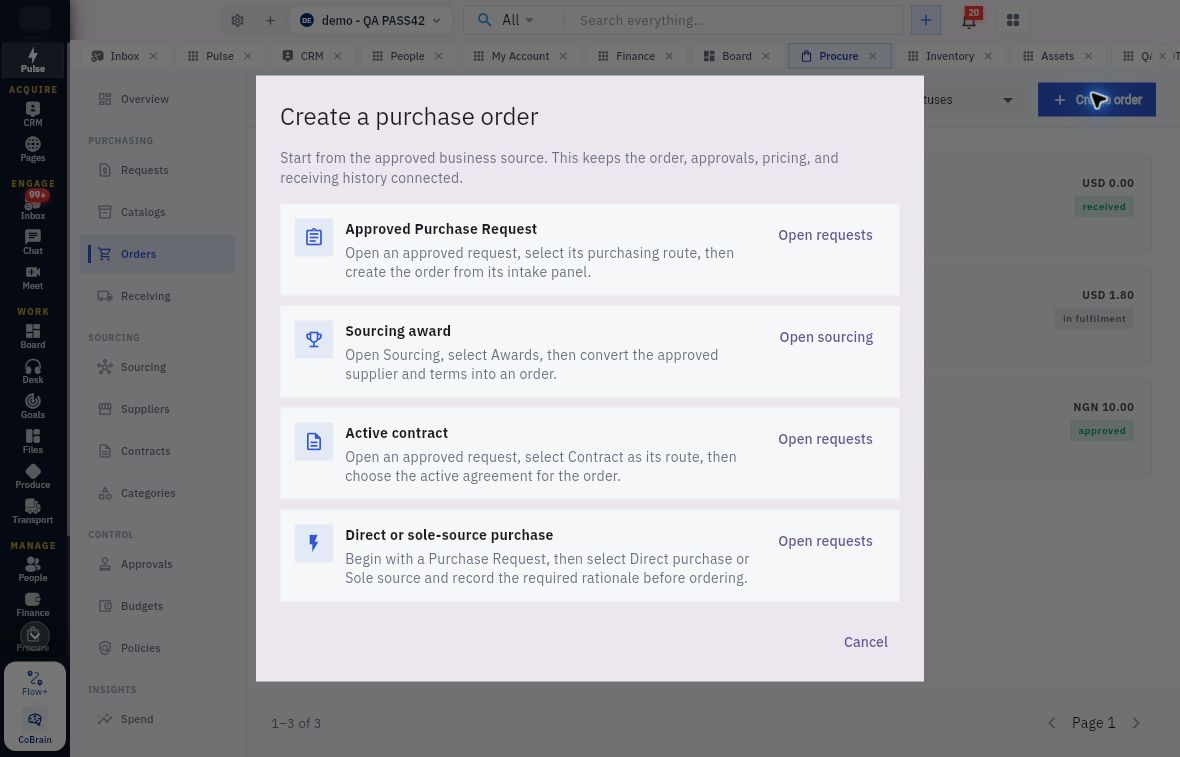
Order creation receipt and acceptance checks
Create purchase order routes back to approved requests, sourcing awards or active agreements rather than an unrelated blank order.
For an approved request, open the request, verify its intake state, assign the authorised owner where required and select the approved purchasing route. Direct or sole-source purchasing needs the required rationale. For an award, use the exact approved supplier and terms from Sourcing. For a contract route, choose the intended active agreement. A shared supplier name does not connect unrelated records.
Before submitting an order for approval, independently compare source PR/award/agreement, supplier, currency, lines, quantities, units, prices, totals, dates and destination. A reviewer should compare the approved source, not merely check that the fields are populated. Keep supplier acknowledgement and commercial exceptions attached to the right order version.
Separate review from issuance
Submit for approval sends the exact order into the approval process. In Approvals → My Queue, match the Purchase order reference before Approve and its decision comments. An approval allows the governed next step; it does not prove issuance, supplier receipt or acceptance of changed terms.
After any authorised issuance, reopen the order and inspect approval, issue, receiving and billing states separately. Do not describe an order as delivered because it is approved, or as paid because it is received. If the source link does not open, use the direct register and exact reference rather than substituting another order for the same supplier.
Handle an order change as a proposal
Propose change opens Propose Purchase Order change for the exact PO/version. It contains required Why is this change needed? and Supplier, plus Required delivery date, Department or cost context and Currency. Existing order items expose description, Type, Quantity, Unit, Unit price, Add item and remove controls. Create an Asset record after acceptance is a separate option, not permission to classify every purchase as an asset.
A required Supplier can be blank in the proposal even when the retained order names one: opening the form has not changed the order. Compare the approved old and proposed terms, including unchanged fields. Save draft differs from Save and submit. Cancel dismisses the proposal, not the order. A version label alone does not prove that many approved commercial amendments; inspect the actual Changes records. An order-level Close order is another action, not proposal cancellation.
Record only the delivery that occurred
From the exact issued order, Record receipt or service delivery starts receiving. Match supplier, order version, line, unit and outstanding quantity first. Use the actual delivery date and quantity supported by the receiving evidence. The expected delivery is not an actual receipt.
The receipt entry opens Record delivery with its PO reference, supplier, lines and outstanding quantities. Per line, Quantity received can prefill the outstanding amount; its helper says enter zero for a line not delivered yet. Condition on arrival can default Good, which is not an inspection finding. Received on must match the actual delivery date, and Delivery note or observations should identify the source note and known count/condition exceptions. Recheck unit and source before Record delivery, then reopen the resulting GRN.
A pending receipt's Inspect and accept opens the separate Inspect received goods form with Accepted quantity, Rejected quantity, Inspection finding and Overall inspection notes. A finding is required when any quantity is not accepted. Classify each inspected unit once. Commit inspection saves the authorised decision; independently reopen the same receipt and compare quantities, state, inspection entry, date and full notes. Delivery save and inspection commit are not the same operation.
For goods, distinguish received/performed quantity, accepted quantity, rejected quantity and awaiting-inspection quantity. Receiving → Receipts provides the saved receipt and source order; an Expected view is a different population. Reopen the receipt by reference and inspect its lines and inspection history before reconciling totals.
A fictional order requires twelve wallets, each. Eight arrive; seven pass inspection and one fails. Four have not yet arrived, while five usable units are still needed to satisfy the accepted requirement: the four undelivered plus a remedy for the rejected one. Receiving twelve now would invent a delivery. Accepting eight would erase the defect.
Treat service confirmation as its own outcome
The order entry point names service delivery, and Settings can require service confirmation. Do not assume the goods-inspection form proves a completed service-acceptance workflow. A service packet should identify the order/version, line and unit, service period, provider's completion evidence, authorised checker, accepted result, defects and next action.
Attendance at a service visit is not always acceptance of its outcome. A maintenance visit may occur while the required report or test remains outstanding. Read the actual service form and its required evidence before using its completion action.
Recover from a discrepancy without duplicating stock
If the saved receipt date differs from the intended date, preserve both values and the source reference and seek the supported correction route. Do not create another receipt to correct a date. Reverse receipt is a consequential action, not a generic Edit button; its downstream effects need to be understood before use.
If a receipt seems missing after save, search the exact source order and expected reference, wait for the list to load and inspect cumulative quantities before retrying. An uncertain notification is not proof that nothing saved. If goods are damaged, preserve the inspection result and identify the affected goods under the handling process. A physical return is a remedy, not a shortcut for correcting an administrative error.
Your readback should name the exact request, order and receipt, state ordered/arrived/accepted/rejected quantities in the same unit, and identify the remaining delivery or remedy. It should not claim Inventory posting or Finance payment without those separate linked results.
Turn what you learned into the way the team works.
Mark this lesson complete once the workflow exists in your workspace—not simply when you reach the bottom.