Settings course 03 — Role definitions teams and module availability
Role definitions describe permissions, while teams and departments organise scope and module availability. Design the required work first, then map it to actual controls. A saved role is not an assignment and a visible module is not permission for every action inside it.
Part of Workroom Settings module course
In this lesson
Permission definitions and organisation scope
Role definitions describe permissions, while teams and departments organise scope and module availability. Design the required work first, then map it to actual controls. A saved role is not an assignment and a visible module is not permission for every action inside it.
In this chapter
- Inspect an existing definition before changing it
- Prepare a custom role from the actual starting point
- Distinguish custom teams from People departments
- Design an implementable access change
Inspect an existing definition before changing it
Open Roles & Access → Manage roles and distinguish built-in profiles from custom profiles. The source lists Guest, Member and Moderator built-ins plus a custom role. Read the exact selected Role being edited and assignment count. A shared definition with several assignments may affect people outside a proposed pilot.
Under Manage permissions, select the relevant module and inspect its gate and action controls. CRM separates Can open CRM, Create leads and Edit leads. Finance includes controls such as Bill view, Bill create, Bill approve, Cash account manage sensitive, Journal post, Payment release, Tax configure and Export. Reading financial data does not justify enabling posting or payment release.
If granular controls are disabled beneath an OFF module gate, do not toggle the gate just to explore. Read the supported state and ask the access owner to resolve the intended design. A permission label is a control, not proof that a particular operation has occurred.
Prepare a custom role from the actual starting point
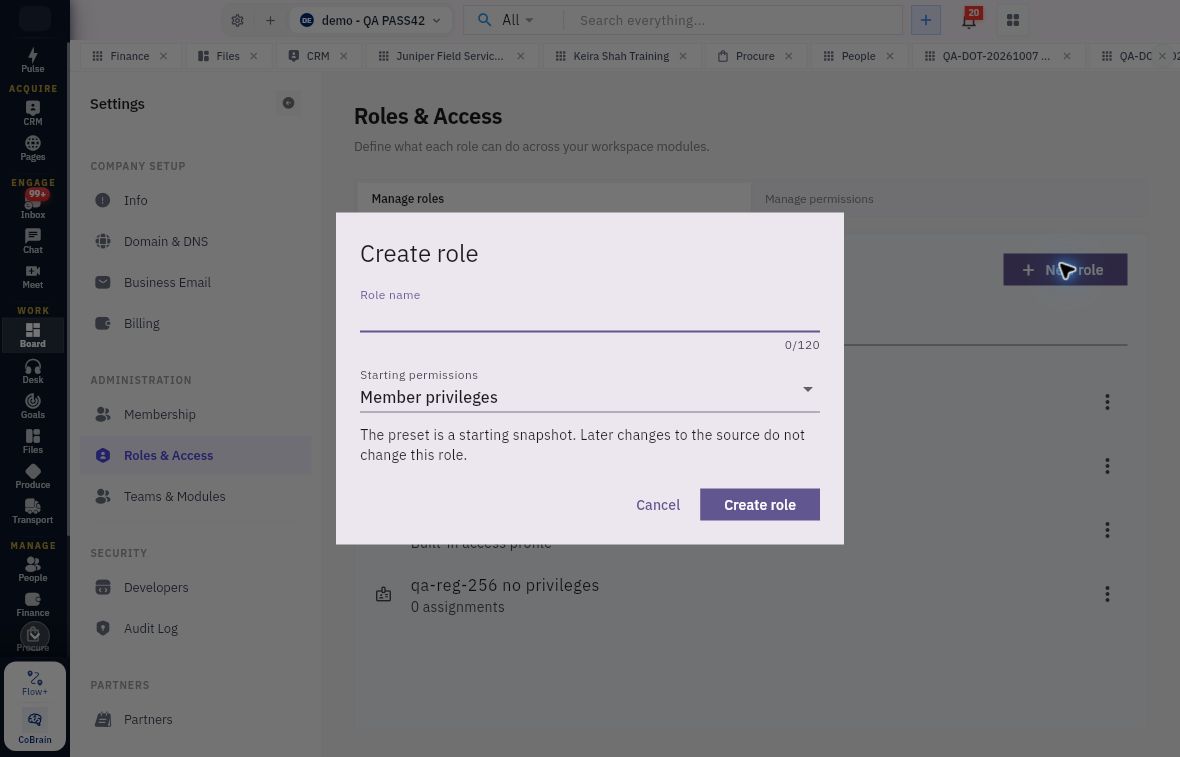
New role opens Create role. Role name has a 120-character limit. Starting permissions is shown as Member privileges. The helper says the preset is a starting snapshot: later changes to the source do not change this role.
Team and department module availability
Create role starts from a permission snapshot; Member privileges is not an empty permission set.
Choose a name that describes responsibility without claiming unverified restrictions. A role named Read only still requires its actual permissions to be reviewed. The starting choice is not a blank privilege set, and the snapshot is not a live inheritance link.
Cancel leaves the form without creating a role. Create role is the creation action, not an assignment to a person. The source establishes this blank form, not a complete saved creation-and-assignment lifecycle. For an authorised implementation, retain the actual returned identity, reopen the permissions and use the supported assignment route shown to the administrator; do not assume that creation automatically grants the role to the person who requested it.
Distinguish custom teams from People departments
Open Teams & Modules. Custom teams and People departments are separate views with separate counts. A People department is organisational structure, not a custom team with another name. The source Custom teams view exposes New team name and Create team; Save and Reset were disabled when nothing had been changed. Their presence does not establish a completed membership or module configuration.
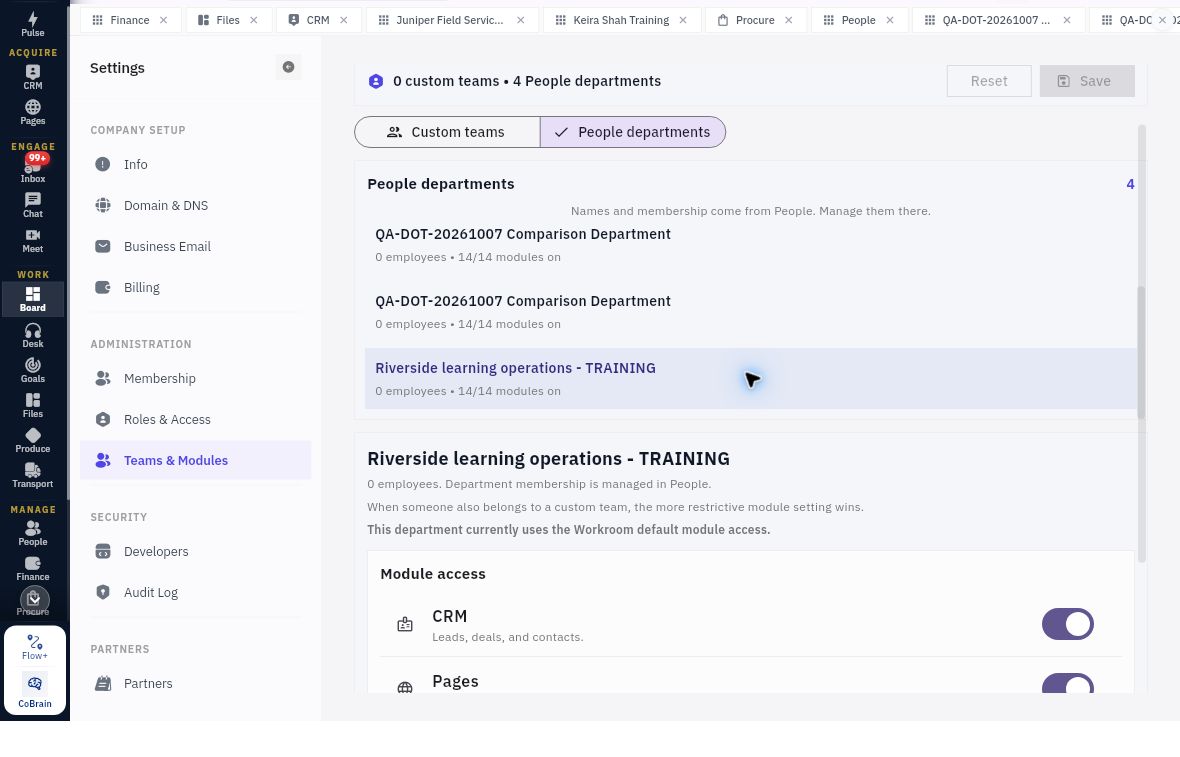
In People departments, names and membership come from People and must be managed there. Read the selected department's employee count, modules-on count and whether it uses Workroom default module access. A department with zero employees can still show all module switches on; that is not access granted to a pilot participant.
Applied scope and access verification
People department membership is managed in People; the helper gives the restrictive team-versus-department module rule.
The helper states that when a person also belongs to a custom team, the more restrictive module setting wins. Apply that rule to these two module-availability layers only. It is not a specification of all permission-role precedence, record sharing or effective behaviour. Do not conclude that turning a module on grants every action within it.
Design an implementable access change
For a fictional reviewer, write required actions such as reading an agreed CRM record and a Files checklist, excluded actions such as CRM editing, customer messages, exports and Finance, and the exact practice accounts and record scope. Translate these to actual controls; do not invent a universal View all records switch.
Before editing a shared role, identify affected assignments and whether a separate approved profile is appropriate. Before using a team, establish its actual members and module scope. Before changing a department, consider its People ownership and users beyond the immediate task. Capacity and membership decisions remain separate.
Acceptance should include retained role definition, exact assignment, team/department module context and intended-account allowed/excluded checks. If the assignment route or entitlement is unavailable, pause that branch and report the exact boundary. Do not upgrade, promote or enable everything as a workaround.
After an uncertain save, reopen the exact role or team rather than create a similarly named duplicate. Reset should not be treated as a proven rollback of saved history; inspect the current supported behaviour and use the owner's recovery plan. Preserve prior values and the reason for the change so later reviews can distinguish deliberate scope from accidental drift.
Turn what you learned into the way the team works.
Mark this lesson complete once the workflow exists in your workspace—not simply when you reach the bottom.