Procure course 03 — Purchase requests catalogues and comparable quantities
A purchase request should let another person understand what is needed, why, when and on what buying basis. Catalogue prices can help, but only when supplier, unit, currency, dates and parent status all match the requirement.
Part of Procure module course
In this lesson
Purchase needs and comparable buying units
A purchase request should let another person understand what is needed, why, when and on what buying basis. Catalogue prices can help, but only when supplier, unit, currency, dates and parent status all match the requirement.
In this chapter
- Explain the need in the request header
- Define each requested line
- Read catalogue headers and items together
- Convert units before comparing prices
- Recover without forcing the workflow
Explain the need in the request header
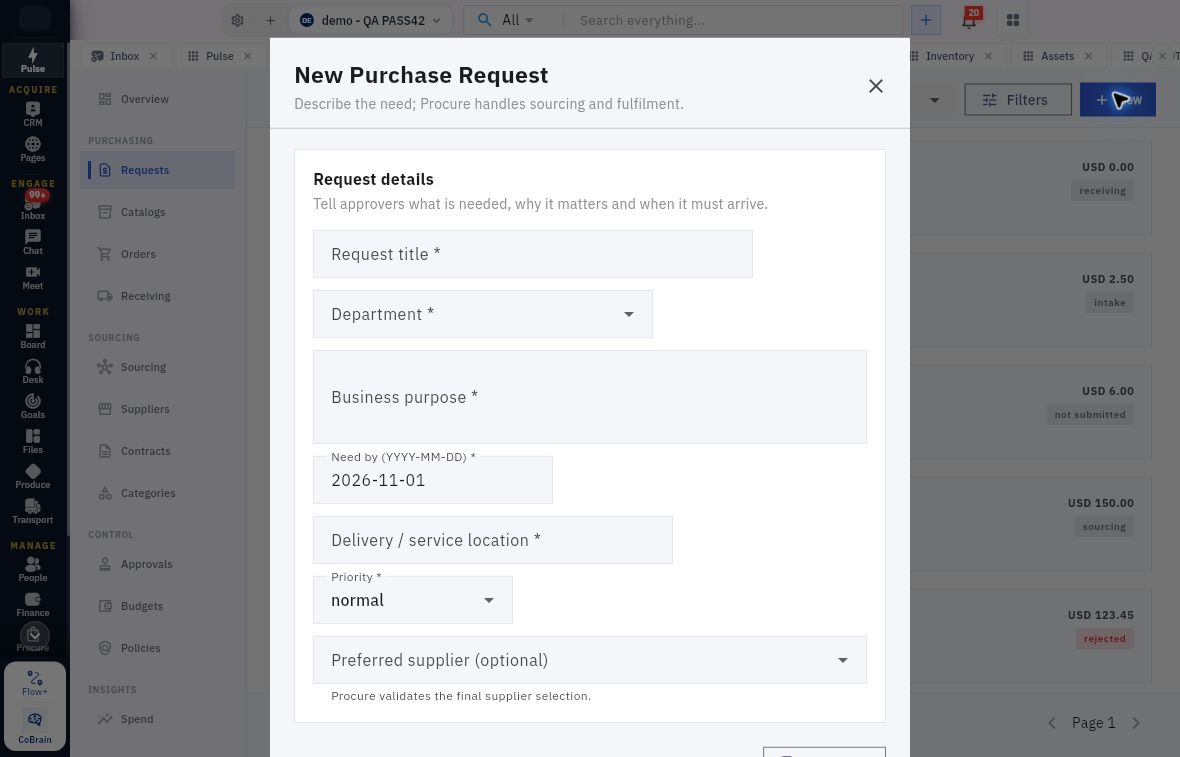
Open Procure → Requests → Requests → New. New Purchase Request contains Request title, Department, Business purpose, Need by, Delivery / service location, Priority and optional Preferred supplier. All except the preferred supplier show required markers in the inspected header.
Request lines review and catalogue interpretation
Purchase-request header with the need, department, purpose, date, destination and priority controls.
The title should identify the need; Business purpose explains the intended result. Need by uses a calendar date, not a response deadline. Location identifies where goods or service are needed. Preferred supplier is a preference subject to procurement validation, not an award decision. Review defaults such as date and normal priority against the actual source.
Define each requested line
Requested items → Add item adds a line with Catalog item, Description, Type, Quantity, Unit, Estimated unit price, Category, Project and Budget allocation. Type offers Goods and Service. The same visible line fields can remain after choosing Service; this does not mean goods inspection and service acceptance are identical.
Description should make the item or service recognisable and acceptance testable. Quantity and Unit belong together. An estimated price supports planning but is not a supplier's final commercial commitment. Project and budget allocation link the request to its intended context; a convenient available allocation is not a valid substitute for the approved one.
Before an authorised save or submission, search the exact title to avoid duplicates and compare every line. Afterward, reopen the returned request reference and check its state, line quantities, units and budget context. Approval can move a request into intake; owner assignment and purchasing-route selection still need their own results.
Read catalogue headers and items together
Open Catalogs → Catalogs for parents, Items for entries and Price Lists for supplier price lists. A parent header includes Catalog name, type, active-supplier selection, optional Contract, Currency, dates and No fixed end date. Type can be Curated catalog or Supplier price list. Match the supplier and effective period before interpreting a price.
A catalogue item has its parent Catalog, name, SKU, description, category, unit, price, minimum quantity, lead time and volume prices. Verify the parent when returning through Items → Add Item; do not assume the editor remembers the intended catalogue. Available for requests is an item setting. A Draft parent can still make Request unavailable even when the item setting is on.
Volume prices pair a quantity threshold with a price. Minimum quantity is the smallest order quantity; it is not the same as a tier threshold or an order multiple. Do not infer automatic whole-pack enforcement from the minimum field. Activate and Archive on the parent are actions, not harmless previews.
Convert units before comparing prices
For a fictional requirement of six clipboards, a supplier offers packs of three at 10.50 per pack plus 2 delivery. Two packs supply six; goods cost 21 and delivered cost is 23 if all other charges are explicitly zero. Entering six at the pack price would order eighteen clipboards and cost 63 before delivery.
Preserve the supplier sales unit, request unit, receiving unit and any Inventory unit separately. If thirteen folders are sold only in packs of four, four packs supply sixteen. Disclose the three extra folders and obtain the quantity decision; rounding down would leave the need short.
A tier from five units at nine per unit is not evidence that a six-item order should use an unrelated pack price. Verify the actual tier method and item identity. Do not mix one quotation revision's price with another revision's delivery terms.
Recover without forcing the workflow
If Request is disabled, inspect parent state, dates, supplier eligibility and policy rather than activating a catalogue to make the button work. A connection error is not an empty directory. If a save is uncertain, search the exact title/SKU and parent before creating another item. If the saved unit is wrong, preserve the discrepancy and seek an authorised correction; never change the stated need to match the mistaken entry.
Turn what you learned into the way the team works.
Mark this lesson complete once the workflow exists in your workspace—not simply when you reach the bottom.