Procure course 02 — Supplier identity onboarding qualification and compliance
A supplier profile identifies the business. Onboarding gathers required information. Qualification evaluates whether the supplier meets the stated conditions. Compliance records support particular requirements. Keep these outcomes separate before allowing a supplier into a purchase.
Part of Procure module course
In this lesson
Supplier identity and eligibility decisions
A supplier profile identifies the business. Onboarding gathers required information. Qualification evaluates whether the supplier meets the stated conditions. Compliance records support particular requirements. Keep these outcomes separate before allowing a supplier into a purchase.
In this chapter
- Create or reuse the exact supplier
- Follow the onboarding case
- Record a qualification conclusion with its conditions
- Match compliance to the exact requirement
- Apply a practical check
Create or reuse the exact supplier
Open Procure → Suppliers → Directory. Search the trading name and relevant variants, then open likely matches and compare legal name, contact and reference. A similar name is not sufficient identity evidence and is not permission to merge records.
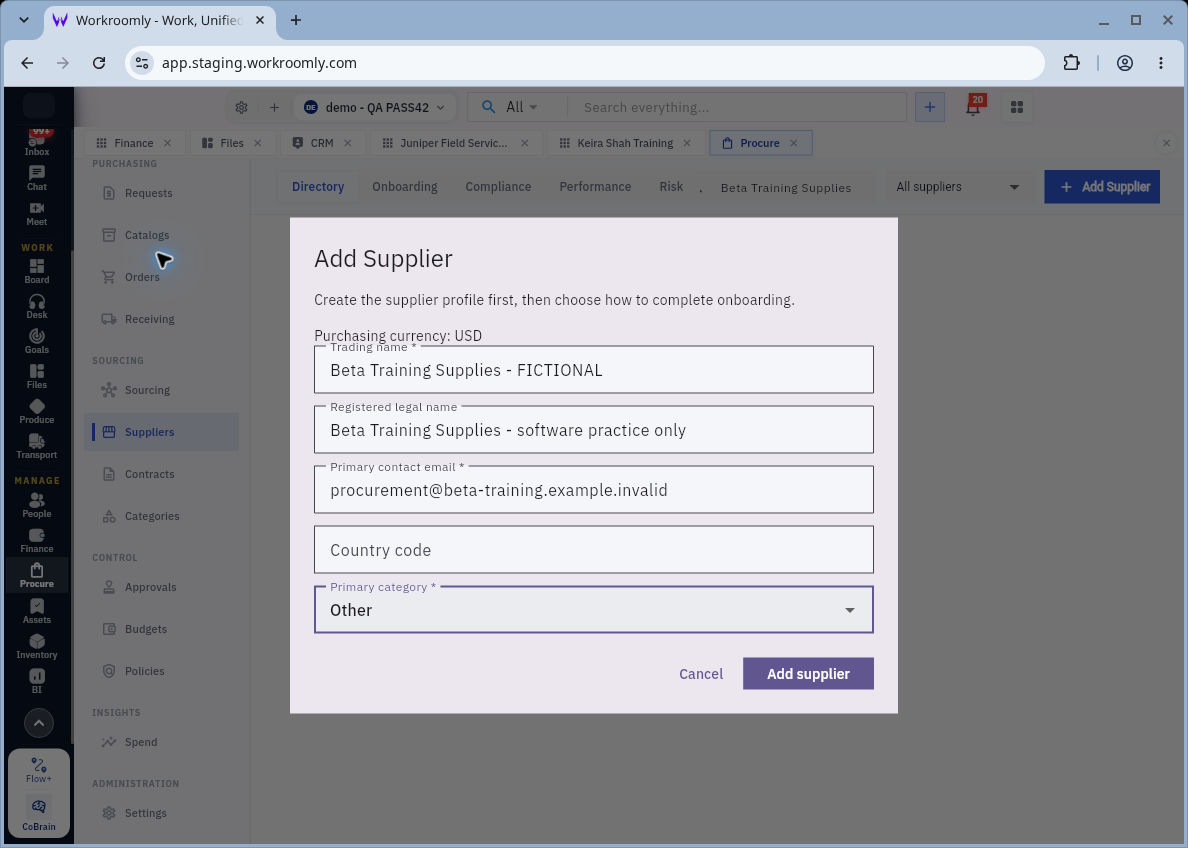
Add supplier opens Add Supplier with purchasing currency, Trading name, Registered legal name, Primary contact email, Country code and Primary category. Trading name, contact email and category carry required markers. Check the default category rather than accepting Other merely because it is present. A placeholder country code is not a saved value.
Onboarding qualification and compliance evidence
Add Supplier with a declared fictional profile; trading name, legal name and contact email serve different purposes.
The image is a declared fictional training supplier with an example.invalid address. In real preparation, use the approved supplier's verified contact; do not borrow a real person's email for practice. Creating the profile does not complete onboarding or approve purchases.
Follow the onboarding case
In Suppliers → Onboarding, match the same supplier reference and inspect case owner, completion provider, due date, state and section count. “Completed by our team” can describe the internal-provider route while the case is still in progress; it is not proof that every section is complete.
Business contacts includes Primary contact name, Primary contact email, Phone number, Finance contact name, Finance / invoicing email, supporting documents, a completion checkbox and Save progress. Primary name and email are required. Keep operational and invoice contacts distinct when the supplier uses different people.
Registration information includes Company registration number, Tax identification number, Country of registration and Registration document reference, with supporting documents and completion control. Country of registration is required. The correct identifiers and documents depend on the actual business and applicable requirements; do not invent them to fill a form.
Save progress records work in the section. Marking This section is complete should mean the information has actually been checked. Compare required-section completion separately from optional sections: five completed sections do not necessarily mean five of the required sections are ready.
Record a qualification conclusion with its conditions
The qualification section contains Qualification outcome, required Verification notes, Qualification conditions, Risk review notes and supporting documents. Qualification conditions already exists when Qualified is shown; selecting Conditionally qualified makes it required. Enter one condition per line as the helper requests.
A default Qualified outcome is not an assessment. Explain the source checks, unresolved conditions and review responsibility before choosing a conclusion. “All fields populated” is not a useful verification note when a registration document is missing or the contact differs from the approved source. Keep the section incomplete until its stated requirement is satisfied.
Match compliance to the exact requirement
Suppliers → Compliance → Record compliance opens Record Supplier Compliance. Match required Supplier and Requirement, then Document or registration reference, Issued on, optional expiry and Evidence → Add files. The terminal action is Send for Review, not an immediate claim of acceptance.
An issue date, expiry date, review date and engagement end have different purposes. If a certificate expires before the work finishes, refer that gap to the qualified reviewer. Uploading the file does not establish coverage or compliance. After an authorised submission, reopen the same supplier/requirement and distinguish submitted, reviewed and accepted evidence.
Apply a practical check
A fictional supplier has eight required onboarding sections; three required and two optional sections are complete. The correct required completion is three of eight, not five of eight. The saved email differs by one character and registration evidence is missing. Resolve the contact with the approved source, obtain the required evidence and keep qualification pending. Do not mark the reviewer section complete to improve a progress percentage.
Performance and risk are separate ongoing reviews. A high delivery score does not cure missing qualification. A low risk label is not no risk. Reconcile supplier identity and review period before interpreting either, and never circulate a synthetic training review as a real supplier finding.
Turn what you learned into the way the team works.
Mark this lesson complete once the workflow exists in your workspace—not simply when you reach the bottom.