Procure course 06 — Returns financial matching and supplier improvement
A purchase can be physically complete while money remains outstanding, or financially settled while a defect still needs follow-through. This chapter connects returns, bills, payments and supplier measures without losing the original source history.
Part of Procure module course
In this lesson
Returns matching and supplier follow-through
A purchase can be physically complete while money remains outstanding, or financially settled while a defect still needs follow-through. This chapter connects returns, bills, payments and supplier measures without losing the original source history.
In this chapter
- Keep a return attached to its receipt
- Match the supplier bill to the purchase
- Verify the payable and allocation
- Read supplier performance by criterion and period
- Interpret spend and savings on their stated basis
Keep a return attached to its receipt
In Receiving → Receipts, open the exact receipt and confirm its source order. Record return opens a receipt-specific form. It asks Why are the goods being returned?, Quantity to return in the line's unit, and shows Available to return. The helper refers to accepted goods and says the return remains linked to the receipt and order.
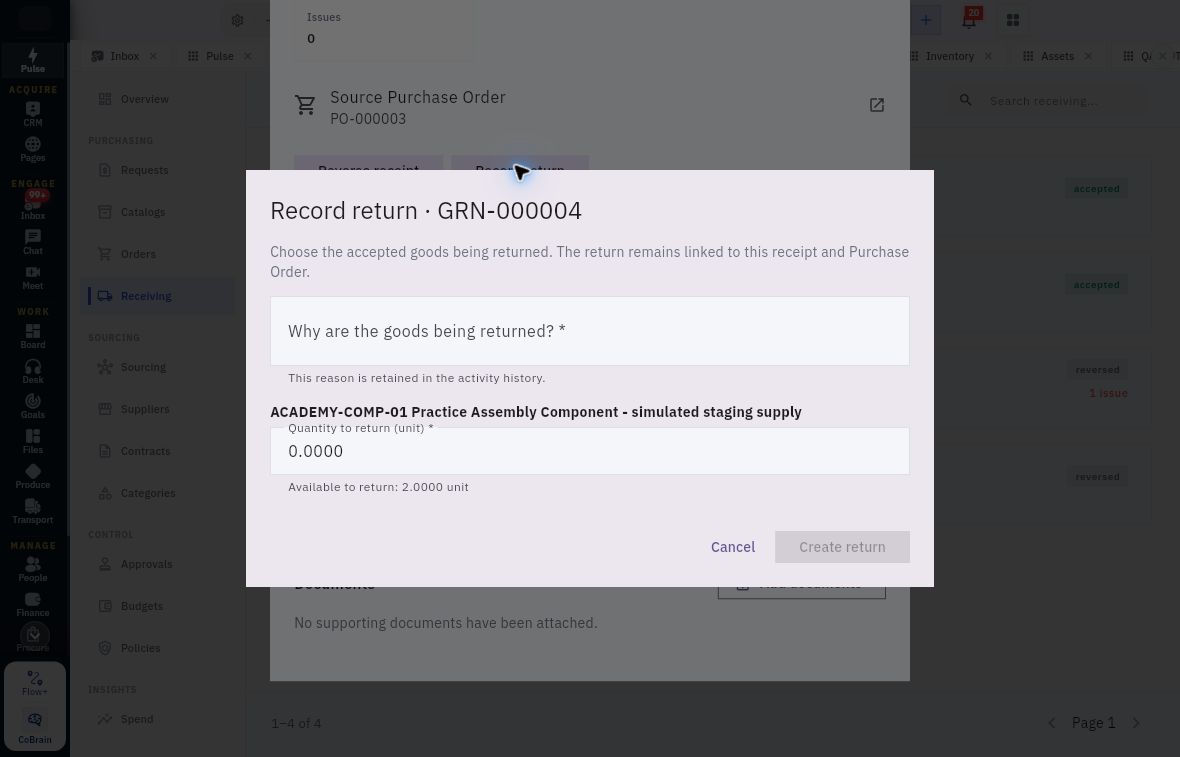
Safe return boundaries and financial reconciliation
Return form tied to an exact receipt, with required reason, return quantity and available accepted quantity.
Do not mark rejected goods accepted merely to fit this control. Establish the supported remedy for the actual quality state. A zero default is not the intended return quantity; availability is not permission to return all available stock. Create return, Reverse receipt and later supplier-received actions have distinct consequences.
For a fictional six-unit order, six arrive and five are accepted. One defective unit is returned, and a no-charge replacement later passes inspection. Gross arrivals are seven, physical returns one, net held six and usable accepted quantity six. The original requirement remains six. The replacement does not erase the first defect or automatically create a new charge, credit or payment.
Match the supplier bill to the purchase
In Finance → Vendor bills → Vendor bills, search the supplier invoice number and variants before creating another bill. A statement is a summary, not another invoice. The bill form has Bill number, Notes, lines, Bill date, Due date, Currency, Exchange rate, Vendor, Purchase order and Goods receipt.
Match the exact supplier, order/version, receipt and accepted scope. A correct amount alone does not establish a three-way match. A service bill created without PO/receipt links in another example is not a template for a PO-backed purchase. Resolve price, quantity, tax or source discrepancies through the authorised process rather than omitting a link to bypass them.
Verify the payable and allocation
For payment preparation, use Finance → Payments → Vendor payments. The form includes payment date, amount, currency, exchange rate, method, provider reference, vendor, cash account, notes and payment evidence. Allocations → Add line uses Payable and Amount. Match the exact open item and total allocations, then distinguish recorded payment, completed payment and allocated balance.
A payment to the same vendor is not proof that this invoice was settled. A return is not automatically a credit. In a fictional 23 invoice with a valid allocated payment of 23, the expected open balance is zero only after the payment and allocation are retained. Real payment execution remains under the organisation's financial authority; inspection requires no money movement.
Read supplier performance by criterion and period
Suppliers → Performance → New performance review identifies Supplier, Period starts and Period ends. Measures pair a 0–100 score with required evidence: Delivery reliability, Quality, Service & responsiveness and Commercial performance. The displayed weights are 30%, 30%, 20% and 20%, and the overall result is calculated and locked. Match by criterion name because visual order can differ between form and detail.
A blank form's scores are defaults, not findings. The terminal action can be Finalize Review, without a separate Save draft action. Establish evidence and authority before entering a judgement. For six original arrivals with five accepted, first-pass quality is 5/6, or 83.33%; eventual six-of-six acceptance after replacement is 100%. Do not substitute the later result for the first-pass measure.
Suppliers → Risk → New risk review contains Supplier, Risk area, Rating, Score, Finding and evidence, Risk owner, Mitigation plan and Next review date. Areas include Operational, Supply Continuity, Financial, Compliance, Data Security, Reputational and Geopolitical; ratings include Low, Moderate, High and Critical. No universal formula converting a performance score into risk is established. Describe cause, possible event, consequence and evidence rather than inventing a numeric probability.
Interpret spend and savings on their stated basis
In Spend, distinguish Finance-approved invoice consequences from contract value or cash paid. Savings can show Baseline, Pipeline and Realized amounts linked to an award and method. Read the complete chronology and approved baseline before reporting a headline saving; pipeline opportunity is not realised cash benefit.
Categories → Strategies → New Strategy includes Category, Strategy title, Owner, Commercial objectives, Market context, Preferred suppliers, Contract coverage (%) and Review date. Coverage accepts 0–100, but the percentage needs an agreed denominator. The form does not establish a separate action register, automatic reminders or task creation. Keep accountable actions and evidence in the approved supporting process.
A useful closeout names the source chain, remaining payable or remedy, defined supplier measures and next review owner. If an apparent total disagrees with source records, preserve the discrepancy and scope instead of changing scores or dates to make a dashboard look complete.
Turn what you learned into the way the team works.
Mark this lesson complete once the workflow exists in your workspace—not simply when you reach the bottom.