Submit a manager performance review
Complete the assigned manager assessment with a supported rating and useful comments, then check the submitted result.
In this lesson
Submit a manager performance review
Complete the assigned manager assessment with a supported rating and useful comments, then check the submitted result.
Before you start: Have the employee’s agreed criteria, relevant work examples and the rating basis. You must be the assigned assessor and the manager-assessment window must be open.
Steps
1. Open Pulse → My Journey → Appraisals → Manager Review. Find the exact employee and cycle. Check the window’s current state; People → Performance → Manager Review is a reporting view, not the assessment form.
2. If the manager assessment is already Submitted, skip steps 3–6 and use View submitted assessment in step 7. If the window is Scheduled or the assessor is wrong, resolve that prerequisite with the performance administrator rather than changing another person’s review.
3. For the unfinished assessment in an Open window, select Assess direct report. Confirm the employee and cycle at the top of the form.
4. Set Rating (1–5) using the agreed assessment basis. Compare the whole review period and role expectations, not just the most recent event. Do not invent a conversion from a separate weighted score if the organisation has not defined one.
5. Enter Evidence and comments. Describe specific work, the applicable criteria, strengths and gaps, and a practical next development step. Distinguish facts from interpretation and retain relevant disagreements accurately.
6. Read the full assessment and finality warning: submission cannot be edited afterwards. When the identity, rating and complete comment are correct, select Submit assessment once.
7. Return to the same employee/cycle card and select View submitted assessment. Compare the retained rating and complete comment. If the response was uncertain, inspect this result before considering any further action.
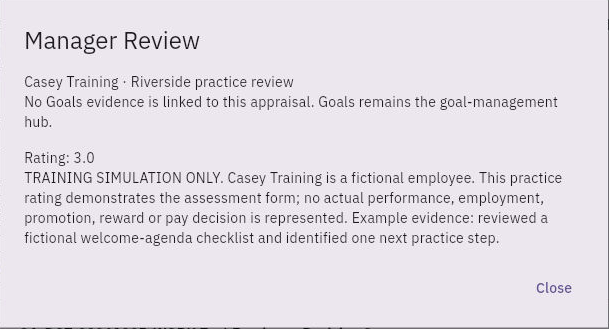
Check the result
8. Use the submitted assessment in the review conversation and development follow-through. Keep the employee’s self review and any final People review or release separate; a manager submission is not the entire appraisal’s completion.
Expected result
The assigned manager assessment is submitted once and its retained rating and comments match the intended review.
Common pitfalls
- A missing self review or placeholder zero is not an employee’s assessed performance. Check the actual submission state.
- A performance comment does not automatically create a learning assignment, goal or meeting. Create those through their own workflows when agreed.
- Do not use exclusion from a cycle to resolve a missing account or an unfinished assessment.
Continue learning
In this series: Manage the employee journey — guide 19 of 25.
Turn what you learned into the way the team works.
Mark this lesson complete once the workflow exists in your workspace—not simply when you reach the bottom.