Create an appraisal cycle draft
Set up the review period and separate self-review and manager-assessment windows before activating a cycle.
In this lesson
Create an appraisal cycle draft
Set up the review period and separate self-review and manager-assessment windows before activating a cycle.
Before you start: Have the cycle name, frequency, review dates and assessment schedule agreed with the performance owner. Define the review criteria and intended participants through your organisation’s process.
Steps
1. Open People → Performance → Appraisal Cycles. Inspect the loaded list for the intended cycle name and period. If it already exists, skip steps 2–5 and check its schedule in step 6 rather than creating another.
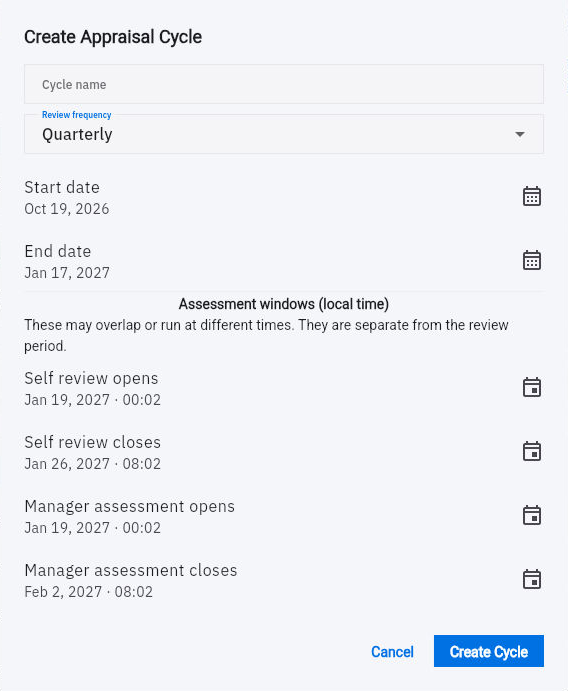
2. Select New Cycle. In Create Appraisal Cycle, enter Cycle name and choose Review frequency—Quarterly, Annual or Bi-annual—as intended.
3. Set Start date and End date for the work being reviewed. These dates describe the review period, not the time when someone can submit an assessment.
4. Set Self review opens, Self review closes, Manager assessment opens and Manager assessment closes. The form labels these windows as local time. Check the year, time and relevant timezone context, and make sure each closing time follows its opening time.
Check the result
5. Review all fields and select Create Cycle once. Return to Appraisal Cycles and find the saved row by name and dates. Read its state, frequency and participant count.
6. Use the exact row’s menu → Assessment schedule to compare the four retained windows. Select Cancel after inspection, then return to the cycle row.
7. For a newly created cycle, keep it as a draft until the owner has checked participant eligibility and assessor arrangements. If you reused an existing Active cycle, retain its current state; do not reset it to repeat this setup. Activation can create review assignments, so a draft’s name or zero participant count is not a guarantee of a narrow activation audience.
Expected result
The appraisal cycle draft has the intended review period and assessment windows, ready for the participation and activation decision.
Common pitfalls
- An Active cycle can still have a Scheduled assessment window. Read both the cycle state and the relevant window.
- The cycle form’s dates do not configure all review criteria, weights or audience rules. Keep those decisions distinct.
- Do not change a cycle-wide window just to make one assessment available without considering the other participants.
Continue learning
In this series: Manage the employee journey — guide 18 of 25.
Turn what you learned into the way the team works.
Mark this lesson complete once the workflow exists in your workspace—not simply when you reach the bottom.