Review supplier performance and risk
Record evidence-based performance measures and a separate assessment of what could affect future supply.
In this lesson
Review supplier performance and risk
Record evidence-based performance measures and a separate assessment of what could affect future supply.
Before you start
Agree the supplier, scope, review period, evidence sources, scoring method and reviewer. Define each measure’s eligible population and success rule. Preserve defects and recovery history rather than counting only the successful deliveries.
Performance describes delivered work. Risk concerns uncertain future events. Neither automatically qualifies a supplier for a new kind of work.
Prepare a performance review
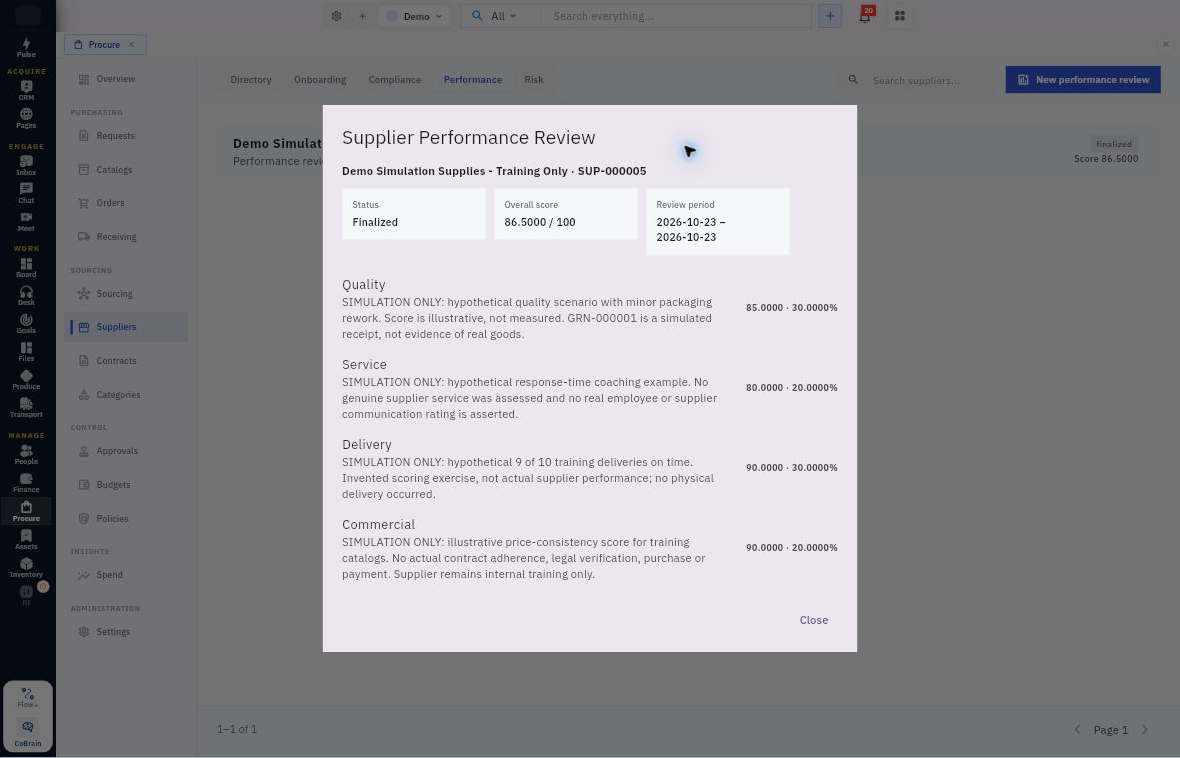
1. Open Procure → Suppliers → Performance and search the supplier and period. If the correct review exists, open it and inspect its scores, narratives and state, then skip steps 2–4 without creating or finalizing it again. For a new review, select New performance review.
2. Confirm Supplier, Period starts and Period ends. Under Performance measures, enter supported Score and Evidence or observation for Delivery reliability, Quality, Service & responsiveness and Commercial performance.
3. Explain the rule, period, counts, source references and exceptions in each narrative. Read the displayed weights and check the calculation. With weights of 30%, 30%, 20% and 20%, multiply each score by its weight and add the contributions; do not invent a missing score or treat zero as “unknown.”
4. Review the full assessment before selecting Finalize Review. Leave and reopen the exact supplier/period to check its actual state, overall score and all four narratives. If it still shows Draft or the outcome is uncertain, investigate that record before retrying.
Prepare a risk review
5. Open Suppliers → Risk and inspect any existing assessment for the same supplier, scope and period. If the appropriate assessment exists, inspect its saved findings, owner, date and state instead of repeating steps 6–7. Select New risk review only for a genuinely new assessment.
6. In Supplier Risk Review, confirm Supplier, choose Risk area, and set Rating and Score using your organisation’s defined method. In Finding and evidence, connect the cause, possible event and business consequence without presenting speculation as fact.
7. Set Risk owner, describe the Mitigation plan, and choose Next review date. Make the action and evidence of effectiveness clear. Review the complete assessment before Finalize Risk Review, then reopen it to check its saved findings, owner, date and actual state.
Expected result
A reviewer can reproduce the performance calculation and understand the separate risk decision and next action.
Remember: A high score cannot override a missing mandatory requirement. An owner or review date does not prove a mitigation was completed or a reminder sent; check the action’s result separately.
Continue learning
In this series: Manage purchasing — guide 15 of 17.
Turn what you learned into the way the team works.
Mark this lesson complete once the workflow exists in your workspace—not simply when you reach the bottom.