People course 07 — Stakeholders policies and governance decisions
Governance connects external relationships, document readiness, published guidance and decisions. The key is to identify the exact person or organisation and the specific obligation: a stakeholder record, a returned document, an acknowledgement and an approval are not interchangeable.
Part of People module course
In this lesson
Stakeholder records and governance scope
Governance connects external relationships, document readiness, published guidance and decisions. The key is to identify the exact person or organisation and the specific obligation: a stakeholder record, a returned document, an acknowledgement and an approval are not interchangeable.
In this chapter
- Find the external relationship
- Prepare onboarding requirements in Config
- Starting onboarding can communicate externally
- Publish policy and verify the reader outcome
- Use Approvals as a queue not a replacement for the source
Find the external relationship
Open People → Stakeholders under Governance. Tabs are Directory, Onboarding, Compliance, Approvals and Config. Directory offers search, Type, Status and KYC filters, Sort, Reset and Export All. Start with a narrow inspection rather than exporting unrelated personal information.
Add Stakeholder → Stakeholder Type offers Partner, Contractor and Other. The selected type changes the form. Do not force an external contractor into an employee record merely because both concern people. A partner editor can contain Company Name, Tier, Revenue Share %, Primary Contact Name and Primary Contact Email. A tier, relationship status and KYC state answer different questions.
Search using the exact organisation/contact and compare approved identity details before creating anything. Similar names can identify different businesses. A stakeholder owner is accountable for the relationship; ownership does not grant account access or establish payment authority.
The Contractor branch has First Name, Last Name, Email, Phone, Hourly Rate and Skills, with a skill text input and Add. Do not place an agreed daily rate in Hourly Rate without a valid hours-per-day conversion; its inspected field has no currency label, so confirm the basis. The Other branch has Name, Relationship Type, Organization, Primary Contact Name, Primary Contact Email and Primary Contact Phone. Neither branch shows internal owner, engagement start/end or review-date fields; keep those responsibilities in the approved supporting process rather than claiming a native date was saved.
Compliance → Upload Document opens Upload KYC Document with Stakeholder, Document Type and a file picker. Types include Business Registration, Tax Certificate, Bank Details, Insurance Certificate, Identity Document, Address Proof, Compliance Certificate, NDA, Contract, W-9 Form, VAT Certificate and Other. An available type is not a requirement to collect that sensitive document. Purpose, expiry and review-date fields are not shown in this form. Match the permitted document to the actual requirement and preserve specialist review separately from upload.
Prepare onboarding requirements in Config
Stakeholders → Config contains Email Templates and Predefined Documents. Email templates are separated for Partner, Contractor and Other. The supported tokens shown are {{name}} and {{link}}. Do not invent a deadline or company token and assume it will merge correctly.
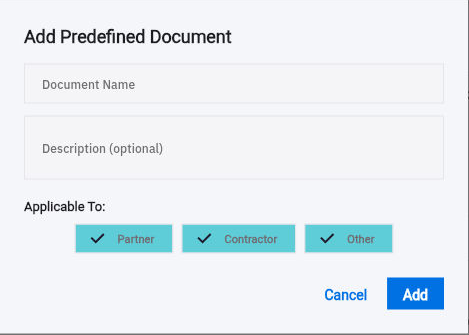
Add Document opens Add Predefined Document with Document Name, optional Description and Applicable To. The three types can all be selected by default.
Onboarding policy and approval decisions
Predefined-document form with all three stakeholder types selected; narrow applicability deliberately.
For a Contractor-only requirement, explicitly confirm that Partner and Other are not selected. The form does not show separate version, expiry, review-date, deadline or file fields. Adding those words to a description does not create automated reminders or version control. Keep the approved document edition and timing requirements in the supported process.
Treat Add and Save Configuration as change boundaries. After an authorised configuration change, leave and reopen Config, compare the exact template body, tokens and applicable types, and check that unrelated requirements remain unchanged. Do not repeatedly save or add duplicate requirements when feedback is unclear.
Starting onboarding can communicate externally
The Config helper says email is sent when onboarding starts. Start Onboarding begins with Select Stakeholder and Continue. Verify the actual recipient, approved content and scope before proceeding; do not assume a later preview or harmless second confirmation. A batch start needs the same exact-recipient checks for every included relationship.
A sent request, a delivered message, a returned document and an accepted requirement are separate outcomes. Match the returned file to the requested subject, edition and scope. Record missing pages or signatures and route substantive compliance review to the appropriate owner. The existence of a document or KYC label does not establish that a specialist review occurred.
For a fictional contractor, the requested scope acknowledgement is version 2, but the returned file is version 1. The contractor remains pending that requirement even if the message was received and other documents are complete. Ask for the exact version rather than changing the request record to make the older response appear correct. An insurance document expiring before the planned engagement ends needs its own owner review; a general onboarding percentage cannot resolve it.
Publish policy and verify the reader outcome
People → Policies has Company Policies and Acknowledgements. Locate the exact policy and edition, open the complete body and check any linked material. Published means the content has that state; it does not alone prove that the intended reader could access it, read it or acknowledged the required edition.
Company Policies → Create Policy separates Policy Title and Version. Assign To offers All Employees, Specific Departments, Specific Roles and Specific Employees; the initial All Employees selection can be too broad. Specific Employees exposes employee search: resolve and select the intended identities rather than merely typing their names.
Review Effective Date, Require acknowledgement and the complete Policy Content rich-text body. Acknowledgement can default On; match the approved obligation rather than imposing one accidentally. Link from Files says to share supporting documents with the policy audience in Files before publishing and that changes to a published file require a new policy version. Verify the exact edition and reader access. Create is a submission, not a preview, and its resulting status needs independent readback; use Cancel for inspection.
Keep the policy's approved wording, intended audience, effective date and acknowledgement requirement together through the publication process. Verify the full saved body and link destinations. If the intended reader cannot open a linked file, resolve the permitted access rather than treating the visible policy title as a complete delivery. Archive is a consequential action, not a way to dismiss a record from an inspection.
Learning Knowledge is adjacent but distinct: an informational article is not automatically company policy. Knowledge can use Write here, Link Page or Link File and its own acknowledgement and audience controls. Choose the record type according to the organisation's governance process rather than duplicating the same guidance in several places without an edition owner.
Use Approvals as a queue not a replacement for the source
General People → Approvals exposes All Pending, Leave Requests, Stakeholder Approvals, Lifecycle and Recruitment. Summary categories can mention compensation even when a separate tab is not visible. A queue count or title does not establish the complete request body or the decision authority.
Before a decision, open the source and match its employee/stakeholder, type, dates, requested change and supporting material. For leave, return to the relevant Leave request; for compensation, match the adjustment again because a shortcut can open an unfiltered list. An event showing Completed while its approval is Pending is a discrepancy to investigate, not permission to approve retrospectively without review.
A useful governance handoff says exactly what is ready and what remains unresolved: the correct stakeholder exists, two of three required documents match, the version-2 acknowledgement is pending, and the relationship owner is following up. It does not claim KYC completion, active access, payment readiness or policy comprehension without their separate results.
Turn what you learned into the way the team works.
Mark this lesson complete once the workflow exists in your workspace—not simply when you reach the bottom.