Review a vacancy’s setup before recruitment
Check that a job describes the intended work and has the right organisational relationships and hiring settings.
Part of Capture the right job application
In this lesson
Review a vacancy’s setup before recruitment
Check that a job describes the intended work and has the right organisational relationships and hiring settings.
Before you start: Have the agreed role requirements, working arrangement, compensation basis and hiring owner. This workflow reviews an existing vacancy before further recruitment activity.
Steps
1. Open People → Recruit → Jobs. Use Search jobs and the Status filter to find the exact vacancy. Wait for a loaded list before interpreting an empty result.
2. Select Open on the matching job. Read its title, department, job type, work mode and current status. Review Overview and distinguish the vacancy from any candidate or application shown in its other tabs.
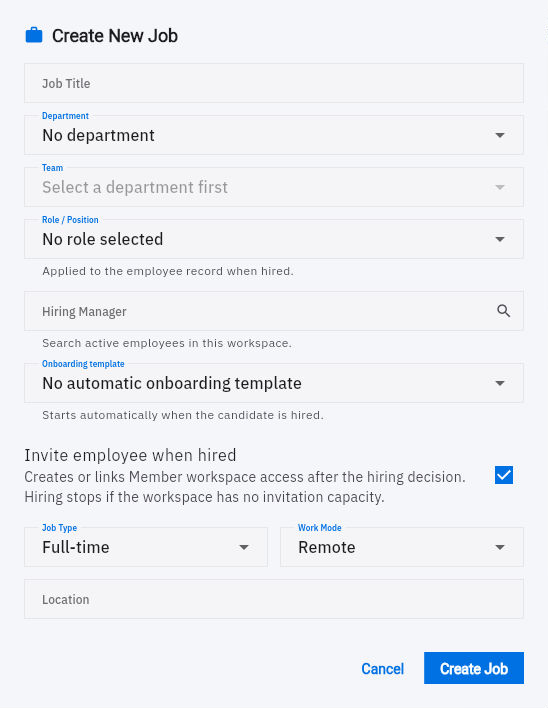
3. Return to the Jobs row and use its Edit action to inspect the full definition. Compare Department, Team, Role / Position and Hiring Manager with the intended position. Team depends on Department; a similar name is not enough to identify the correct record.
4. Review Onboarding template and Invite employee when hired. These settings describe later hiring effects: a selected template can start onboarding, and the invitation setting can create or link member access. Confirm that those effects match the hiring plan.
Check the result
5. Read Description and Requirements. Check that the expected work, essential criteria and working arrangement are clear enough for a candidate to understand. Requirements are entered one per line; do not substitute a long internal approval narrative for useful job information.
6. Check the salary range against the agreed currency, period and numerical scale. The job’s Min/Max fields do not explain all of those units, so resolve an unclear display or input convention with the People owner before changing or publishing the vacancy.
7. Cancel the editor after your review. Give the hiring owner any specific corrections needed before the next recruitment step. If a separate edit is agreed, change only the intended values and reopen the saved job to check them.
Expected result
You can explain what the vacancy offers, who owns it and which hiring effects need to be correct before proceeding.
Common pitfalls
- A business job title does not automatically establish the employee’s workforce role or access permissions.
- Do not assume Create Job creates an internal-only draft. Confirm the publication behaviour before creating a new vacancy.
- Do not infer salary units from a rounded list display or copy a number from another job.
Continue learning
In this series: Manage the employee journey — guide 4 of 25.
Turn what you learned into the way the team works.
Mark this lesson complete once the workflow exists in your workspace—not simply when you reach the bottom.