Record an employee skill assessment
Assess one employee against an existing skill and save an evidence-supported current level and development target.
In this lesson
Record an employee skill assessment
Assess one employee against an existing skill and save an evidence-supported current level and development target.
Before you start: Have the exact skill definition, agreed level criteria and relevant work examples. Use your assigned assessment role; course attendance alone is not a skill assessment.
Steps
1. Open People → Learning → Skills and find the exact skill. Read its description so the assessment covers the intended capability, not a similarly named entry.
2. Check Employee proficiency for the same employee and skill. If the intended assessment is already recorded correctly, skip steps 3–6 and inspect its current level, target and source in step 7. Do not overwrite a later assessment to repeat an earlier one.
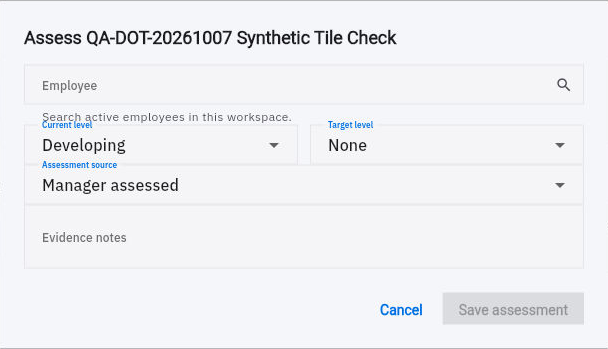
3. Select Assess employee on that skill. Confirm the dialog title, then search for and select the exact Employee.
4. Set Current level from the work evidence using the available scale: Novice, Developing, Proficient, Advanced or Expert. Choose a meaningful Target level when a development goal is intended; current and target are different judgements.
5. Select Assessment source truthfully—Manager assessed, Administrator assessed or Verified—according to the process actually used. In Evidence notes, identify the relevant work examples, dates, criteria, support given and conclusion. Keep the note relevant and avoid unnecessary private details.
Check the result
6. Review the employee, skill, current level, target, source and note, then select Save assessment once.
7. Return to Skills and find the same person-skill proficiency row. Compare the retained current level, target and source. Where the normal interface exposes the assessment details or learning Records, inspect the saved notes as well.
8. Agree the next development activity against the gap. Reassess using later work when appropriate rather than treating a course-completion percentage as automatic proof of proficiency.
Expected result
The employee’s skill record reflects the intended assessment and target, grounded in the actual work reviewed.
Common pitfalls
- The default Manager assessed label does not prove the operator is the manager, and selecting Verified does not perform verification.
- Self-assess is a separate route for the signed-in person, not a way to assess another employee.
- Creating a skill catalogue entry does not assess anyone. Check the individual proficiency record separately.
Continue learning
In this series: Manage the employee journey — guide 17 of 25.
Turn what you learned into the way the team works.
Mark this lesson complete once the workflow exists in your workspace—not simply when you reach the bottom.