Create a knowledge article draft
Write a reusable knowledge article with the right owner, audience and review dates.
In this lesson
Create a knowledge article draft
Write a reusable knowledge article with the right owner, audience and review dates.
Before you start: Have the complete current guidance, its owner and intended readers. Decide whether acknowledgement is required and when the content should be reviewed.
Steps
1. Open People → Learning → Knowledge and check for an existing article with the same purpose and edition. If the intended draft already exists, skip steps 2–6 and inspect it in step 7 instead of creating another copy.
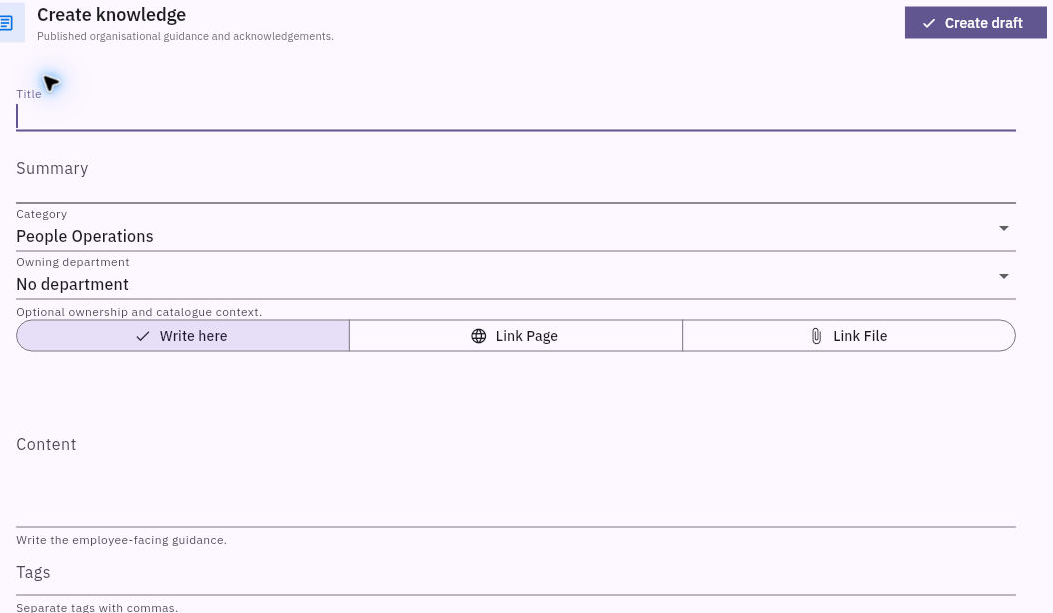
2. Select Create knowledge. Enter Title, Summary, Category and Owning department. Choose a title that helps readers identify the task the article supports.
3. Keep Write here selected for this workflow and enter the complete Content. Include the steps and references readers need rather than just a title or short description. Add useful comma-separated Tags.
Check the result
4. Set the intended audience. Empty audience groups include every employee, while selections across groups use OR matching. Check the selected people or groups instead of treating blank fields as private.
5. Set Effective, Review and Expiry dates according to the content plan. These dates serve different purposes; the review date is when someone should check the guidance, not proof that the review has happened.
6. Set Require acknowledgement and Feature in Learning overview deliberately. Read the complete article and settings, then select Create draft once.
7. Return to Knowledge and open the exact article. Check its title, complete body, version and state. Use Edit to compare the retained owner, audience, dates and settings where available, then cancel the inspection if correct.
8. Keep publication as the next distinct decision. A saved Draft is not evidence that readers received or acknowledged the article.
Expected result
The knowledge article is saved as a complete, owned draft with a deliberate audience and review plan.
Common pitfalls
- Link Page and Link File search existing permitted records; they are not public-URL or file-upload fields. Use those modes only for the intended accessible source.
- Acknowledgement is version-specific evidence of a receipt, not a test of understanding.
- A passed expiry or review date should prompt a content check; do not infer the article’s current status from the date alone.
Continue learning
In this series: Manage the employee journey — guide 16 of 25.
Turn what you learned into the way the team works.
Mark this lesson complete once the workflow exists in your workspace—not simply when you reach the bottom.