Prepare a training session draft
Create a training draft with the correct facilitator, timing, delivery details and audience before scheduling it.
In this lesson
Prepare a training session draft
Create a training draft with the correct facilitator, timing, delivery details and audience before scheduling it.
Before you start: Have the session objective, usable materials, facilitator, date and timezone, duration, capacity and intended participants. Know whether participation is required.
Steps
1. Open People → Learning → Training and look for the intended session by title and date. If it already exists, skip steps 2–6 and inspect its saved details in step 7 without creating another.
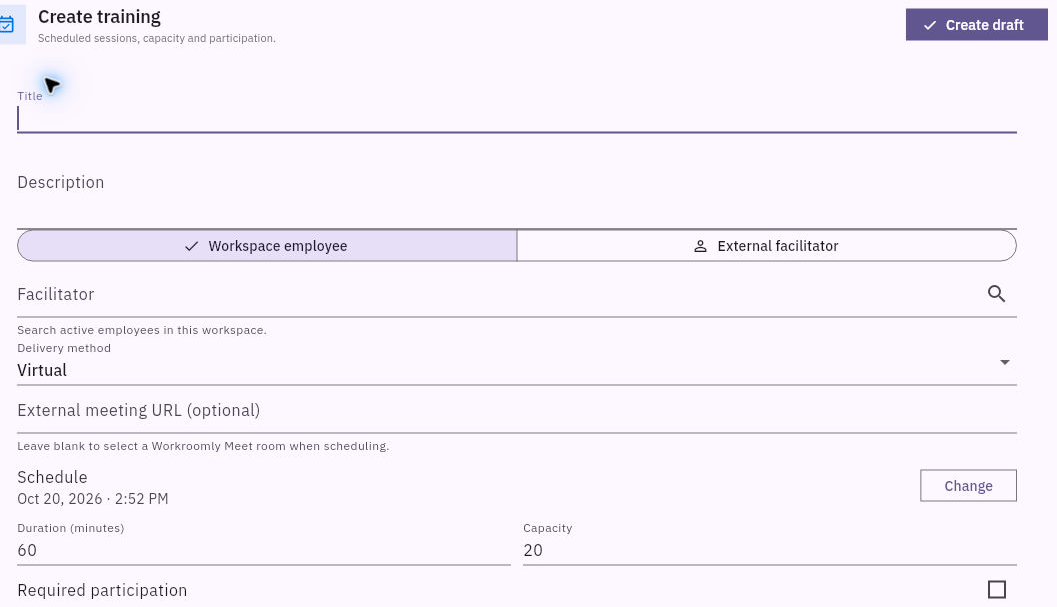
2. Select Create training. Enter a clear Title and Description explaining the task participants will practise and how to find the materials.
3. Choose the intended facilitator source. For Workspace employee, search and select the actual facilitator. Select the appropriate Delivery method—Virtual, In-person or Hybrid—and complete the relevant meeting or location details.
4. Use Change for the schedule and compare the date, time and timezone context with the plan. Set Duration and Capacity deliberately. Do not copy a displayed default time as if it were confirmed UTC.
Check the result
5. Set Required participation as intended and choose the exact audience through Employees, Departments, Teams or Roles. Empty groups include every employee, and selections across groups use OR matching. Review the actual selected identities or groups.
6. Choose an existing Related course or Related skills only when they genuinely support this session. Review all fields, then select Create draft once.
7. Return to Training, find the exact session and check its current state. For the saved draft, open Edit and compare facilitator, delivery details, schedule, duration, capacity, audience and optional links. Close the inspection without another save when correct.
8. Arrange the later scheduling step through your normal training process. Draft creation is separate from scheduling, calendar invitations, registration and attendance.
Expected result
The training session is prepared as a checked draft with enough information for the scheduling decision.
Common pitfalls
- Calendar linked does not prove that an invitation was delivered or that a meeting took place.
- A registration count is not an attendance count. Record attendance from the actual session, not from enrolment.
- If a save response is unclear, find the original title after reloading before creating another session.
Continue learning
In this series: Manage the employee journey — guide 15 of 25.
Turn what you learned into the way the team works.
Mark this lesson complete once the workflow exists in your workspace—not simply when you reach the bottom.