People course 05 — Learning courses paths training knowledge and skills
Learning brings together content, structured sequences, live sessions and capability records. A course completion, an attendance mark and a skill assessment answer different questions. Use each for its intended purpose and verify the audience before publication.
Part of People module course
In this lesson
Learning content and completion design
Learning brings together content, structured sequences, live sessions and capability records. A course completion, an attendance mark and a skill assessment answer different questions. Use each for its intended purpose and verify the audience before publication.
In this chapter
- Build a course around an observable outcome
- Add lessons and completion rules
- Connect courses into a path
- Plan live training separately
- Publish reusable knowledge to the intended readers
- Assess capability with evidence
Build a course around an observable outcome
Open People → Learning → Courses → Create course. The parent action is Create draft. The form contains Title, Summary, Description, Category and Level. Description should say what the learner will be able to do. Choose the instructor source deliberately: Workspace employee searches active employees; External instructor is a separate branch.
Audience controls include Employees, Departments, Teams, Roles and All employees. The helper states that empty groups include every employee and selections across groups use OR matching. Blank does not mean private. Selecting an individual plus a department broadens the intended group rather than restricting it to their intersection.
Related skills connects the course to capability definitions. Prerequisite courses refers to published courses learners should complete first. Confirm the exact prerequisite and learner access. A title match alone is insufficient.
Add lessons and completion rules
Add lesson has Lesson title, Lesson type, Duration (minutes) and Required for course completion. Article content belongs in the Content field. Other types include Video, File, Link, Quiz, Acknowledgement and Page; inspect their branch-specific fields instead of assuming an upload or link automatically works.
Paths training knowledge and capability
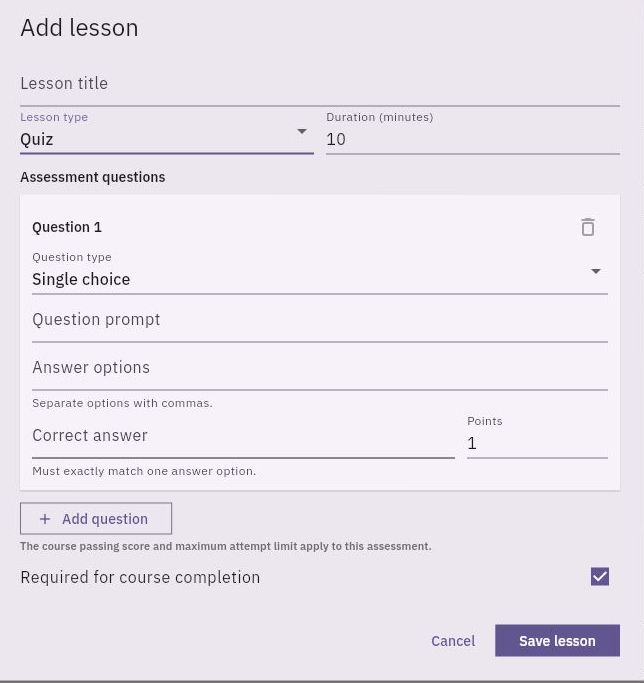
Quiz lesson editor with prompt, comma-separated options, exact correct answer and required-completion control.
The Quiz form separates the prompt, answer options, exact correct answer and points. In the shown Single choice form, answer options are comma-separated and Correct answer must exactly match an option. The helper says the course's passing score and maximum attempt limit apply. Define an answerable question and explained feedback in your learning design; a quiz label alone is not an assessment of practical competence.
Review lesson order using the move controls, the required flags, Issue certificate on completion, Passing score (%), Maximum assessment attempts and the completion rule. A certificate setting is not evidence that a certificate was issued. Reopen the full saved body, including its ending, in a reader view after an authorised save; a clipped editor excerpt cannot establish complete content.
For Video and Link, the branch-specific field is URL alongside title, type, duration and Required. Verify the actual destination and playable/readable content; a metadata URL is not a working lesson. File uses File reference to search permitted workspace File records. Page uses Page reference to search permitted workspace Page records. These are existing-record selectors, not upload controls or arbitrary page-URL fields. Check the selected edition and intended learner's access.
Acknowledgement uses a Content text field. Write the complete statement the learner is acknowledging; it is not proof that a practical task was passed. Save lesson is distinct from saving the parent course. Completion-rule choices are Complete every required lesson, Complete every lesson and Pass the course assessment. Select a rule that matches the available content and actual assessment design, then verify the learner outcome separately.
Connect courses into a path
In Learning → Paths → Create path, enter a title and summary, select the actual audience and add ordered steps. A Course step uses Linked item, a step title, Days after start and Required, followed by Add step. Verify the course identity and publication state before selecting it. A draft course may be absent from the selector; that is not permission to publish unfinished content.
After creation, reopen the exact path and check audience identities, order and required state. A count such as Employees (1) should be opened to verify which person it represents. Blank add-step controls are inputs for another step, not a readback of the existing step's link or delay. If a saved view does not expose a needed value, ask for the supported inspection route rather than recreating the step.
Plan live training separately
Learning → Training → Create training has Title, Description, facilitator source, Delivery method, External meeting URL, schedule, Duration and Capacity. Delivery methods include Virtual, In-person and Hybrid. A blank external URL helper allows selecting a Workroomly Meet room when scheduling, but does not establish that a room or working call exists.
Use Change to inspect the schedule and verify the timezone context before scheduling. Duration is minutes; Capacity is the number of places. The default 60 minutes and 20 places are not policy limits or recommendations. Select the intended audience and learning relationships, create the authorised draft, then independently reopen it. Registration is enrolment, attendance is participation, completion is a workflow result and skill proficiency needs assessment evidence.
Publish reusable knowledge to the intended readers
Learning → Knowledge → Create knowledge includes Title, Summary, Category, Owning department, content mode and comma-separated Tags. Write here provides Content. Link Page instead uses a permitted Page reference search; Link File uses a permitted File reference search. These are not arbitrary public-URL or upload fields.
The lower form has audience controls, Effective, Review, Expiry, Require acknowledgement and Feature in Learning overview. Ownership is not the same as audience or access. Featuring an article aids discovery; acknowledgement does not prove comprehension. Empty groups and OR matching need the same deliberate audience review as courses. List actions can include Open, Edit, Archive and Publish for a draft. Keep the approved edition and dates aligned before publication.
Assess capability with evidence
Learning → Skills → Create skill has Name, Category and Description. Categories include Customer Operations, Leadership, Communication, Finance, Procurement, Data, Product, Security and Technical. Describe the task and success criteria clearly before creating another similarly named skill.
Assess employee names the skill and offers Employee, Current level, Target level, Assessment source and Evidence notes. Levels are Novice, Developing, Proficient, Advanced and Expert; target can be None. Sources include Manager assessed, Administrator assessed and Verified. Selecting Verified does not perform verification. Notes should identify relevant work, criteria, support given, conclusion and next development action without unnecessary personal information.
Self-assess is a separate route without an Employee selector or Assessment source field. Do not use it to represent another person. Employee Records and Certifications are separate again; a course completion does not prove a professional certification or competence.
For a fictional pack-checking course, the learner finishes every required lesson but misses a document-version error in independent practice. Record the completion accurately, keep proficiency below the agreed independent standard and assign a targeted practice task. Do not change the skill level simply to make the learning dashboard look complete.
Turn what you learned into the way the team works.
Mark this lesson complete once the workflow exists in your workspace—not simply when you reach the bottom.