Configure a stakeholder document requirement
Add a reusable document requirement for the intended stakeholder types and check that the configuration is retained.
In this lesson
Configure a stakeholder document requirement
Add a reusable document requirement for the intended stakeholder types and check that the configuration is retained.
Before you start: Have the agreed document name, description and applicable stakeholder types. This changes reusable configuration, not just one person’s onboarding request.
Steps
1. Open People → Governance → Stakeholders → Config. Read the existing Predefined Documents before adding anything. If the intended requirement already exists, skip steps 2–5 and inspect its retained name, description and type scope in step 6.
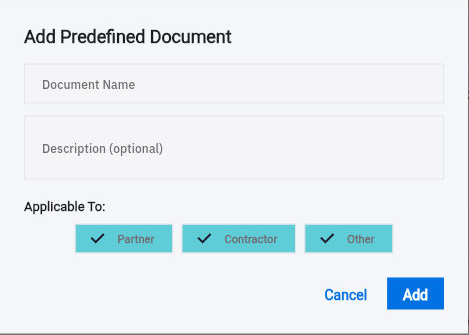
2. Select Add Document. In Add Predefined Document, enter a clear Document Name and a description explaining what the stakeholder should provide.
3. Check Applicable To deliberately. Partner, Contractor and Other can all be selected by default. Keep only the types for which this requirement is actually intended.
Check the result
4. Review the name, description and type choices, then select Add. Check that the intended requirement appears once in the configuration list.
5. Review the rest of the configuration for unintended changes, then select Save Configuration. Avoid changing unrelated email templates while adding a document requirement.
6. Leave Config and reopen it. Compare the retained requirement and its type scope with the intended setup. Check that the other templates and document definitions remain as expected. If the result is uncertain, inspect the original entry before adding another.
7. Before starting an individual onboarding, check the exact stakeholder, primary contact, current message template and applicable document requirements. Start Onboarding is a separate step that can initiate communication; configuration alone is not a sent request.
8. When documents later arrive, review the actual version, contents and current review state. A requirement being configured does not establish that a file was received or verified.
Expected result
The reusable document requirement has the intended description and stakeholder-type scope, ready for the onboarding owner to use.
Common pitfalls
- This form does not provide separate expiry, review-date, deadline or version controls. Describing a deadline does not create an automated reminder.
- Use only the supported email-template tokens when later editing communication: the observed tokens are {{name}} and {{link}}.
- An upload option is not a reason to collect unnecessary identity or bank information. Request only what the approved relationship process needs.
Continue learning
In this series: Manage the employee journey — guide 23 of 25.
Turn what you learned into the way the team works.
Mark this lesson complete once the workflow exists in your workspace—not simply when you reach the bottom.