Understand the People Summary figures
Read each workforce measure in its own scope and trace a useful question back to the relevant People records.
In this lesson
Understand the People Summary figures
Read each workforce measure in its own scope and trace a useful question back to the relevant People records.
Before you start: Know which workroom and reporting question you are reviewing. A headcount, pending queue and trend measure can cover different populations and periods.
Steps
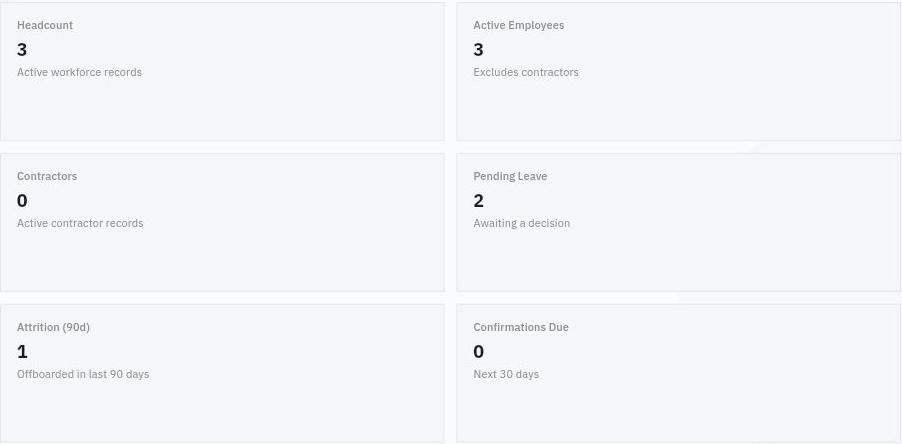
1. Open People → Summary in the intended workroom. Read the labels and helpers on the top cards before comparing their numbers.
2. Distinguish Headcount for active workforce records, Active Employees excluding contractors and Contractors for active contractor records. These are counts; do not relabel them as full-time equivalent capacity.
3. Read the time-specific cards separately. Pending Leave is awaiting a decision, Attrition (90d) concerns offboarded records in the last 90 days, and Confirmations Due looks ahead 30 days. They do not share one reporting period.
Check the result
4. Scroll to Operational Queues and choose the question that needs action, such as pending leave or an open role. Confirm the destination and filters if you use a queue link. You can also open the underlying People module directly.
5. For a headcount question, open Directory → Employees and compare the relevant statuses and department scope. For pending leave, open Leave and the applicable request or approval view. For a departure, inspect the exact Lifecycle event and employee rather than inferring identity from a count.
6. Compare Department Distribution with the same active-employee scope. If it differs from a top card, investigate the relevant employee records and missing department values before explaining the difference.
7. Read People Ecosystem as stakeholder and document measures, separate from employee headcount. Check their labels and underlying relationship records before interpreting a percentage.
8. Check People Trends. If no analytics snapshots are available, report that a trend is not available; do not infer that the workforce was unchanged. Summarise the useful finding and any specific unresolved difference for the relevant owner.
Expected result
You can explain the selected People figures without mixing populations, time windows or incomplete trend information.
Common pitfalls
- An attrition count is not automatically a turnover percentage. A rate needs a defined denominator.
- A zero queue or 0/0 document measure does not prove that every business obligation is complete.
- Do not alter employee data merely to make two summary displays agree. Resolve the underlying scope and records first.
Continue learning
In this series: Manage the employee journey — guide 24 of 25.
Turn what you learned into the way the team works.
Mark this lesson complete once the workflow exists in your workspace—not simply when you reach the bottom.