Pages course 04 — Read results and maintain a reliable page
A page needs review after launch as well as before it. Content can become misleading, a route can send the wrong value, or a correctly captured enquiry can remain unowned. Analytics helps you see patterns, but a high conversion number cannot compensate for a broken handling process. This chapter explains the reporting and maintenance screens and gives you a practical diagnosis sequence.
Part of Pages module course
In this lesson
Reporting scope and page measures
A page needs review after launch as well as before it. Content can become misleading, a route can send the wrong value, or a correctly captured enquiry can remain unowned. Analytics helps you see patterns, but a high conversion number cannot compensate for a broken handling process. This chapter explains the reporting and maintenance screens and gives you a practical diagnosis sequence.
In this chapter
- Read Summary at workroom scope
- Separate page Analytics from workroom panels
- Use a meaningful conversion calculation
- Understand the maintenance actions
- Define a bounded revision
- Diagnose in the order the visitor journey depends on
- Complete the Pages workflow
Read Summary at workroom scope
Open Pages → Summary in the correct workroom. Read total pages and the Published, Draft and Closed breakdown. Views, submissions and conversion describe activity under the product's measurement rules. Keep the scope and period with any number you report.
A displayed one submission from one visitor can produce 100 percent while providing very little information about demand. Test traffic can also affect small totals. Do not call a metric unique-person conversion or a last-30-days rate unless that definition and period are actually stated.
Inspect lower areas such as capture trend, publishing attention and page breakdown when available. A card title or coloured domain label is not necessarily a navigation link. If a click does not navigate, do not diagnose a broken route without establishing the intended behaviour. Open the exact page through the directory when you need its own results.
Separate page Analytics from workroom panels
On a page, open Analytics. The illustrated metrics are Views, described as Total page visits; Visitors, Unique people reached; Submissions, Captured conversions; and Conversion, Visitor to submission rate. These labels describe the intended measures, but they do not explain every detail of deduplication, attribution, test exclusion or reporting window.
Read each panel's scope. Capture Trend can describe recent submission volume across the Pages workroom rather than only the selected page. Workroom footprint counts pages and states. Do not combine a workroom trend with a page-only denominator without explaining the difference.
Maintenance revisions and complete workflow
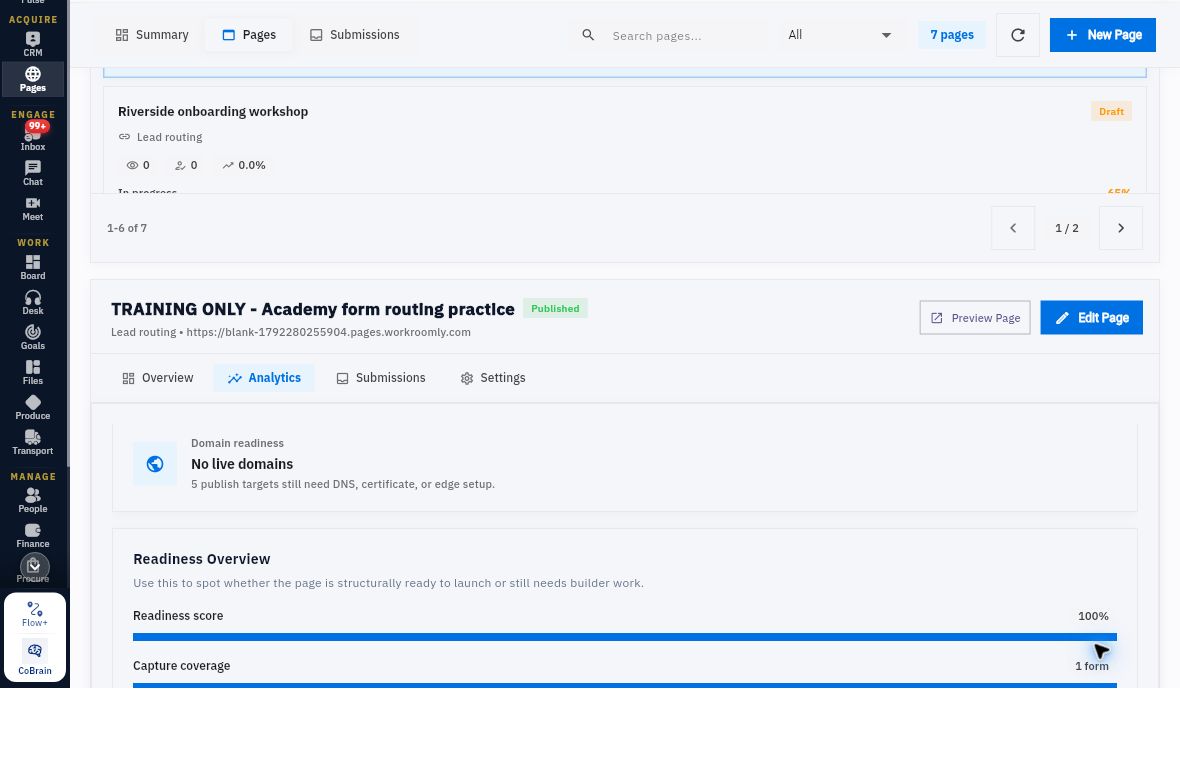
Domain readiness can report targets needing DNS, certificate or edge setup. That broader panel can differ from the selected page's Workroomly URL state. Compare the exact target and scope before calling the displays contradictory. A managed-domain issue does not automatically mean every Workroomly-hosted page is unreachable.
Readiness score, form count, block count and recommendations concern structural preparation. A score of 100 percent does not prove approved copy, public access, correct routing or accepted follow-up. A recommendation to duplicate a page or add a section is a suggestion, not an instruction you must follow.
Use a meaningful conversion calculation
For a sample explicitly defined as 12 submissions from 240 views in the same period and page, submissions divided by views is 5 percent. That is a response-per-view measure, not necessarily a unique-person rate. If the product labels its measure visitor-to-submission, use the corresponding visitor basis rather than substituting views.
Suppose 16 non-test enquiries contain two Pending routes, two completed routes with wrong emails, three correct destinations with no accepted handler and nine with accepted handling. Nine of 16, or 56.25 percent, reached accepted handling. This operational proportion answers a different question from visitor conversion. Report the stalled stages rather than hiding them behind a headline percentage.
If tests are identifiable only in submissions but not in views, you cannot calculate a clean non-test visitor rate from those values alone. State the missing denominator. The useful next action may be reconciling unowned enquiries rather than increasing page traffic.
Understand the maintenance actions
Open the page's Settings. Actions include Close Page, Share Page, Submissions, Duplicate as Draft and Delete Page. Their effects are not interchangeable:
| Action | Decision to make first |
|---|---|
| Close Page | The description says it stops new submissions while keeping the page live. Decide whether that is the intended intake boundary. |
| Share Page | Confirm the intended audience and approved access; sharing is not merely copying private working notes. |
| Submissions | Inspect retained responses and their scope. |
| Duplicate as Draft | Decide why a separate draft is needed and how it will be distinguished from the original. |
| Delete Page | Treat as a consequential removal, not a troubleshooting refresh. |
Do not use Close or Delete to make an unexplained status disappear. Preserve the records needed to understand outstanding enquiries. A duplicate should not silently replace the established page identity or its submission history.
The editor can expose Undo and Redo, but those controls do not establish a complete native version-history or rollback system. Keep the approved old and new wording and configuration when planning a significant revision. Do not promise a one-click recovery that you have not verified.
Define a bounded revision
Suppose you want to add an optional Topic question. Write down its purpose, wording, Required setting, handling location and effect on the existing route. Keep First name and Work email mappings unchanged if that is the approved scope. Explain to visitors not to include confidential or unnecessary personal information.
Review the surrounding copy too. A newly added question should not coexist with a promise of an automatic meeting if the page only requests an enquiry. A success-message change can be as important as a field change because it alters the visitor's expectation.
Before editing a live page, confirm the supported relationship between saved edits and published content. If that behaviour is unclear, ask the page owner for the safe approved route. Apply only the agreed changes, wait for saved state and reopen. Compare changed fields and protected unchanged settings. Review the whole visitor page and update publication only within the approved scope.
After the release, use a distinct approved test identity when a new capture test is required. Keep its trace separate from earlier responses. Restoring old wording through supported controls is different from proving that previous submissions or external effects were reversed.
Diagnose in the order the visitor journey depends on
Start with identity: correct workroom, page, form, version and route. Then inspect these stages in order:
- Content and configuration: Is the retained page what was approved, including field types, required flags and mappings?
- Access: Can the intended audience load the actual approved address and version?
- Validation and capture: Does the permitted test behave as expected, and is the response retained?
- Processing: What does the same response report about routing, with which destination or error?
- Destination values: Does the independently reopened record match each mapped value?
- Handling: Is an eligible person responsible and ready to take the agreed next action within the visitor's communication expectations?
Fix the earliest failed stage without losing later observations. If the page promises an unapproved booking, a successful technical route does not make the content acceptable. If the response is already stored and Pending, changing the headline does not resolve processing. If the Lead is correct but unassigned, another form submission does not establish ownership.
For an uncertain action, preserve what exists and inspect before retrying. Do not create manual lookalike records, overwrite source values or rerun routes solely to produce a reassuring screenshot. A manual business recovery can be appropriate when authorised, but it does not retrospectively prove the automatic route worked.
Complete the Pages workflow
Use an approved sample page or a written plan. Identify its internal name and visitor offer, the selected layout and metadata, the Form Widget fields, exact mapping pairs and intended destination. Explain its publication mode and the audience context needed for an access check. Follow one response through filters, Activity, Metadata and the destination values, preserving any ownership or permission gaps.
Finally, propose one useful revision and say how you would verify it without changing unrelated settings or generating duplicate enquiries. Your expected result is a page you can explain and maintain from visible content through accountable handling. A saved draft, Published badge or attractive conversion figure is one part of that result, not the whole of it.
Turn what you learned into the way the team works.
Mark this lesson complete once the workflow exists in your workspace—not simply when you reach the bottom.