Trace a lot and check stock eligibility
Follow a tracked item to its source, current positions, quality records and expiry before use.
In this lesson
Trace a lot and check stock eligibility
Before you begin
Know the exact item, stock unit, quantity, intended location and use date. This is a traceability review, not an instruction to release held stock.
Trace the item
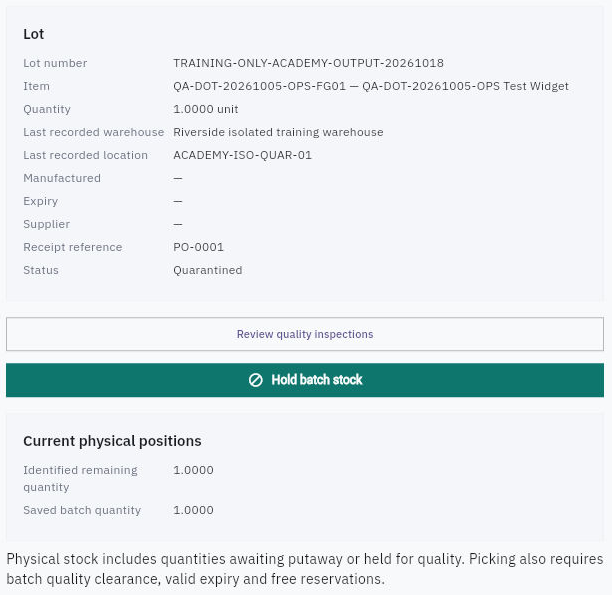
1. Open Inventory → Lots & Serials → Lots. Find the exact lot and check its item, quantity, last recorded warehouse/location and dates. A blank expiry means no date is displayed—not unlimited shelf life. 2. Open the lot. Match its item, receipt reference, status and Current physical positions. Read each position's location, stock state and quantity. Identified remaining quantity and Saved batch quantity can describe the same stock; do not add them together. 3. Read Genealogy to trace the source and production relationships. Keep each reference's role clear. A finished-output receipt does not prove the corresponding material quantity was consumed.
Check the result
4. Open Inventory → Items → the exact item → Stock. Compare the named locations and their On hand, Reserved, Available, In transit and Quarantined values. A lot can be physically present but not eligible for picking. A header's last location is not a substitute for all current position rows. 5. Return to the lot and choose Review quality inspections. Match the inspection's item, lot, source, quantity, findings and decision. Follow any stated final-quality and putaway requirements with the responsible owner. Leave Hold batch stock untouched unless you are intentionally performing an authorised hold. 6. For serialized stock, use Serial Numbers and match unique identities to their source. Serial numbers are captured through Receiving for serial-tracked items; do not count repeated scans as additional units or invent a serial to fill a gap. 7. Check Expiring and the actual expiry date. The view can include upcoming and already expired lots. Confirm the applicable cutoff with the stock owner rather than assuming every listed lot is already expired. 8. Before use, confirm the exact tracked identity, current quality clearance, expiry, ready location and free allocation together. Keep overlapping restrictions on the same units from being counted twice.
Check the result
You can identify the exact eligible stock—or the specific restriction that prevents use. When a notice affects a lot or serial, trace its remaining positions and earlier issues; identifying a downstream holder does not mean they have been contacted or returned the stock.
Continue learning
In this series: Manage stock — guide 10 of 17.
Turn what you learned into the way the team works.
Mark this lesson complete once the workflow exists in your workspace—not simply when you reach the bottom.