Prepare a customer or supplier return
Choose the correct return direction, preserve the original source, and separate requested quantities from actual movements.
In this lesson
Prepare a customer or supplier return
Before you begin
Have the original customer issue or supplier receipt, exact item and unit, party, quantity, reason and warehouse. Check earlier returns so the same units are not requested twice.
Prepare the request
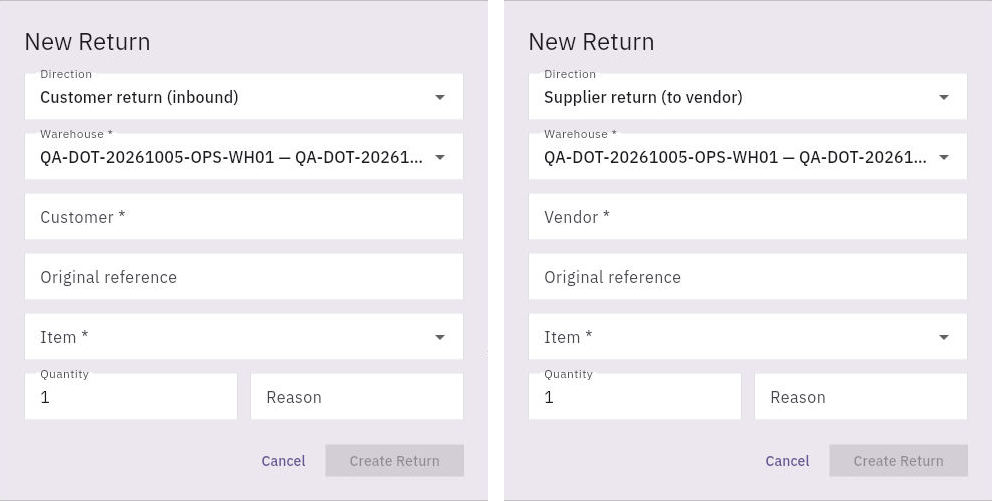
1. Open Inventory → Returns. Choose Customer Returns for goods coming back from a customer, or Supplier Returns for goods going out to a vendor. 2. Search for the intended return. If it exists, use that reference and skip steps 3–4. Preserve its actual stage and quantities. 3. Choose New Return from the correct tab. Verify the form says Customer return (inbound) or Supplier return (to vendor). Select the intended Warehouse, Customer or Vendor, Original reference, Item, Quantity and Reason. Replace the default quantity with the requested amount; it is not a received count. 4. Confirm your team's permission and expected stock/communication effects, then select Create Return once. Find the resulting record and verify its direction, party, source, item and requested quantity. If the save is unclear, look for that record before trying again.
Check the result
Follow the actual goods
5. For an inbound return, record only the goods actually counted at receipt. Keep a short arrival, extra item or identity mismatch separate from the original request. Obtain the required inspection before deciding reuse. 6. Reconcile the disposition against the one received quantity. Restock, quarantine and scrap-designated groups must not double-count the same units. A later release moves units out of a held group; it is not another receipt. Scrap designation does not prove disposal has occurred. 7. For a supplier return, match the vendor agreement and trace selection, staging, dispatch and acknowledgement. Staged goods remain in your custody; dispatch is not automatically vendor receipt. 8. Before any later-stage stock action, confirm the exact supported control and quantity scope with the Inventory owner. The initial form does not expose receipt location, lot/serial or split-disposition fields. Do not use an unrelated adjustment to imitate a return. 9. After an action, reopen the same return and the relevant item/location stock and movements. Check quantities and restrictions together. Keep refunds, replacement orders, credits and payments with their separate commercial owners.
Check the result
The request has the right direction and original source. Actual receipt or dispatch, quality disposition and the commercial remedy remain distinguishable, with any unresolved quantity still visible.
Continue learning
In this series: Manage stock — guide 11 of 17.
Turn what you learned into the way the team works.
Mark this lesson complete once the workflow exists in your workspace—not simply when you reach the bottom.