Review stock counts and investigate differences
Match each count to the correct item, location and time before approving a correction.
In this lesson
Review stock counts and investigate differences
Before you begin
Agree the items, stock units, locations, count cutoff and responsible counter/reviewer. Preserve a stock snapshot and either pause movements under your team's procedure or record the movements between the snapshot and count.
Check the count record
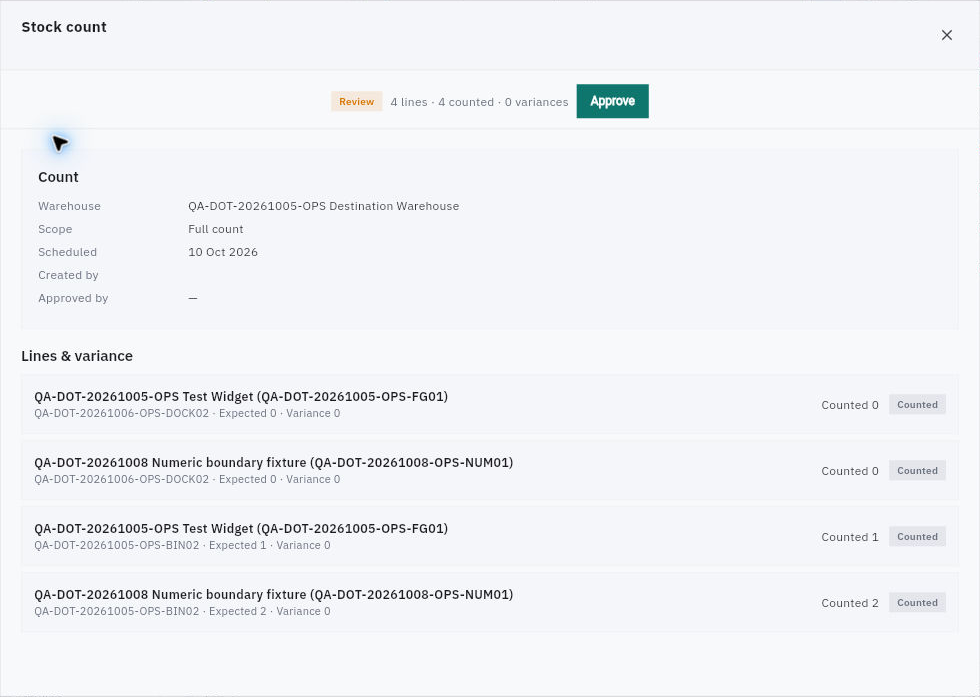
1. Open Inventory → Stock Counts. Find the intended count by reference. Use its actual stage—Scheduled, Counting, Review, Approved or Posted—rather than treating every listed count as finished. 2. Open the reference and check the full warehouse, scope and scheduled date. Match each item and location. Read Expected, Counted and Variance per line; four counted lines do not mean four units of one item. 3. Compare the saved quantities with the actual count information and observation time. A scheduled date is not necessarily the time stock was physically counted. Preserve an original count and any independent recount separately.
Check the result
Investigate before correcting
4. Calculate the expected quantity at the count cutoff: snapshot quantity plus validated additions minus validated removals that occurred after the snapshot. Then subtract this expected quantity from the observed count. Do not count the same receipt twice or place in-transit units at both ends. 5. Resolve item, unit, location and timing mismatches first. Count held stock physically present but retain its restriction; reserved quantities are not extra units. A remaining difference does not establish theft, damage or another cause by itself. 6. If preparing a new count, inspect Schedule Count before committing. Its initial form offers Warehouse and Limit to Zone A, with the warning that otherwise every stocked location is counted. If that is broader than your agreed scope, choose Cancel and ask the Inventory owner for the correct route—do not schedule a warehouse-wide count to fix one bin. 7. A count in Review may show Approve. Use your team's reviewed approval process, not approval as a way to discover what happens next. For a separate correction, Valuation → Adjustments → New Adjustment exposes Item, Warehouse, signed Quantity change, Reason and Notes; confirm it can preserve your exact approved scope before submitting anything.
Check the result
The comparison uses the same item, unit, place and cutoff. Any correction has a supported scope and approval. After a permitted correction, reopen its record and the exact stock/movement views to verify the change; approval, stock posting and Finance effects are separate checks.
Continue learning
In this series: Manage stock — guide 9 of 17.
Turn what you learned into the way the team works.
Mark this lesson complete once the workflow exists in your workspace—not simply when you reach the bottom.