Review a source-linked receipt and its quantities
Match the receipt to the exact source, item and location before handing accepted stock to putaway.
In this lesson
Review a source-linked receipt and its quantities
Receiving, quality acceptance and putaway are separate decisions. Inspect the same receipt and item line rather than combining quantities from similar records.
Find the receipt
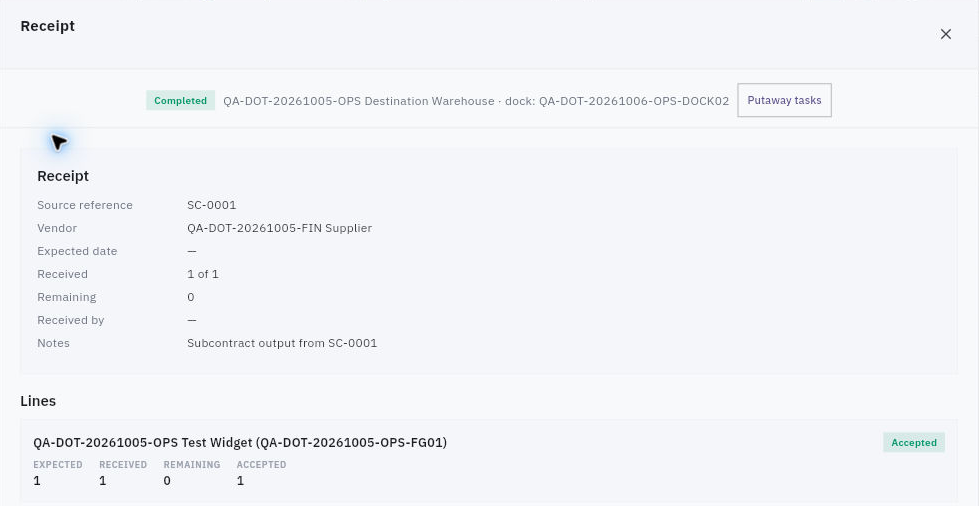
1. Open Inventory → Receiving. Choose the relevant stage—Expected, Receiving, Inspection, Putaway or Completed—and check search and warehouse filters. 2. Find the receipt by its reference and source. If you cannot find it, check the originating workflow with the responsible owner rather than creating an unrelated receipt or changing stock to fill the gap. 3. Open the exact row. Confirm the warehouse, receiving dock and Source reference. Keep the list-to-detail identity when the detail title is only “Receipt”. 4. Under Lines, match the SKU and stock unit. Read Expected, Received, Accepted and Remaining separately. Expected 1, Received 1 and Accepted 1 can describe the same one unit—not three units. 5. Read the receipt state and the line’s quality/acceptance state. Preserve any held, rejected, missing or damaged quantity and its responsible quality decision.
Check the result
Prepare the next step
6. Compare the source document and actual receiving evidence with the recorded quantities. A source reference or note is not the complete source document; resolve discrepancies before claiming the full receipt is correct. 7. Open Putaway tasks to inspect the linked quantity, source dock and destination. Read the task’s own status; a Putaway tab can contain a completed task too. 8. Hand the accepted quantity and any remaining exception to the next owner. Check the later movement and storage balance separately before treating the receipt as available stock.
Expected result: the receipt’s identity, source and quantity decision are clear, with quality and putaway obligations preserved.
Tips: A blank Received by or Expected date is missing data, not a reason to invent a person or time. An Accepted receipt in another module does not establish stock for this SKU without the linked Inventory transaction and balance.
Continue learning
In this series: Manage stock — guide 5 of 17.
Turn what you learned into the way the team works.
Mark this lesson complete once the workflow exists in your workspace—not simply when you reach the bottom.