Trace a stock balance through its movements
Follow receipts, putaway and reservations for one exact item and location without double-counting stock.
In this lesson
Trace a stock balance through its movements
Choose the exact SKU, stock unit, warehouse and time you need to explain. Keep other items and later events out of that comparison.
Follow the movement trail
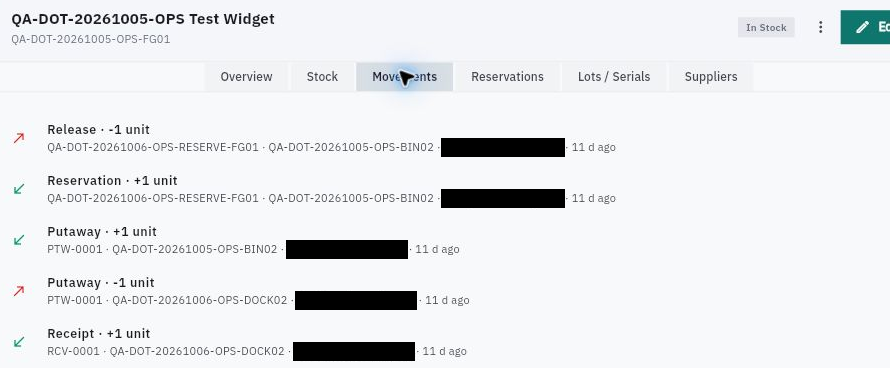
1. Open Inventory → Items, find the SKU and read Overview. Note On Hand, Available, Reserved, Incoming and Outgoing at the current scope. 2. Open Movements on the same item. Read event type, source reference, sign, quantity and location together. If newest events are first, work upward from the oldest relevant row. 3. For a receipt, open Inventory → Receiving and find its exact reference. Match the source, item, unit, accepted quantity and receiving location. Expected, Received and Accepted can describe the same units at different stages—not three quantities to add. 4. Open the receipt’s Putaway tasks. Match the quantity, source location and destination. A minus at the dock and plus at the bin moves the same stock; it does not increase the warehouse total again.
Check the result
Compare allocation and current stock
5. Read reservation and release events by their shared reference. They change allocation, not physical receipt or issue. Check Reservations for the current state rather than relying on one movement row. 6. Open the item’s Stock tab and compare each relevant location. Then use Inventory → Stock as an independent view, checking search, warehouse/category filters and pagination. 7. Keep Available, On Hand, Quarantined and other measures distinct. If values do not reconcile, trace the exact source and quality state with the Inventory owner rather than silently changing a balance.
Expected result: you can explain the supported movement chain and identify any missing opening balance, event or scope needed for a complete reconciliation.
Tips: A relative date such as “13 d ago” is not an exact transaction timestamp. A matching transaction trail is not a physical stock count. Do not repeat receipts, reservations or adjustments to make today’s screen match an older screenshot.
Continue learning
In this series: Manage stock — guide 4 of 17.
Turn what you learned into the way the team works.
Mark this lesson complete once the workflow exists in your workspace—not simply when you reach the bottom.